Quick answer
- Settings first: IONOS lists
imap.ionos.comport 993 andpop.ionos.comport 995, both SSL/TLS. Username is your full email address. - Free ways: Gmail's Import mail and contacts tool, Google Workspace Data migration for admins, or both accounts in an IMAP client. Gmail import moves messages only, so labels are not rebuilt.
- Bulk: Corbett Email Migration Tool copies a live IONOS mailbox into Gmail with folders, dates and read status, and its free trial copies 10 emails per folder.
You want to migrate 1&1 IONOS webmail to Gmail, and Google is changing how that works. Gmail is retiring POP fetching from other accounts, so older guides may lead to a button you no longer see. Below are four ways to migrate 1&1 IONOS webmail to Gmail, with real IONOS settings, Google limits and a contacts section.
What settings do you need to migrate 1&1 IONOS webmail to Gmail?
You need your IONOS address, its password and server values. IONOS publishes them in its help centre, and its page still uses 1&1 in places. Webmail is only a window, so these server values are what every method below talks to.
- Incoming IMAP server:
imap.ionos.com, port 993, SSL/TLS. - Incoming POP3 server:
pop.ionos.com, port 995, SSL/TLS. - Outgoing SMTP server:
smtp.ionos.com, port 465 with SSL/TLS. Port 587 with STARTTLS works where 465 is blocked. - Username: your full email address. Password: one for that specific address.
IONOS lists no step to switch IMAP on for an address, so login problems trace back to a wrong password or a blocked port. Sign in to IONOS Webmail first to test your details. If your address is on another IONOS plan such as hosted Exchange, it needs separate server details from IONOS.
How to migrate 1&1 IONOS webmail to Gmail with Gmail import?
Gmail has a one-time import tool for personal accounts. It copies messages from your old address into Gmail. It costs nothing, but Google is winding down POP fetching, so check that you still see it.
- Open Gmail on your computer and sign in to your receiving account.
- Select your gear icon, then See all settings.
- Open your Accounts and import tab and select Import mail and contacts.
- Follow its screens. Enter your 1&1 IONOS webmail address and password. If Gmail asks for a POP server, use
pop.ionos.comwith port 995 and SSL. - Select Start import and let Gmail run.
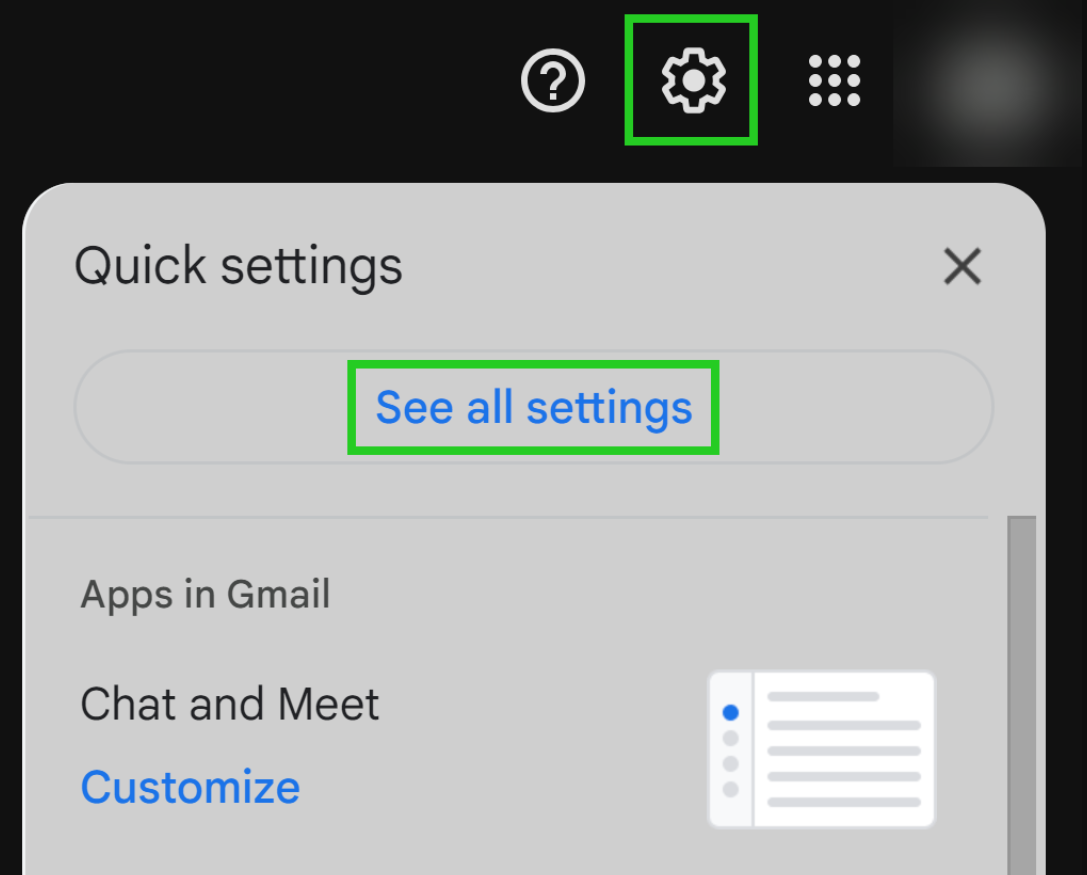
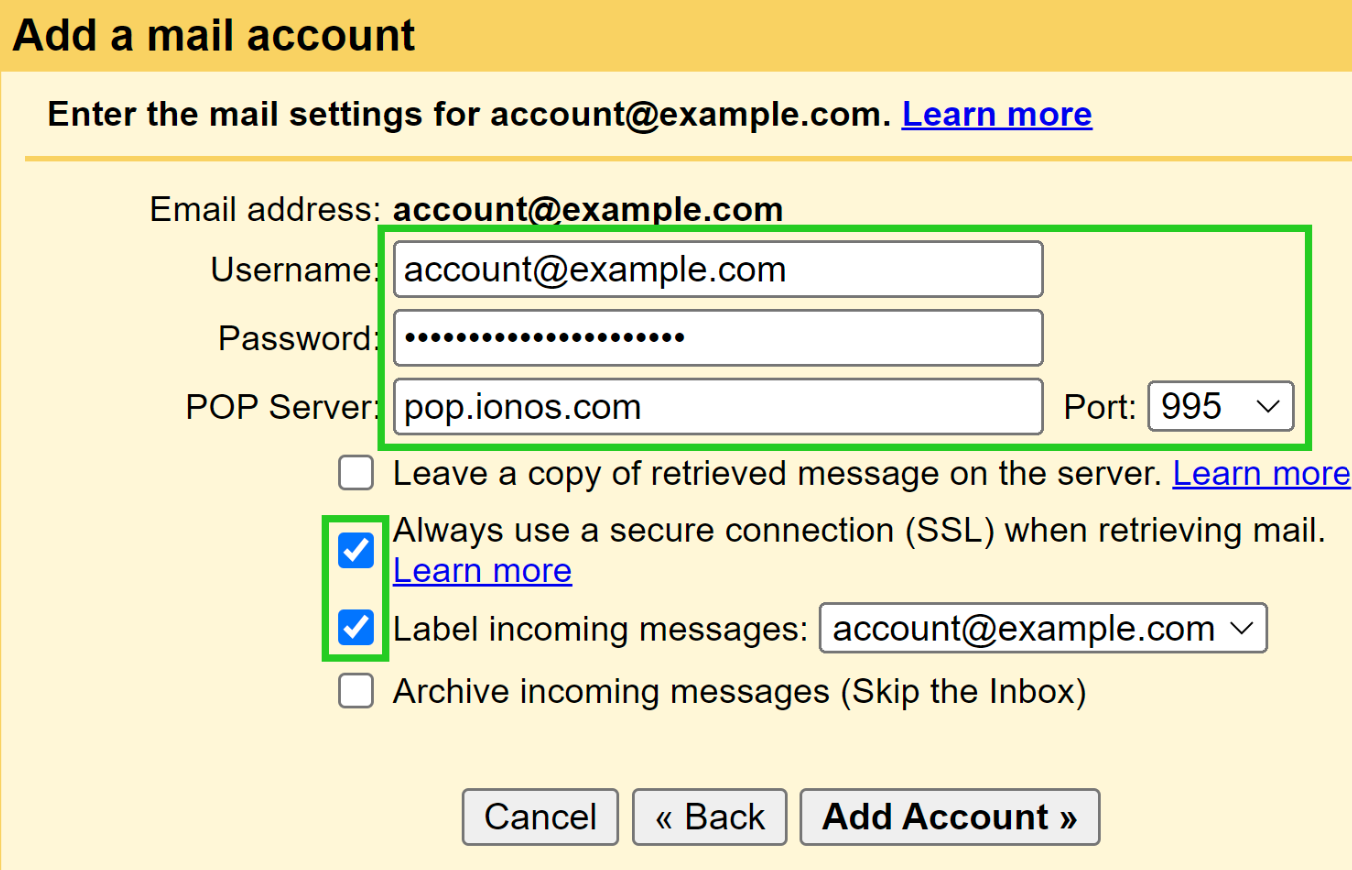
Google's support page says Gmail import brings in messages only. Folders and labels from your IONOS account are not imported. Mail of 150 MB or more is skipped, and Gmail suggests looking for other problems if nothing arrives after 2 hours. Google also keeps forwarding mail sent to your old address into Gmail for 30 days after import.
Google's own notice says POP in "Check mail from other accounts" stops for new users after Q1 2026, and existing users keep it until January 2027. A one-time import on Gmail web is listed as staying, but it is not continuous sync. If you do not see Import mail and contacts, skip to another way.
How to migrate 1&1 IONOS webmail to Google Workspace?
An admin can run Data migration. IONOS has its own article on it, and it applies to IONOS Mail Basic and Mail Business accounts.
- Sign in as a Super Admin.
- Open Google's guide to migrate email from an IMAP account and start its Data migration wizard.
- Enter
imap.ionos.comas your source server. - Enter your IONOS address and password for every mailbox you want to move.
- Finish its steps. Transfer starts and a progress bar shows status.
Google's guide covers up to 100 IMAP users in one run. You can type 20 or fewer users by hand, and a CSV file above that must stay under 128 MB. IONOS's article gives no size or time limits, so test with one user first. It also needs Super Admin rights, so an ordinary Workspace user cannot run it. See IONOS's transfer to Google Workspace article for its version of these steps.
How to migrate 1&1 IONOS webmail to Gmail with an IMAP client?
Add your IONOS account and your Gmail account to one email program, then drag folders across. It works for free Gmail and Workspace, but it is slow for big mailboxes because every message passes through your PC.
- Open Thunderbird or Outlook and add your IONOS account over IMAP with settings above.
- Add your Gmail account in same program and wait for both to finish syncing.
- Create a folder in Gmail for every IONOS folder you want to keep.
- Drag messages from IONOS folders into those Gmail folders. Gmail shows folders made that way as labels.
- Open Gmail on web and check counts before you touch your IONOS account.
That route is not in IONOS's or Google's docs, so test with one small folder first. Our guide to migrate IMAP to Gmail covers sync settings for large folders.
How to migrate 1&1 IONOS webmail to Gmail in bulk?
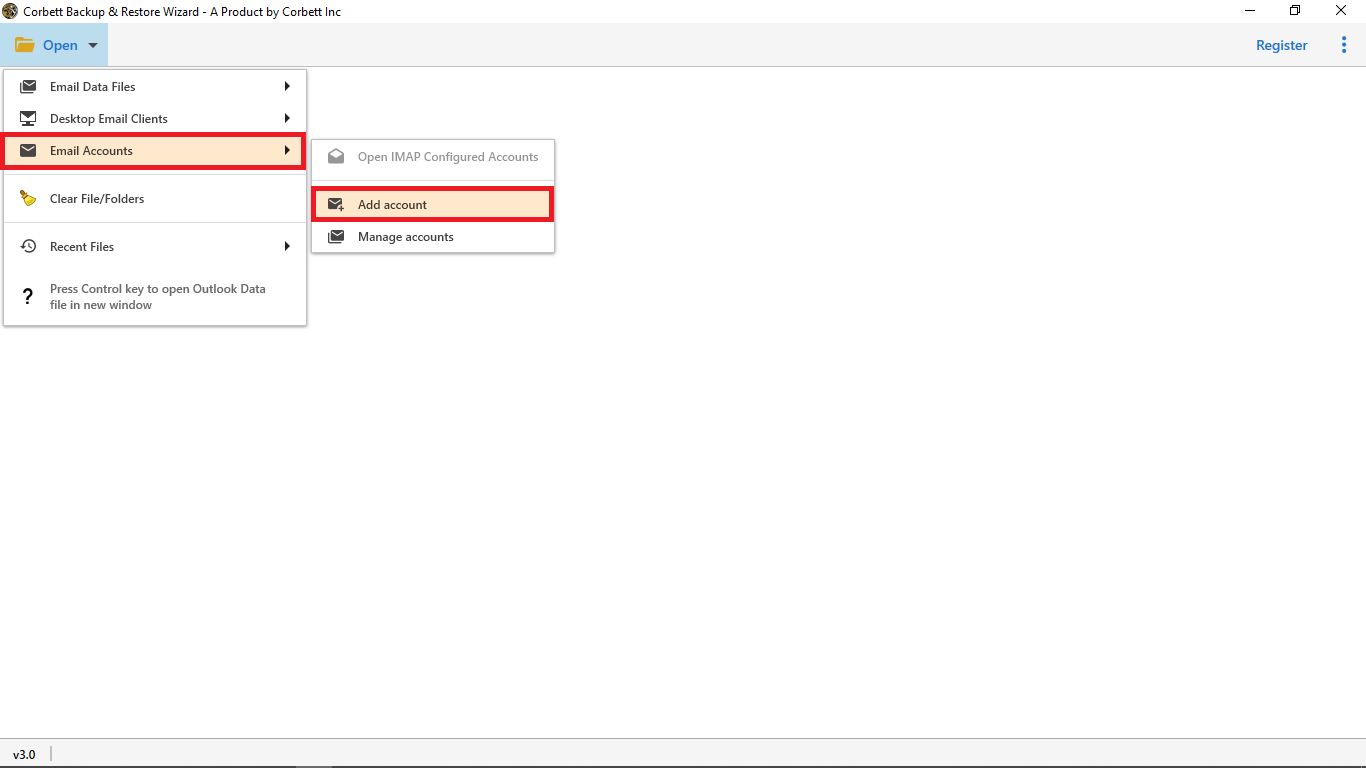
Use Corbett Email Migration Tool for IONOS mailboxes. It copies a live mailbox into another account, and its page lists Gmail and any IMAP host on either side. Folder hierarchy, dates and read status stay intact, duplicates are skipped and a CSV report lists results. Your IONOS mailbox is read only, so nothing is deleted. Gmail sign-in uses Google's own consent window, so your Google password never enters our software. It runs on Windows 11, 10, 8 and 7 and Windows Server 2008 to 2025. Free trial copies 10 emails per folder.
Steps to migrate 1&1 IONOS webmail to Gmail with software
- Install Corbett Email Migration Tool on a Windows PC and run it as administrator.
- Set your 1&1 IONOS webmail mailbox as source. Enter
imap.ionos.com, port 993, your full address and password. - Set Gmail as destination and sign in through Google's consent window.
- Select 1&1 IONOS webmail folders and filters you want to move.
- Start a free trial run with one folder, then check Gmail.
- After counts look right, buy a licence and move everything.
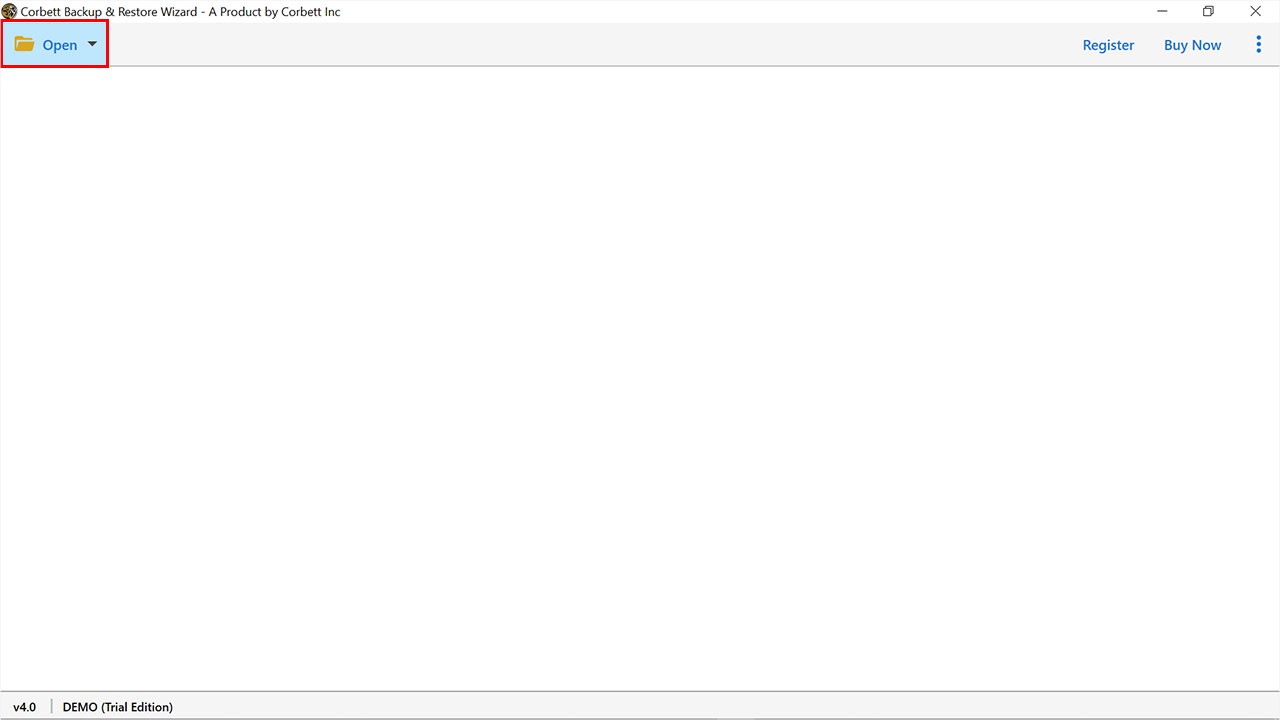
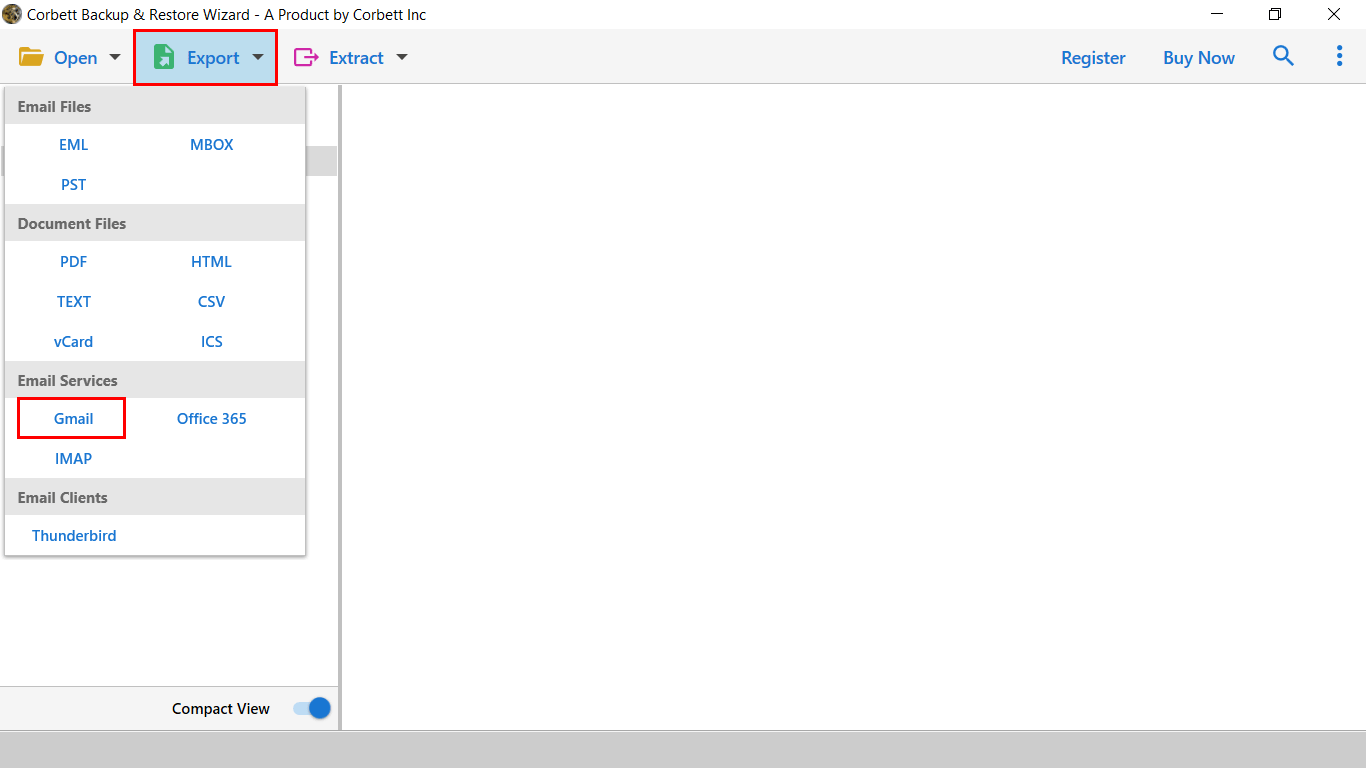
Its page names providers it detects by itself, and IONOS is not on that list, so type server values by hand as shown earlier. Licence is a lifetime one from $99 for up to 5 machines with a 30-day money-back guarantee. It has no scheduler, so plan one cutover. For many users, its page describes a CSV file that maps source to destination accounts. See our guides to move Yandex Mail to Gmail and move GoDaddy email to Gmail for that same idea on other hosts.
How to move 1&1 IONOS contacts to Gmail?
A mail move does not bring contacts. Export your IONOS address book as a file, then import that file into Google Contacts.
- Sign in to IONOS Webmail and select Address Book icon in blue bar at top left.
- Under My Address Books, select your address book and open its Action icon menu.
- Choose its export option and save a CSV file. IONOS's own Microsoft 365 article tells users to export Webmail contacts in CSV format.
- Open Google Contacts and select Import in its left menu.
- Upload your file and select Import. Check a few contacts for names and phone numbers.
IONOS's import article places Import in that Action menu and says to export an address book first to see file layout. It does not print its Export label, so use wording on your screen. vCard is another format IONOS names for contacts. Need more contact help? See how to export Gmail contacts.
Which way to migrate 1&1 IONOS webmail to Gmail is best?
Try Gmail import for one personal mailbox. Admins on Workspace should use Data migration. Use software for folders, filters and many mailboxes.
| Way to migrate 1&1 IONOS webmail to Gmail | Needs | Folders kept | Volume | Cost |
|---|---|---|---|---|
| Gmail import to migrate 1&1 IONOS webmail | Gmail web, IONOS login | No, messages only | One account, mail under 150 MB | Free |
| Workspace Data migration for 1&1 IONOS webmail | Super Admin rights | See Google's guide | Up to 100 users per run | Free with Workspace |
| IMAP client to move 1&1 IONOS webmail to Gmail | Thunderbird or Outlook, both logins | Folders become labels | Folder by folder | Free |
| Corbett tool to migrate 1&1 IONOS webmail to Gmail | Windows PC, IMAP and Gmail login | Yes | Entire mailboxes with CSV user map | Free trial, then from $99 |
Those ideas work for other hosts. See how to move Roundcube to Gmail or move Hostmonster webmail to Gmail.
Why does 1&1 IONOS webmail to Gmail migration fail?
Import mail and contacts is missing when you migrate 1&1 IONOS webmail to Gmail
Google is removing POP fetching, so new users may not see it. Use Workspace Data migration, an IMAP client or software.
Server denied access when you migrate 1&1 IONOS webmail to Gmail
Google's help page says to check username and password and your old account's access settings. Use your full IONOS address and sign in to IONOS Webmail once to confirm your password.
Some 1&1 IONOS emails are missing in Gmail
Mail of 150 MB or more is skipped. Search Gmail with in:anywhere plus your terms, and check old IONOS folders, since Gmail import ignores them.
Connection timed out or reset
Google advises trying again later. Check that port 993 or 995 is open on your network.
Migrated 1&1 IONOS webmail has no folders in Gmail
Gmail import ignores folders. Use an IMAP client or software to keep IONOS folder structure.
What to do after you migrate 1&1 IONOS webmail to Gmail?
Compare message counts, open mail with attachments and set up forwarding in your IONOS mailbox for new mail. Keep your IONOS account until counts match, then update addresses on your accounts. Back up your Gmail account with Gmail Backup Tool if you want a second copy.
Our view
Start with Gmail's own import only if you still see it, because Google is retiring POP fetching and import skips folders. For anything beyond a small mailbox, an IMAP client or software keeps your folders as labels. Test one small folder first, since IONOS and Google docs do not cover that client route.
Key takeaways
- To migrate 1&1 IONOS webmail to Gmail, use
imap.ionos.comport 993 orpop.ionos.comport 995 with SSL/TLS. - Gmail import to migrate 1&1 IONOS webmail copies messages only, skips mail of 150 MB or more and does not bring folders or labels.
- Google is ending POP fetching for new users, so Import mail and contacts may be missing.
- Workspace admins can run Data migration with
imap.ionos.comas source. - Corbett Email Migration Tool can migrate 1&1 IONOS webmail to Gmail with folders, and its free trial copies 10 emails per folder.
Questions about migrate 1&1 IONOS webmail to Gmail
How do I migrate 1&1 IONOS webmail to Gmail?
To migrate 1&1 IONOS webmail to Gmail, use Gmail's Import mail and contacts tool, Google Workspace Data migration, an IMAP client with both accounts, or backup software that copies IONOS mail into Gmail.
What are IONOS IMAP settings?
To migrate 1&1 IONOS webmail to Gmail over IMAP, use server imap.ionos.com, port 993, SSL/TLS. Outgoing is smtp.ionos.com port 465 with SSL/TLS or port 587 with STARTTLS.
What are IONOS POP3 settings?
Server pop.ionos.com, port 995, SSL/TLS. Username is your full email address.
Does Gmail import keep IONOS folders?
No. Google says import brings in messages only, and folders and labels from your old account are not imported.
Is there a size limit on Gmail import?
Yes. Gmail cannot import an email of 150 MB or bigger, including attachments.
Is Gmail ending POP import?
Google says fetching mail from other accounts over POP stops for new users after Q1 2026. Existing users keep it until January 2027.
Can I move IONOS mail to Google Workspace?
Yes. A Super Admin can run Data migration with imap.ionos.com as source. Google's guide allows up to 100 IMAP users per run.
How do I move IONOS contacts to Gmail?
To move 1&1 IONOS contacts to Gmail, export your IONOS address book as CSV from Webmail, then import that file in Google Contacts.
Does Corbett Email Migration Tool support Gmail?
Yes. Its page lists Gmail and any IMAP host on either side. Enter imap.ionos.com by hand, because IONOS is not a named provider there.
Will migration delete my IONOS emails?
No. Every way here copies mail, and our software reads your IONOS mailbox without changing it.
