How to Convert MBOX to HTML – Best Tips & Solution
Exporting MBOX to HTML file format may be difficult for many users. Therefore, this blog will guide you to convert MBOX to HTML easily. Here, we will explain various methods to convert the files and also discuss the reasons you want to save your mailbox data.
HTML stands for HyperText Markup Language which is used to construct and design web pages, as well as read documents, images, text, content, and the body of the page. HTML uses markup languages which are used to display and develop documents on the internet. It is most commonly used to create the web page’s structure.
Whereas, MBOX file is different from HTML format, which is used to store multiple emails in one file. The file is used in many programs like Thunderbird, Apple Mail, Eudora, etc. It not only contains emails but also save attachments with complete attributes. So, by converting your files you can access your emails in a web browser. But why do we need to open an MBOX file in Chrome or another browser? To answer this, look at the next section of the article.
Quick Answer
To convert MBOX to HTML, install the Corbett MBOX Converter, click Open, choose Email Data Files then MBOX File and load your file. Click Export, select HTML, choose a destination folder and click Save. The tool converts MBOX to HTML in bulk with attachments, folder hierarchy and email headers preserved so the result opens in any web browser like Chrome or Firefox.
Benefits of Converting MBOX to HTML File
The purpose of converting MBOX files to HTML file types is mostly determined by the user’s intent. Every user has their own reasons for exporting MBOX files into HTML Files. Some of the main technical reasons we mentioned below.
- In any system, HTML files can be simply modified and accessed.
- There is no issue in saving and sharing the HTML file as it is very lightweight.
- You can easily open and edit the file in Notepad, Text editor.
- The file opens in any browser or operating system without any limitations.
- You don’t need to install additional software to open the HTML file.
Hence, exporting your MBOX file will make it easier for you to access and share your emails. Now how can you save the files in HTML format? For this, we searched the internet for several solutions. We will explain them with clear steps one by one.
Manual Method to Export MBOX to HTML
- Download and open Thunderbird on your system.
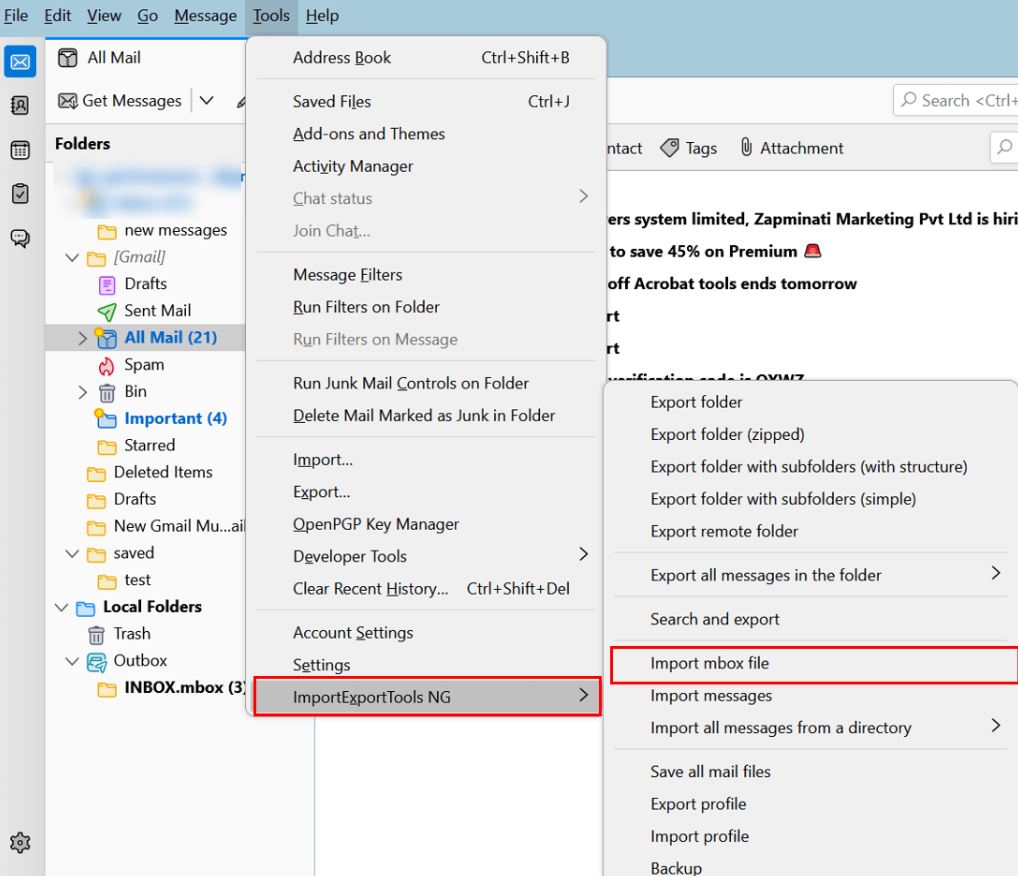
- Install ImportExportTools NG add-on in Thunderbird.
- Go to the “Tools” option, and click “Import/Export Tools NG“.
- Select the “Import mbox file” option and open your MBOX file in the application.
- Once you have imported the Mailbox, go to the folder which contains your data.
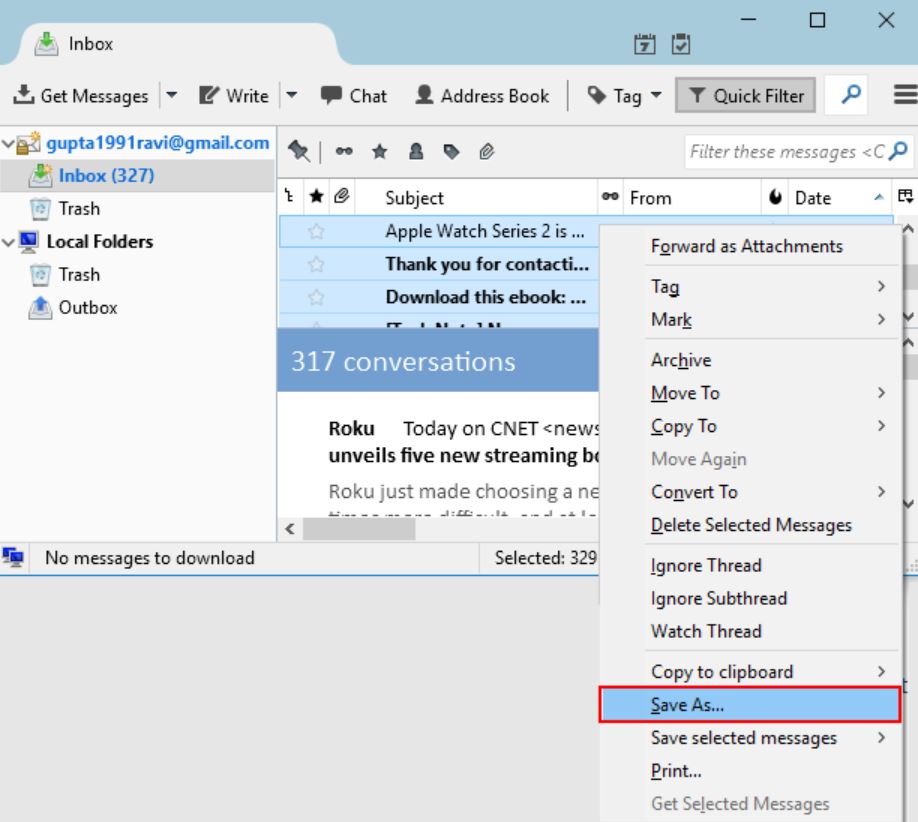
- Click on the “More” option. Choose the “Save As” option.
- Select HTML Files (*.html, *.htm, .shtml, .xhtml) as file type & hit “Save“.
Now, from these steps, your MBOX file will be changed into the HTML format. But, using this process also has issues which we will discuss below.
Limitations of Manual Method
As you can see while the above method is free, you cannot convert multiple files at the same time. Not only this, but there are also many issues while exporting the files.
- Not suitable for converting large MBOX files.
- There is a chance of missing emails or attachments.
- The process can be difficult for non-technical users.
- Requires email application to open and convert MBOX files.
- Data quality may reduce during file conversion.
These are the possible problems users may encounter. Therefore, to avoid this mistake there is a smart method that you can use which we will explain below.
Save MBOX File into HTML File with A Smart Solution
To effectively convert the MBOX file to HTML, professional software will be a great option. Here, we will introduce to you the Corbett MBOX Converter, which you can use to export your MBOX file in HTML or any file format. Users can download free demo version to convert a limited number of MBOX files to HTML & explore the software features before purchasing full version.
Steps to Convert MBOX to HTML Files
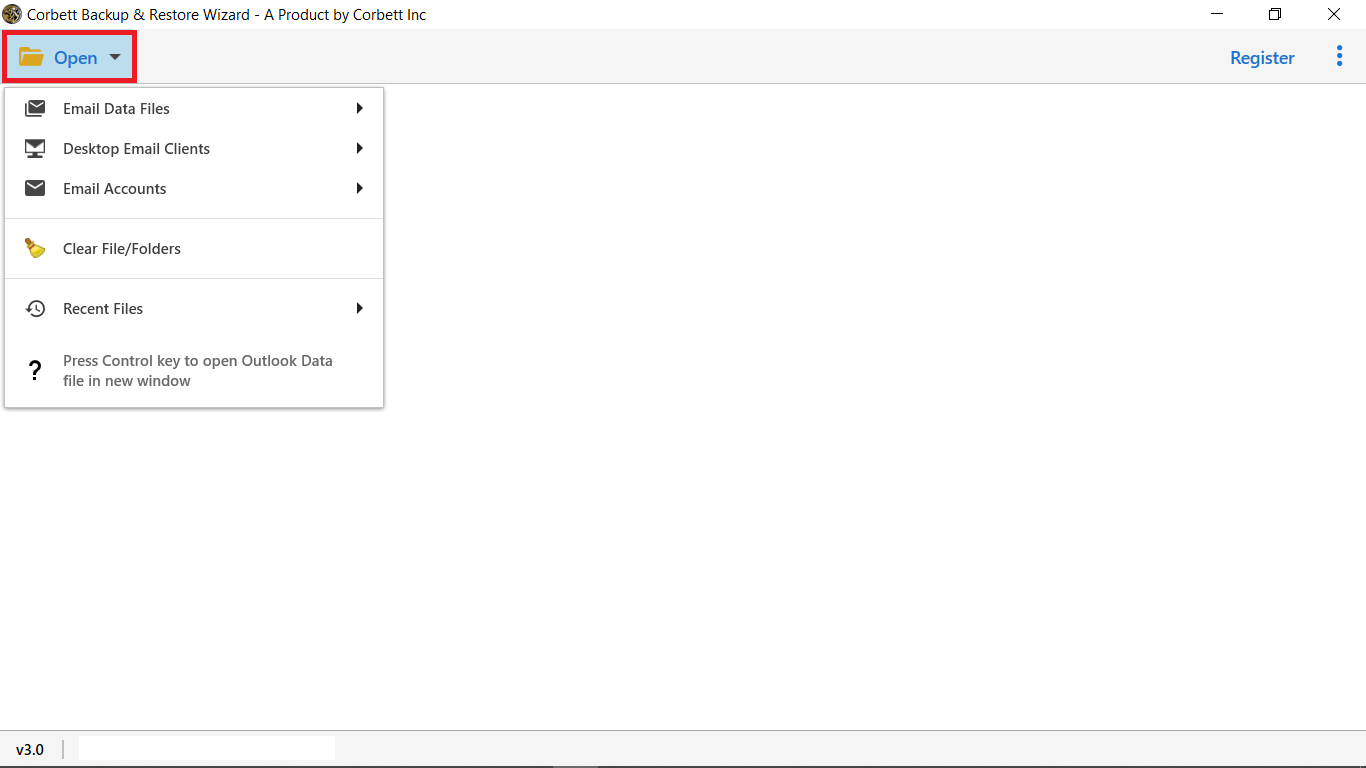
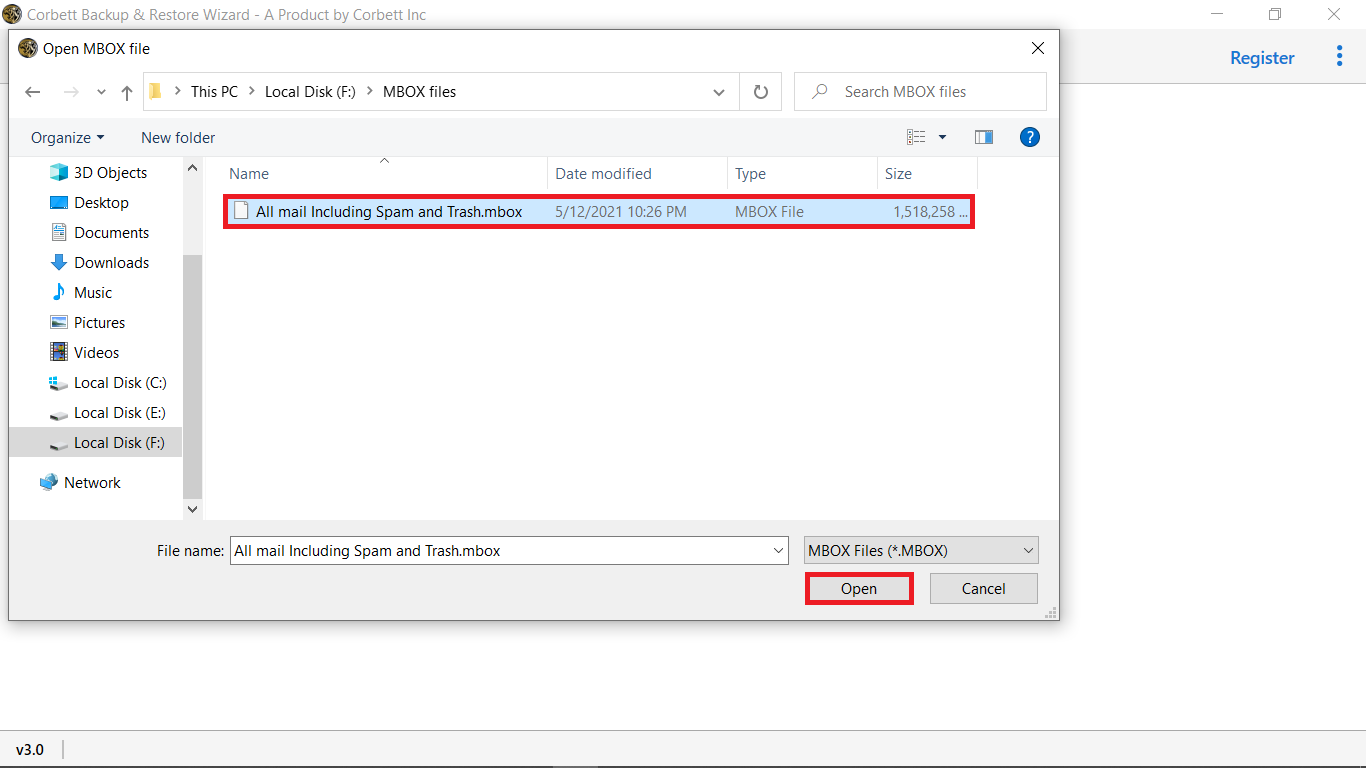
- Download software and select Open option to convert MBOX to HTML File.
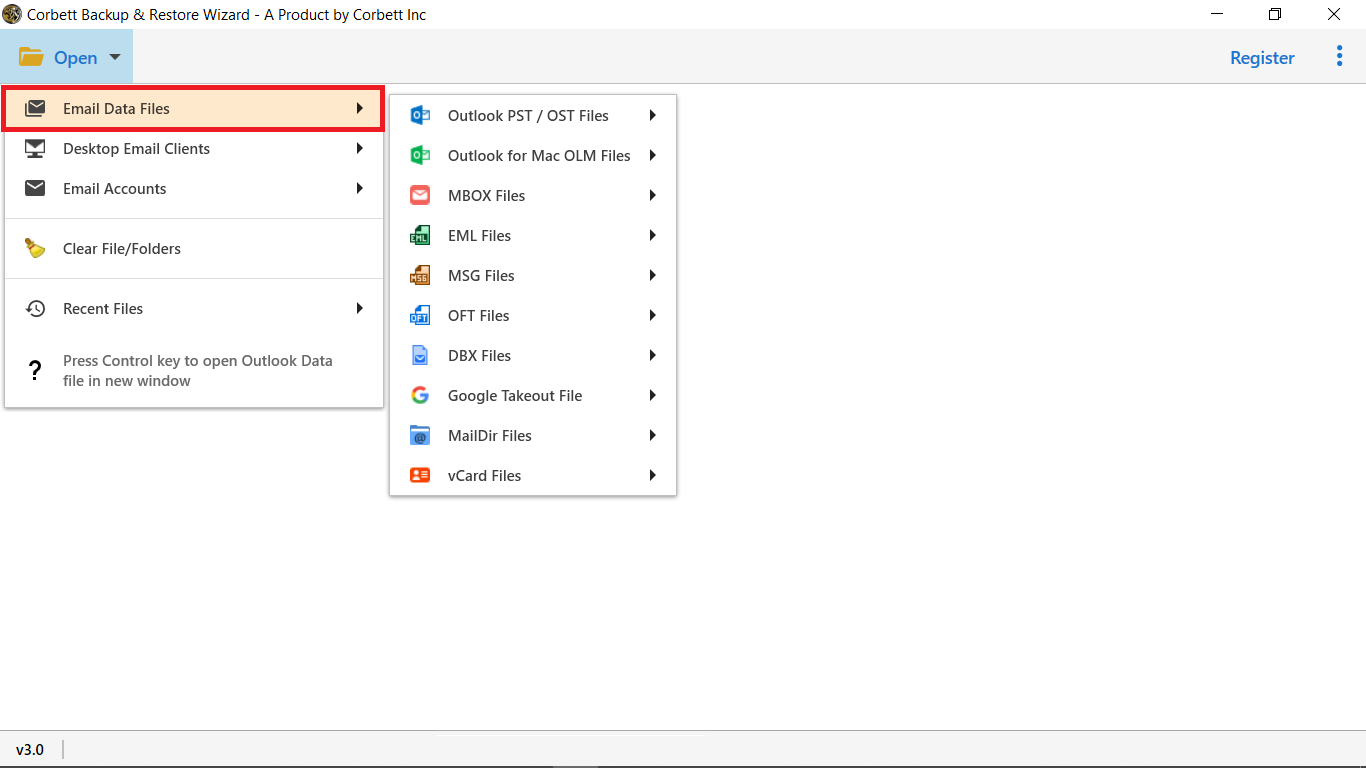
- From the drop-down menu, select MBOX Files from the Email Data Files option.
- Then, under the tool’s preview window, browse for the. mbox files on your system & upload them.
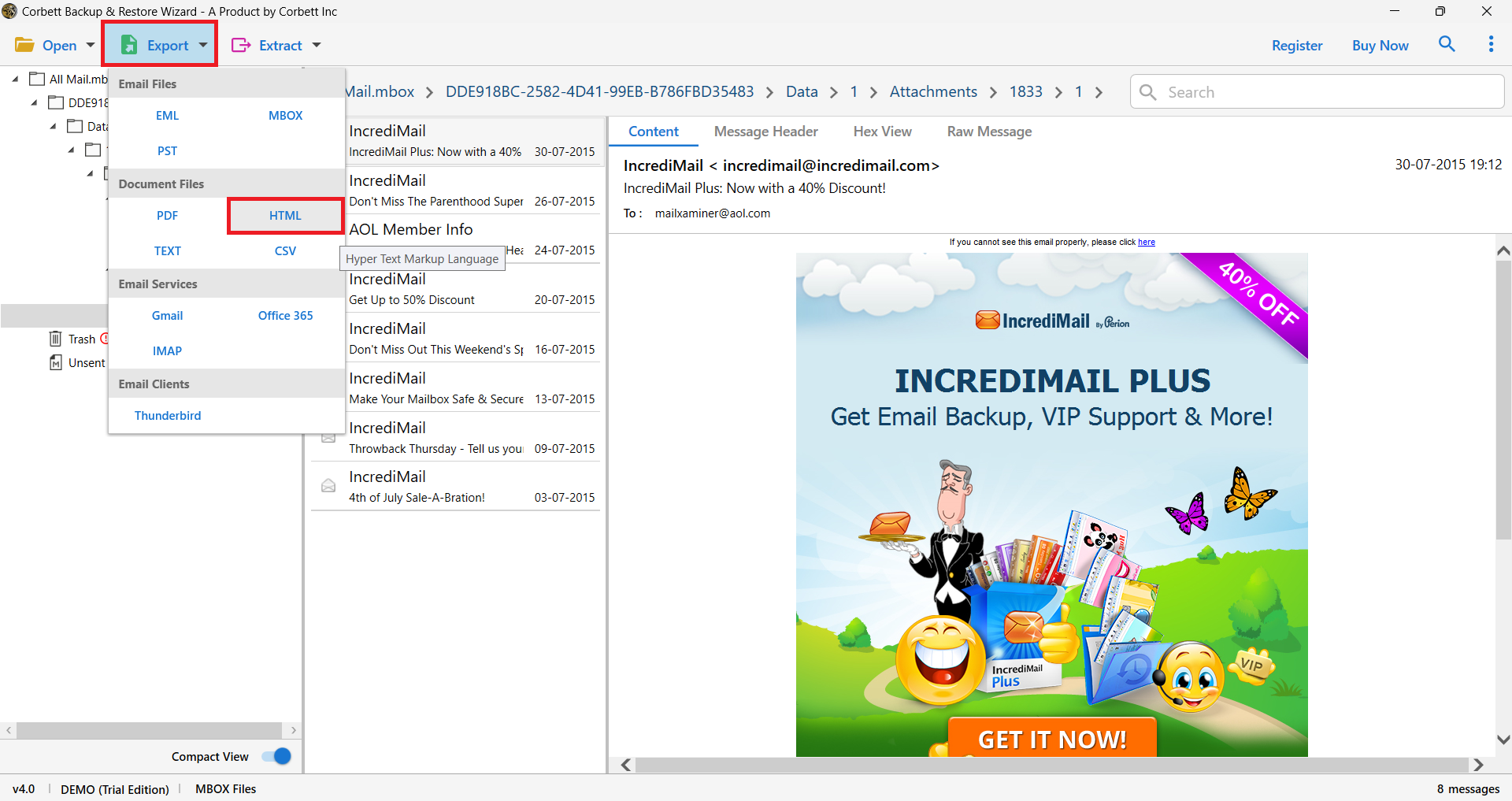
- Then, from drop-down menu on ribbon bar, choose Export options & select HTML.
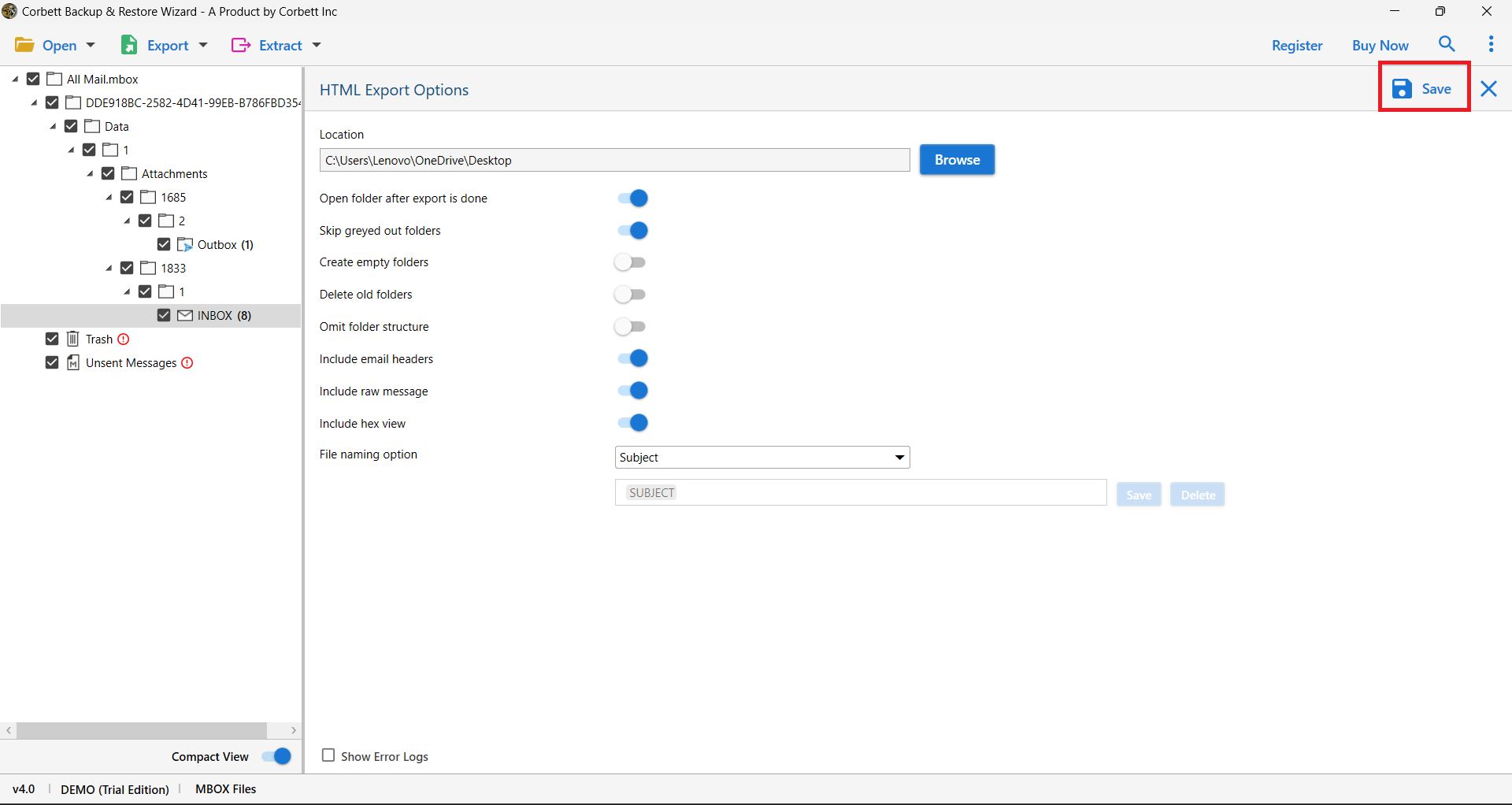
- Finally, under the HTML Export Options list, click Save to begin the conversion process.
These are the steps to convert your MBOX files into HTML format using the automated tool. The software does have many additional features which will help you.
Main Features of Automated Solutions
- Convert multiple MBOX emails to HTML in bulk without file size limitations.
- Convert only selected emails instead of entire MBOX mailbox.
- No need to install any external software or email client to perform conversion.
- Choose preferred location to save converted HTML files.
- Maintains original folder hierarchy during conversion process.
- Allows users to preview MBOX emails before converting MBOX to HTML.
- Get round-the-clock customer support whenever you need help.
Frequently Asked Questions
Q1. How do I open an MBOX file in Chrome?
Ans. Convert the MBOX file to HTML first using a tool like the Corbett MBOX Converter. The output HTML file opens in Chrome, Firefox, Edge or any browser without an email client.
Q2. What is the easiest way to convert MBOX to HTML in bulk?
Ans. Use the Corbett MBOX Converter. Add multiple MBOX files at once, choose HTML as export format, set a destination folder and click Save. The tool processes all files in one batch and keeps folder hierarchy intact.
Q3. Can I convert MBOX to HTML without installing Thunderbird?
Ans. Yes. The Corbett MBOX Converter reads MBOX files directly and exports them to HTML on Windows without Thunderbird, Apple Mail or any other email client installed.
Q4. Will attachments stay in the converted HTML files?
Ans. Yes. Attachments are saved alongside each HTML email or embedded depending on your settings, so you keep full email content including images, PDFs and Office files.
Q5. How do I open the MBOX format if I have no Outlook or Thunderbird?
Ans. Use any MBOX viewer, convert the file to HTML or PDF first, or open the MBOX file in Notepad to read raw text. Apple Mail, Eudora and Postbox also support MBOX.
Q6. How can I view a Google Takeout MBOX file?
Ans. Convert the Google Takeout MBOX to HTML or PST using a converter. You can then open the HTML in any browser or load the PST in Outlook to read your Gmail backup.
Q7. Is converting MBOX to HTML safe and lossless?
Ans. Yes. The Corbett MBOX Converter opens MBOX in read only mode and produces HTML copies without changing or deleting the original file. All emails, attachments and metadata stay intact.
Concluding Words
Saving MBOX file data into HTML format can be difficult. However, this article provided methods to easily convert MBOX to HTML files. Here, we used a manual method to export the files, but it has more drawbacks than benefits. Professional software on the other hand will make your work much easier and faster. Therefore, these two are the techniques that can help you open your MBOX file in Chrome.
Also Read: How to Convert Bulk MBOX Files to TEXT Files