Zimbra to PST Converter to Export Zimbra TGZ to PST
Zimbra is a open-source email, calendar, and collaboration platform. It allows users to send emails, share documents, manage tasks, and share files through web browser or desktop clients. On the other hand, PST (Personal Storage Table) is a file used by Microsoft Outlook to save emails, calendar events, contacts, tasks, and other mailbox data on your computer.
TGZ and PST are different formats and neither email platform provides a direct option to perform data conversion. Well, don’t be discouraged. Our team has come up with a reliable solution, i.e., an Error Free Zimbra Converter Tool that allows exporting entire Zimbra data files to PST in a fraction of a second.
So continue with the blog post and follow several steps to convert Zimbra mailbox to PST format.
Steps to Export Zimbra Mailbox to PST Format
Before forwarding towards the solution section, download the Zimbra to PST Migrator.
- Install and Run Zimbra to PST Converter Tool on Windows OS.
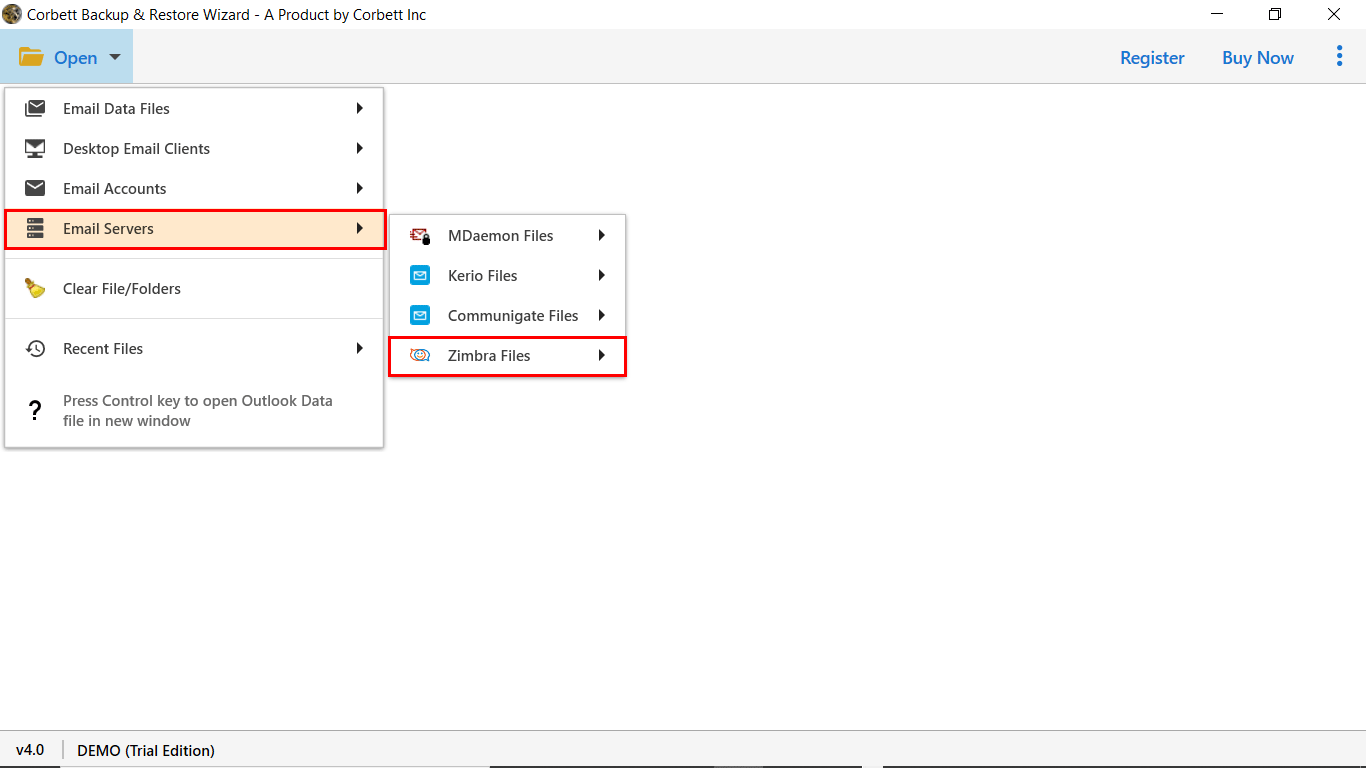
- Now Navigate to Open Tab >> Email Server >> Zimbra.

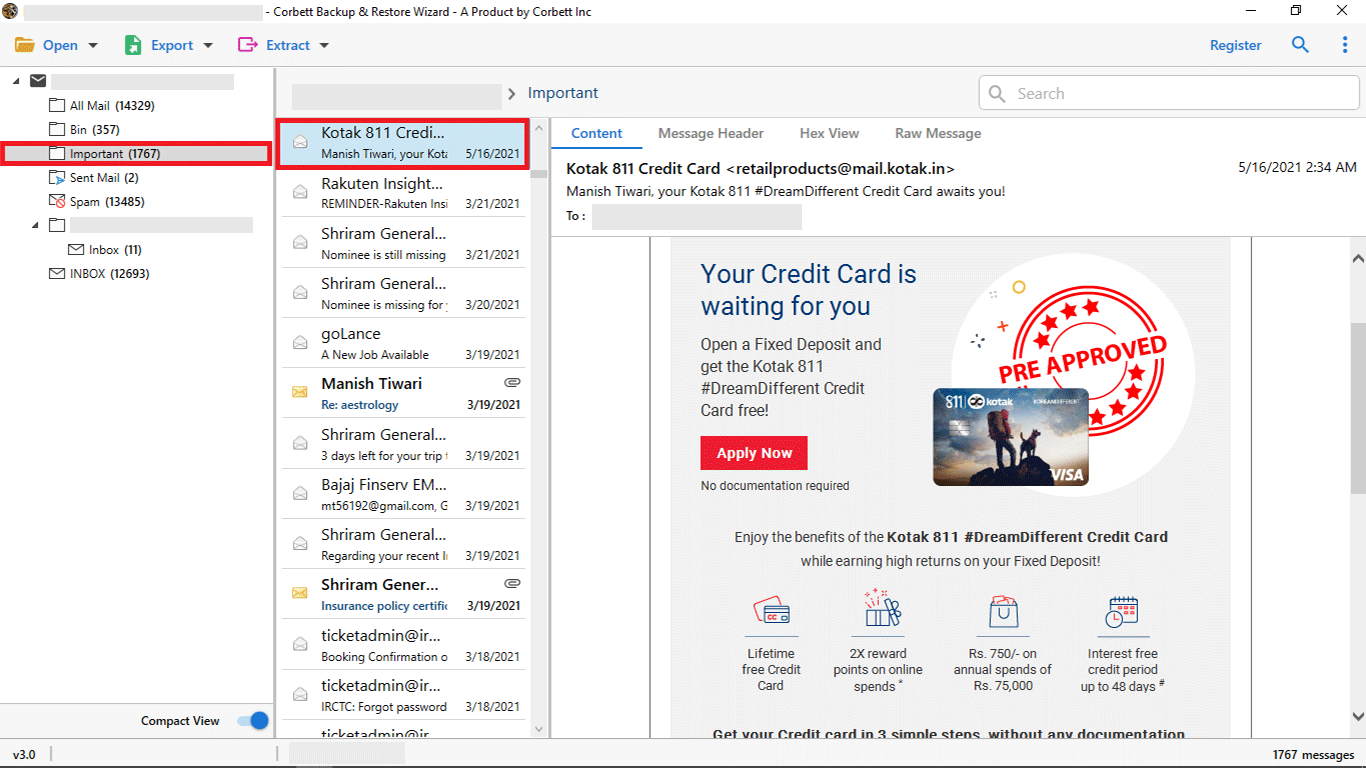
- The software will scan and fetch all the data stored in the webmail account.
- Preview and sort the email data with attachments.
- Now, click on Export Tab and select PST as the conversion option.
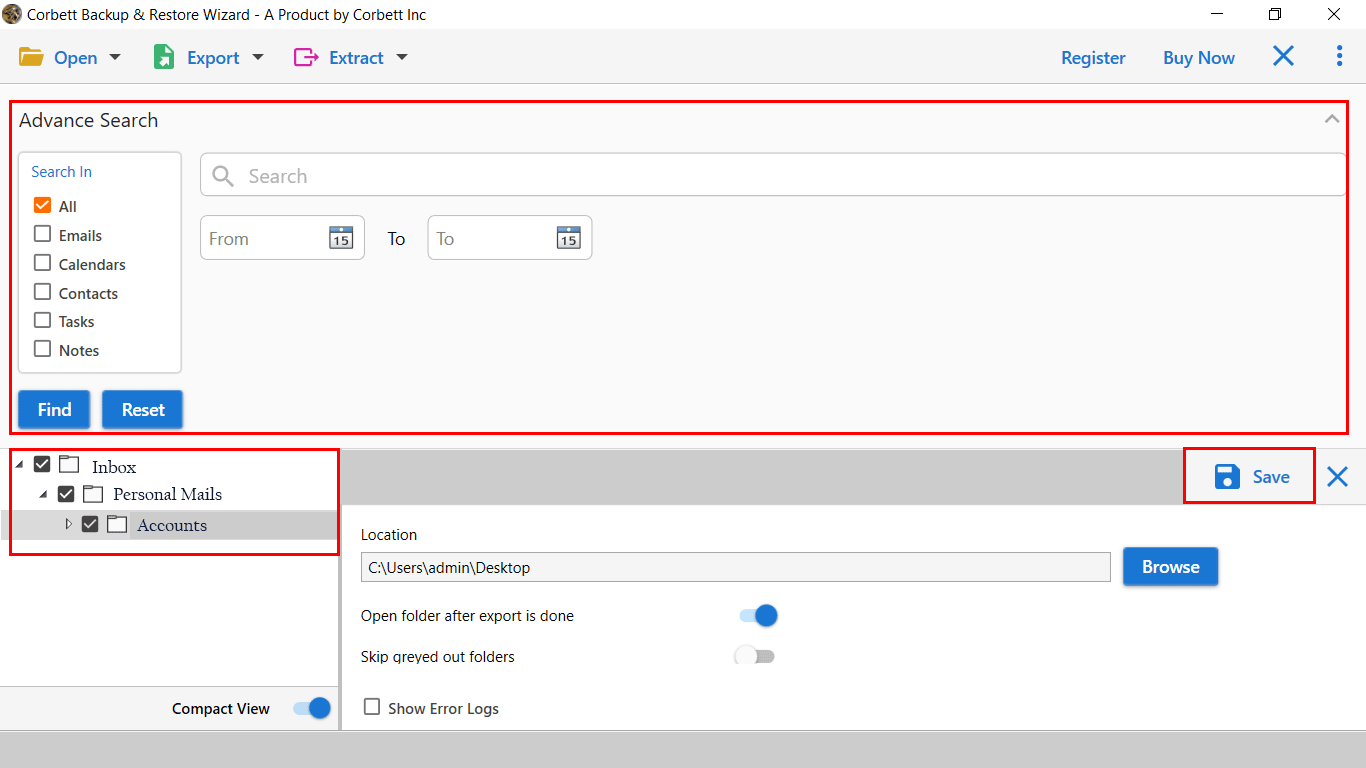
- The last step is to apply the data filters and click on the Save button.
That’s all now. The software will export Zimbra mailbox to PST format with all data attributes. Additionally, users can convert any size of data file in one go.
Why Choose Zimbra to PST Converter Software?
- Standalone tool to convert TGZ files to PST format.
- Before migration, preview data in different modes.
- Offers offline functionality to secure users data.
- Simple and easy-to-use interface for everyone.
- We provide 24/7 customer support service to assist users.
- Free demo version is available to test software features.
What are the Reasons Behind Data Migration?
You already get the procedure to export Zimbra TGZ to PST format in the above blog post. In the article’s next section, the user will know the reasons for data migration from Zimbra to PST format.
- Secure Platform: Microsoft provides a high array of protection and prevents email data from external attacks regarding data security.
- Compatibility: Users will get device compatibility support when importing PST to any email application. If you are using Zimbra On-premises, you can only access your data files from the network.
- Account Management: Zimbra Discontinued its desktop client services. It isn’t easy to manage multiple profile data, which can be a primary reason why users are looking for a way to export Zimbra mailbox to PST format.
- Data Filtering: The spam filtering option is inefficient in the Zimbra application, and users will get all spam messages in the primary mailbox.
Main Features of Zimbra to PST Conversion Software
- Support Multiple Mailbox Conversion: For large-scale TGZ to PST migration, the automated approach offers a batch mode that lets users convert multiple data files simultaneously. Also, the software fetches all configured data files from the source location.
- Single Folder Conversion: This mode let users migrate specific mailbox as per user requirements. Also, a date filter option allows filtering emails based on the month, year, week, etc.
- Retain Mailbox Structure: During the migration process, the Zimbra to PST converter preserves all data attributes intact from the header source (From, To, Cc, Bcc, time, date, subject), body source (font, text, color, line, table, etc.), images, etc.
- Works On Windows OS: The Zimbra to PST Migrator is programmed for Windows OS and can easily be accessed on 32 & 64-bit Machines. Also, it supports the latest Windows 11 and its older editions.
So There You Have It
In conclusion, we provided a reliable Zimbra to PST Converter tool that allows users to migrate emails from Zimbra TGZ files to Microsoft Outlook PST format. It allows users to export complete mailbox data, including emails, attachments, contacts, calendars, and tasks. The software is designed with a user-friendly interface suitable for every kind of user. You can also use a demo version to check utility features before purchase.
Next Read: