Yahoo Mail Storage Limit Explained
In short: A free Yahoo Mail account now gives you 20 GB of storage, down from 1 TB. In the UK and EU it is 15 GB. Go over the limit and you stop receiving mail until you clear space. Free it up by emptying Trash and Spam and deleting large attachments. You can also back up your mail locally and delete it to keep everything without paying.
The Yahoo Mail storage limit now
For years Yahoo Mail gave free users a huge 1 TB of storage. In 2025 that changed. Free accounts now get 20 GB. From 5 May 2026 accounts in the UK and EU get 15 GB. The 25 MB per email attachment limit has not changed. Here is how the tiers stand:
| Plan | Storage | Price |
|---|---|---|
| Free (most regions) | 20 GB | Free |
| Free (UK and EU) | 15 GB | Free (from 5 May 2026) |
| 100 GB add-on | 100 GB | about $1.99/month |
| Yahoo Mail Plus | 200 GB | about $5/month |
| 1 TB add-on | 1 TB | about $9.99/month |
Your total counts Inbox, Sent, Drafts, custom folders, Spam and Trash. The mobile app cache is separate and does not count.
What the cut means for you
Going from 1 TB to 20 GB is a 98% drop that lands hardest on the people who trusted Yahoo with years of mail. If you have saved newsletters, photos and forwarded files since the 1 TB days, you may already be close to full without realizing it. The part that catches people out: once you hit the limit you cannot receive new mail. Messages sent to you bounce back to the sender. You do not get them later, you simply miss them until you make room. The good news is that you do not have to pay or delete anything you care about. You can clear space for free or simply keep every email by backing it up locally first.

Senior Analyst, Corbett Software
“The 20 GB cut worries people because they think it means paying up or losing mail. It does not. Most inboxes are full of a few huge attachments and years of Spam and Trash. Clear those and you drop well under the limit. If you want to keep everything, back it up to your computer first, then delete freely.”
Yahoo vs Gmail, Outlook and iCloud
The cut stings, but it helps to see where 20 GB actually sits against the other free inboxes. Yahoo’s space is for your mailbox alone, while most rivals share their quota with cloud drives and photos:
| Provider | Free storage | Shared with |
|---|---|---|
| Yahoo Mail | 20 GB | Mailbox only |
| Gmail | 15 GB | Drive and Photos |
| Outlook.com | 15 GB | Plus 5 GB OneDrive |
| iCloud Mail | 5 GB | Drive, photos and backups |
So Yahoo still hands a free user more inbox room than Gmail or Outlook. The pain is simply that the old 1 TB days are gone for everyone.
How to check your storage usage
Before you delete anything, see where you stand:
- Sign in to Yahoo Mail in a browser.
- Click the Settings gear, then More Settings.
- Select Storage to see how much of your limit is used.
You can also hover over Storage in the left menu for a quick percentage.
What happens when your mailbox is full
When you reach the limit, Yahoo pauses new mail. In practice that means:
- You cannot send or receive new emails until you free up space or upgrade.
- Messages sent to you bounce back to the sender, so you miss them rather than getting them later.
- Yahoo shows warning notices in your inbox as you approach the limit.
- You can still read the mail you already have, only new delivery is stopped.
How to free up space
A few targeted clean-ups usually drop you well under the limit:
- Delete the biggest emails first. Sort or search for large attachments, since one folder of photos or videos can outweigh thousands of text emails.
- Empty Trash and Spam. Both count toward your total, so clearing them frees real space straight away.
- Clear old newsletters and forwards. Search by sender and delete in bulk.
- Check every folder. Sent and custom folders count too, not just the Inbox.
- Do it regularly. A quick monthly clear keeps you clear of the limit.
Keep your old emails without paying
Deleting to free space is fine for junk, but not for mail you may need again. The way to have both, empty space and every email kept, is to back the mailbox up to your own computer first, then delete it from Yahoo. Your storage drops while the emails still live safely offline.
The Corbett Yahoo Backup Tool signs in to your account and saves the mailbox to your PC as PST, PDF, MBOX or EML, with attachments and folder structure kept. It previews the mail first, filters by date or sender so you can archive the oldest mail. A free demo edition runs on every edition of Windows.
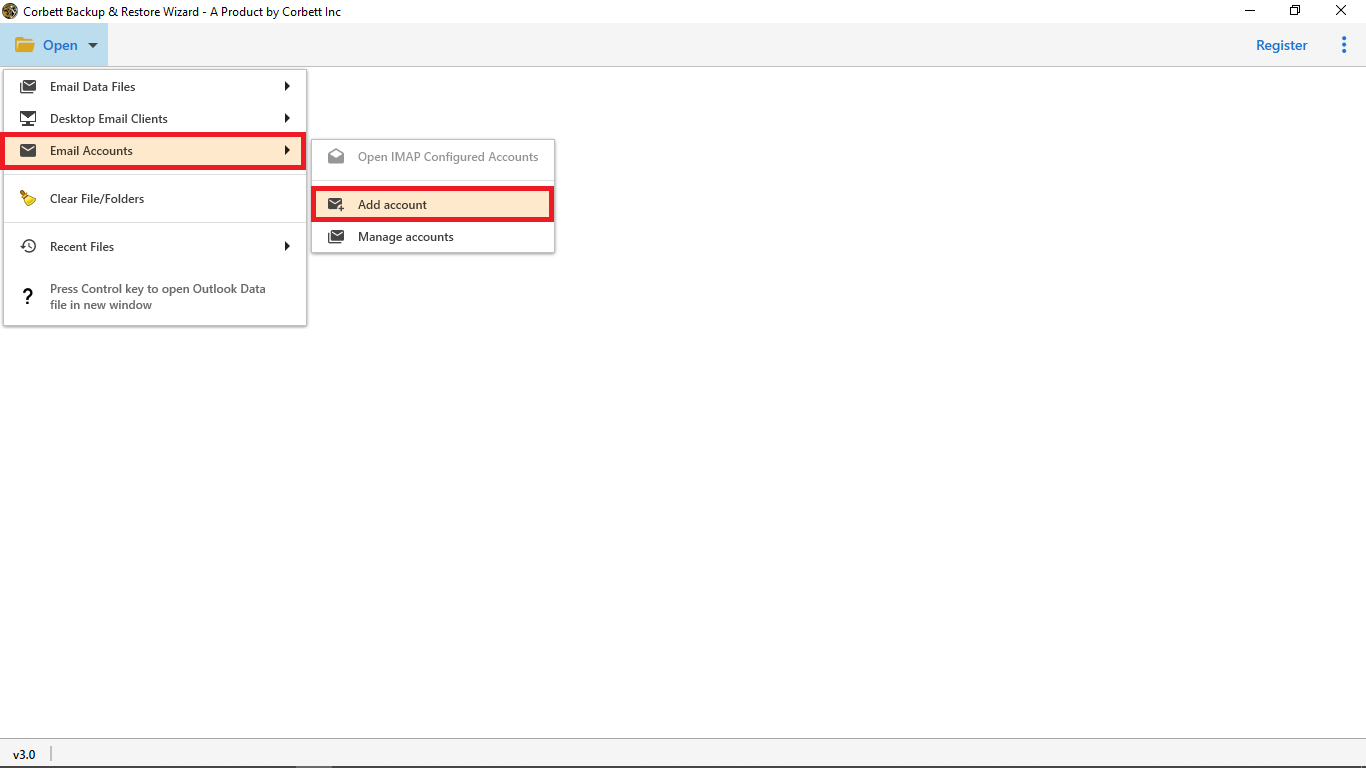
- Open the tool and choose Open then Email Account then Add Account.
- Sign in with your Yahoo address and an app password, then preview the mailbox.
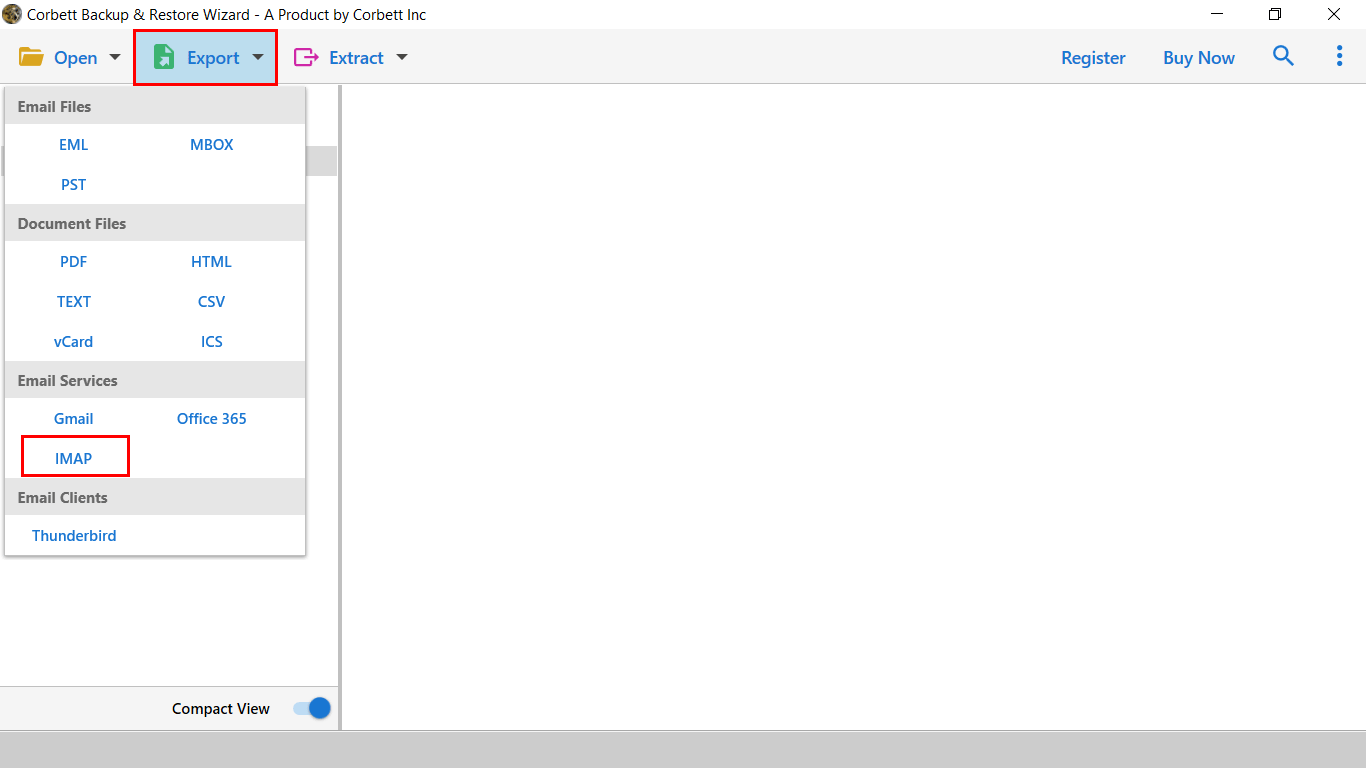
- Click Export, pick a format such as PST or PDF, apply a date filter for the oldest mail, then Save. Delete that mail from Yahoo once the backup is done.
Frequently asked questions
What is the Yahoo Mail storage limit now?
Free Yahoo Mail accounts get 20 GB, down from the old 1 TB. In the UK and EU the free limit is 15 GB from 5 May 2026. Yahoo Mail Plus gives 200 GB. Paid add-ons offer 100 GB or 1 TB.
Why did Yahoo reduce the storage limit?
Yahoo cut free storage from 1 TB to 20 GB during 2025 as part of a wider change to its free mail policy. The move brought Yahoo closer to rivals like Gmail and Outlook, which offer 15 GB free.
Can I increase my Yahoo Mail storage for free?
No, the free 20 GB cannot be extended. To hold more mail without paying, back it up to your computer and delete it from Yahoo, which frees space while keeping every email.
What happens if my Yahoo mailbox is full?
You cannot send or receive new mail. Messages sent to you bounce back to the sender. You can still read existing mail. Clear space or upgrade to resume normal delivery.
Does Trash and Spam count toward the limit?
Yes. Inbox, Sent, Drafts, custom folders, Spam and Trash all count. Emptying Trash and Spam is one of the quickest ways to free real space.
What is the Yahoo Mail attachment size limit?
25 MB per email, for both sending and receiving. This is separate from your storage limit and has not changed.