Quick Answer
Download BlueYonder emails in 3 ways. Use PDF, Outlook or Thunderbird or backup software.
PDF suits a few messages. Outlook or Thunderbird suits one mailbox over IMAP. Software suits big mailboxes with filters.
Create a Virgin Media app password first. Check your BlueYonder IMAP settings and test one folder.
Your BlueYonder mailbox lives on Virgin Media servers. Virgin Media staff have told users on its community forum that mailboxes are deleted 90 days after broadband service ends so a local copy matters. Below are three ways to download BlueYonder emails to your computer, including an app password step that most guides ignore.
How to prepare your account and BlueYonder IMAP settings?
Create a Virgin Media app password and note server settings before you save BlueYonder mail. Virgin Media retains a separate password for mail applications, because IMAP and POP do not support its extra login protection.
- Open My Virgin Media app and sign in.
- Go to Account settings, then Account details.
- Under Virgin Media Mail, select Manage next to app password.
- Generate a new app password and copy it.
| Setting | BlueYonder value |
|---|---|
| Incoming IMAP server | imap.virginmedia.com, port 993, SSL/TLS |
| Incoming POP3 server | pop3.virginmedia.com, port 995, SSL/TLS |
| Outgoing SMTP server | smtp.virginmedia.com, port 465, SSL/TLS |
| Username | Your full name@blueyonder.co.uk address |
| Password | Virgin Media app password |
Virgin Media lists these values in its Email settings guide. One app password serves all your mail applications but a new one disables your old one so update every application after you generate it. Some older guides show imap4.blueyonder.co.uk. Users in a Virgin Media community thread posted that name and one fix suggested there was new app password. No solution is marked on that page.
How to download BlueYonder emails one by one as PDF?
Open a message in BlueYonder webmail and print it to PDF. It costs nothing and suits a handful of important messages.
- Sign in to BlueYonder webmail with your Virgin Media login.
- Open a message in your inbox.
- Press Ctrl+P on Windows or Cmd+P on Mac.
- Choose Save as PDF as your printer, select a folder and select Save.
Catch: you save one message at a time, attachments need their own download and folders are not kept.
How to save BlueYonder mail with Outlook or Thunderbird?
Add your account over IMAP, then export a PST from Outlook or copy folders into local folders in Thunderbird. Use your app password, not your normal login.
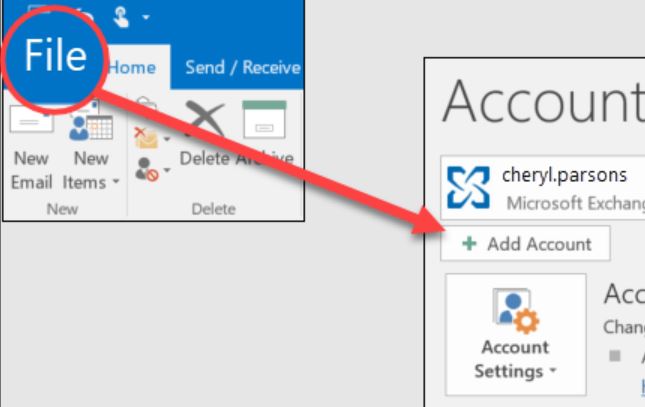
- In classic Outlook, select File, Add Account and choose manual setup with IMAP.
- Enter
imap.virginmedia.com, port 993, SSL/TLS, thensmtp.virginmedia.com, port 465, SSL/TLS. - Use your full BlueYonder address as username and your app password as password.
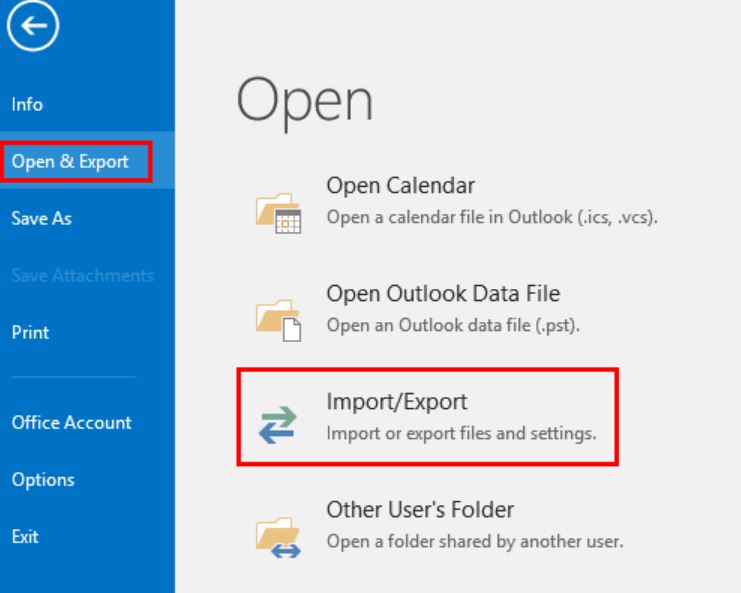
- Wait for folders to sync. Select File, Open & Export and Import/Export.
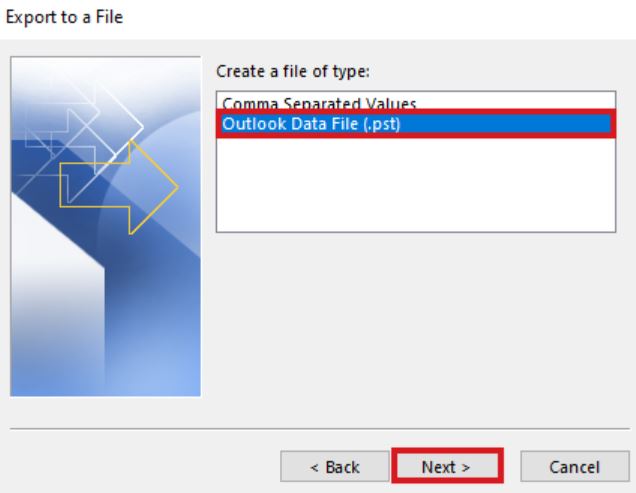
- Choose Export to a file, then Outlook Data File (.pst).
- Tick BlueYonder folders, select a save location and finish.
In Thunderbird, add your account with same values, then drag folders into Local Folders. That step matters. In a Virgin Media community thread, a user with 15 to 20 years of saved mail asked how to save BlueYonder mail. One reply warned that IMAP clients mirror server changes so store copies in local folders and include them in your backup. Another thread advises exporting to PST before you quit: Emails stored in Outlook after quitting Virgin Media.
Catch: you work folder by folder, a large mailbox takes hours and a message you delete in your client can vanish from your server too.
How to save BlueYonder mail in bulk?
Use Corbett Webmail Backup Tool to save BlueYonder mail over IMAP. Its page says it handles any IMAP mailbox that lacks a page of its own. Output formats are PST, MBOX, EML, MSG, PDF, HTML, CSV and TXT and your folder tree, dates, unread flags and full headers remain intact. Filters include date range, sender, recipient, subject, words and attachments. Windows 7 to 11 and Windows Server 2008 to 2025 are supported. A free demo is available and there is no Mac build.
Steps to save BlueYonder mail with software
- Install it on a Windows PC and start it as administrator.
- Choose IMAP option and enter
imap.virginmedia.com, port 993, your full BlueYonder address and your Virgin Media app password. - Tick BlueYonder folders you want. Message counts show next to folder names.
- Add date, sender or attachment filters if you want less mail.
- Choose a format like PST or EML, then set a destination folder or USB disk.
- Start backup and open your output folder to check files.
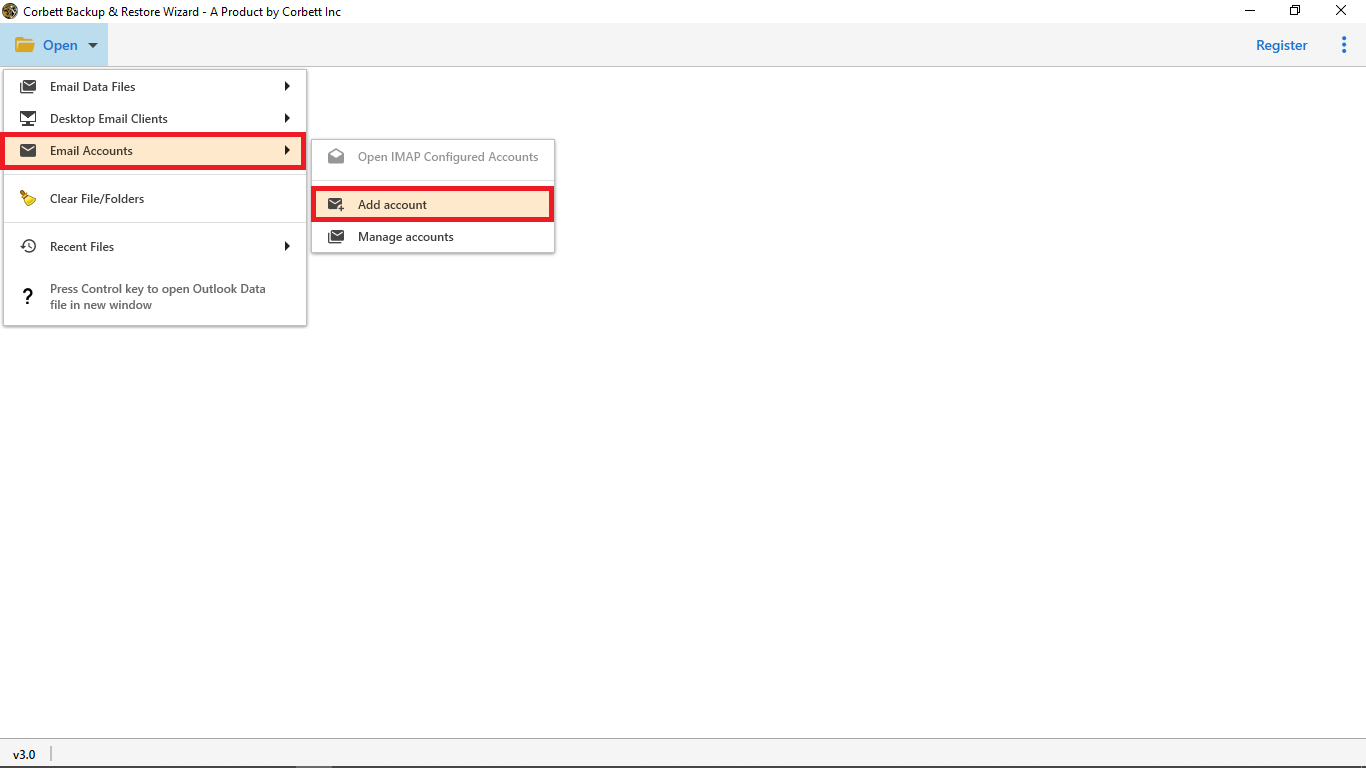
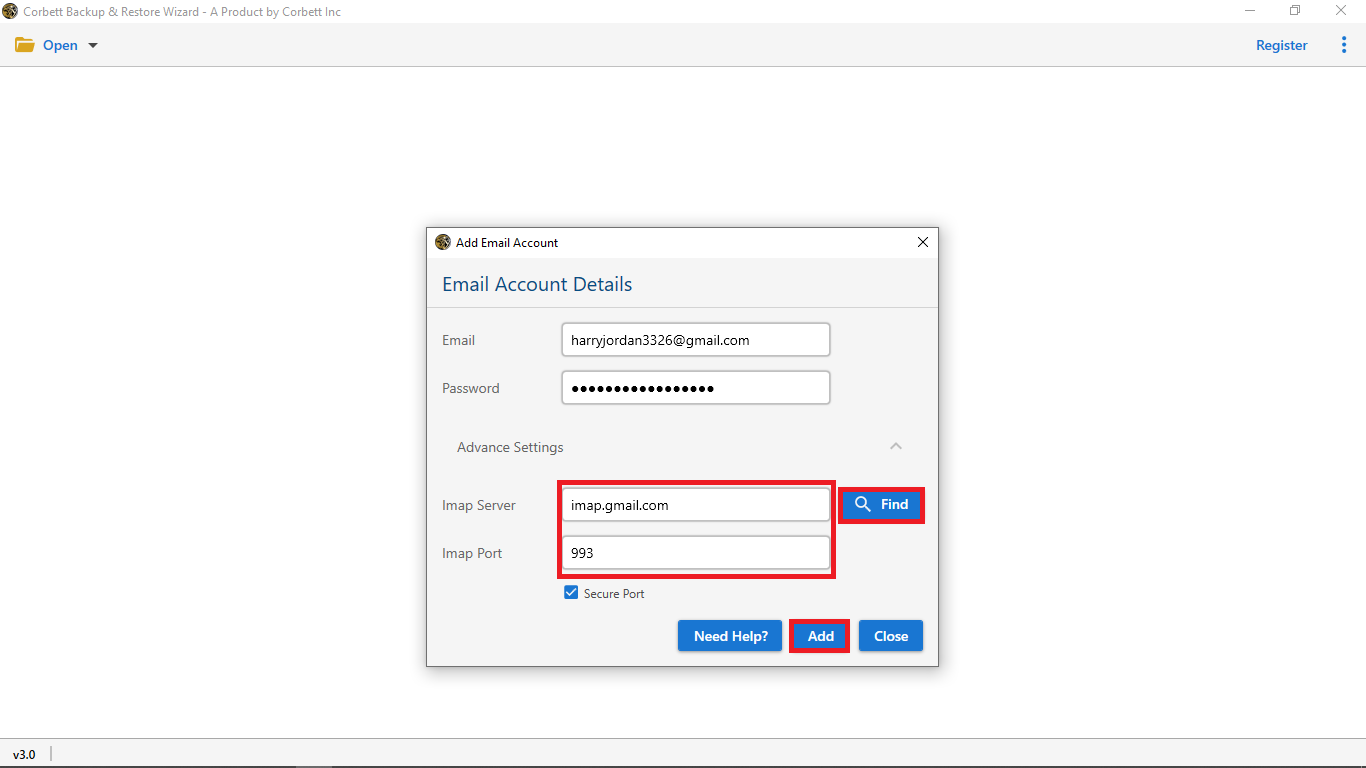
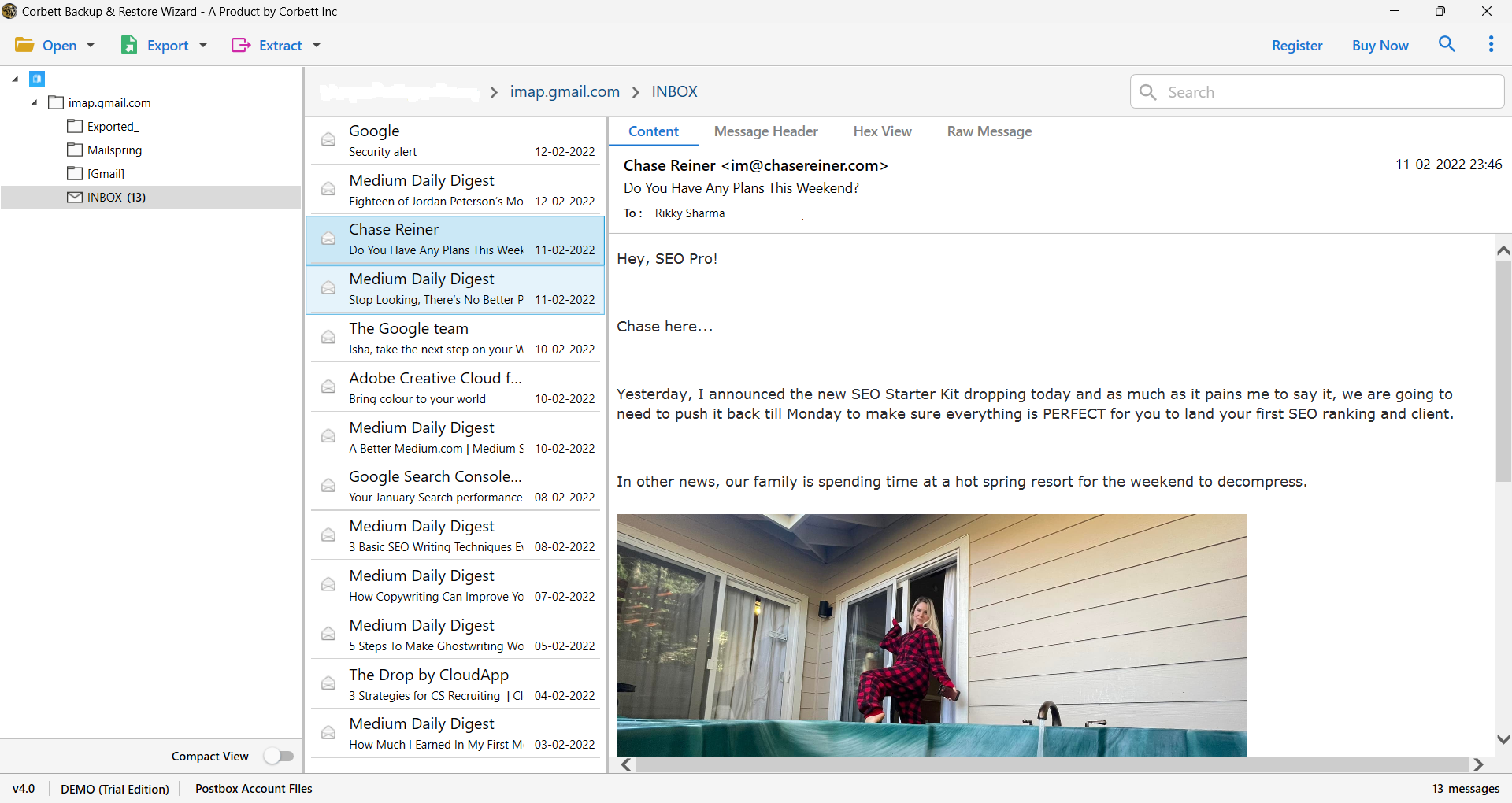
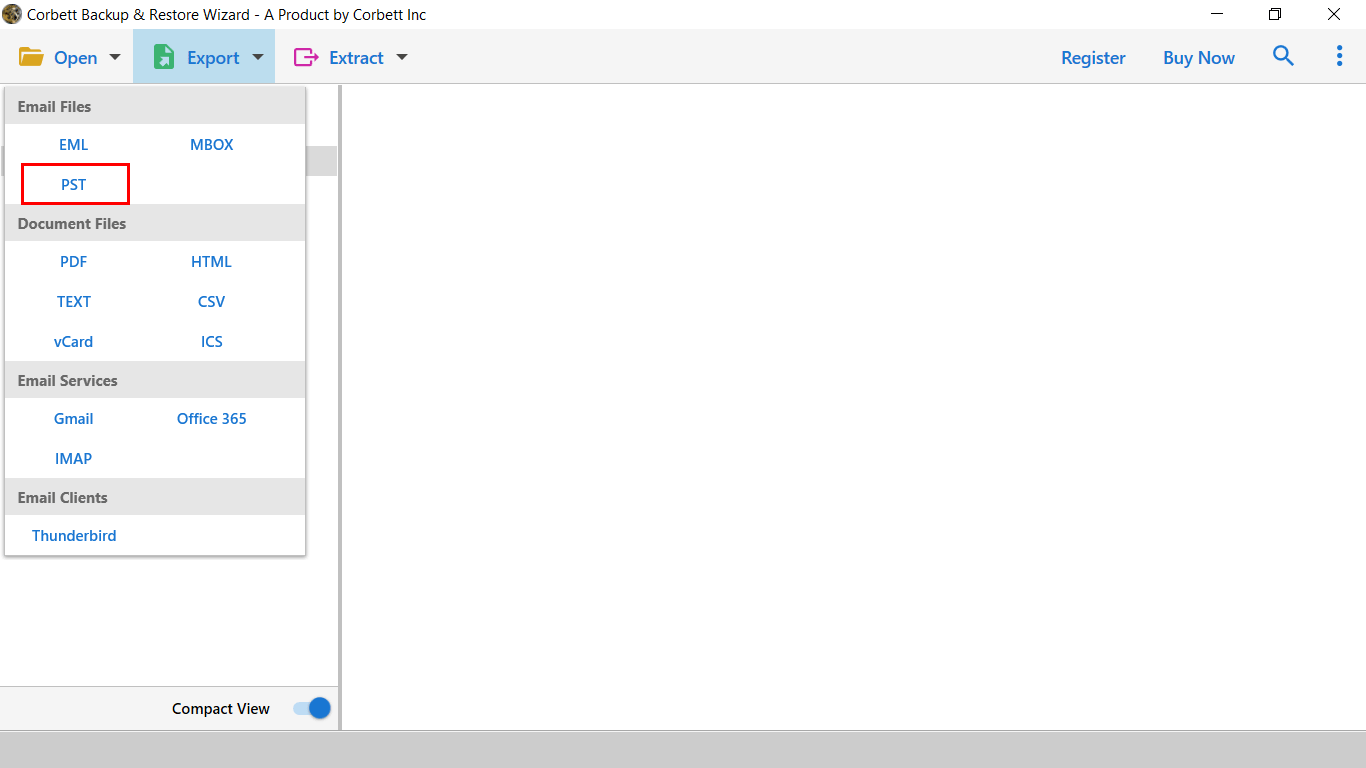
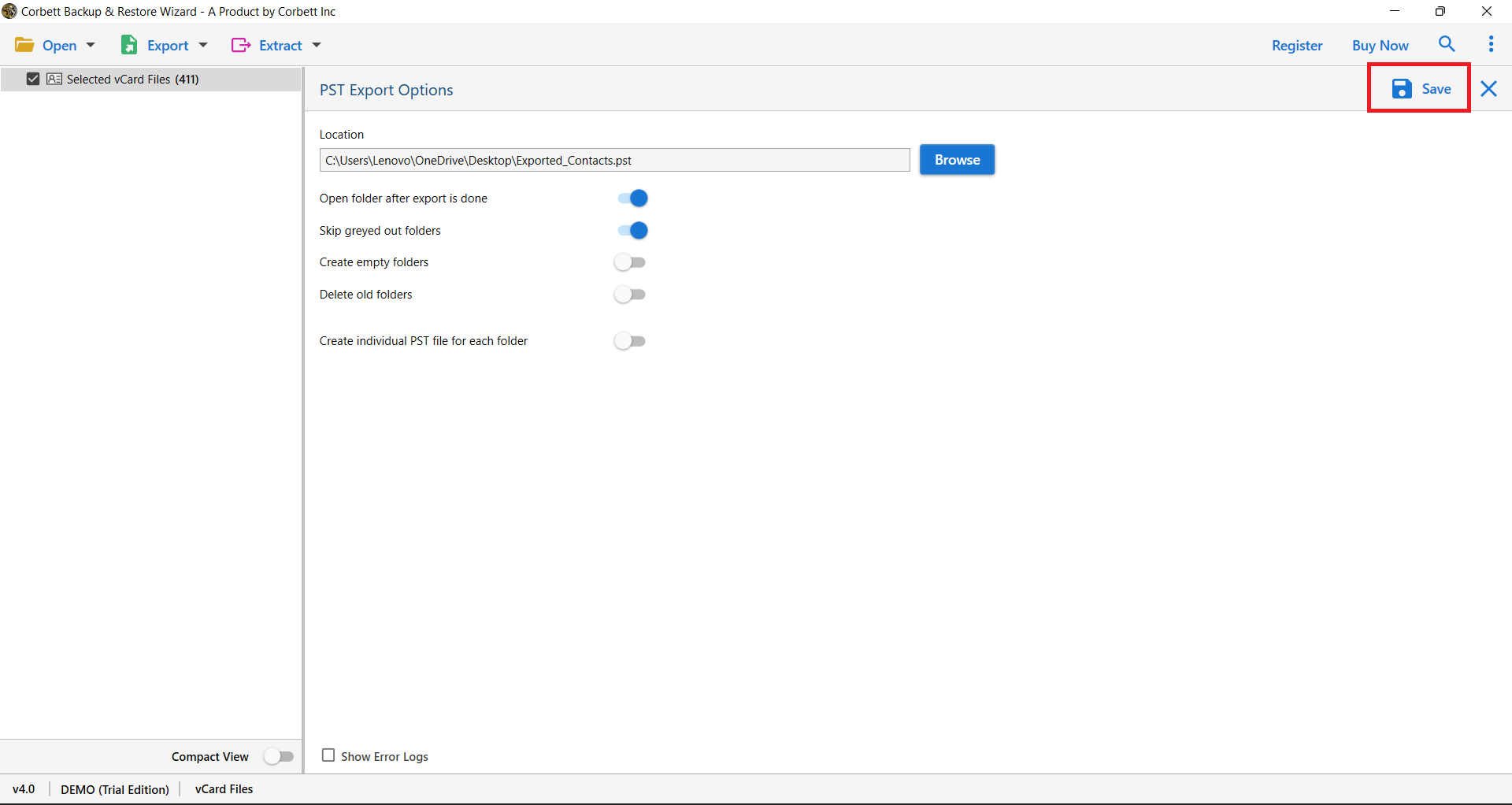
Its product page does not mention Virgin Media or app passwords so enter your app password in its password field and test one folder in free demo first. Mail is copied from your server so your BlueYonder inbox remains as it was. Need Gmail as destination? See how to Move Hostmonster webmail to Gmail with same IMAP idea.
Which way to save BlueYonder mail suits you?
Use PDF for a few messages, Outlook or Thunderbird for one personal mailbox and software for many folders, filters or formats beyond PST.
| Way to save BlueYonder mail | Needs | Formats | Volume | Cost |
|---|---|---|---|---|
| Print to PDF | Browser, webmail login | One message at a time | Free | |
| Outlook or Thunderbird over IMAP | App password, mail application | PST (Outlook), local folders (Thunderbird) | Folder by folder | Free |
| Corbett Webmail Backup Tool | Windows PC, app password | PST, MBOX, EML, MSG, PDF, HTML, CSV, TXT | Batch with filters | Free demo, then from $99 |
That IMAP idea works for other providers. See how to Save Yahoo emails to computer or Download IMAP emails from server.
Why does a BlueYonder email backup fail?
Login is rejected during a BlueYonder backup
Mail applications reject your normal Virgin Media password. Generate an app password and enter it as your password. If you made a new one, update every application, because old ones stop working.
Password reset says your email is not registered
Users reported that error in a Virgin Media thread and a forum team member moved them to private messages. Contact Virgin Media support with your account details.
Your mailbox is gone after you quit Virgin Media
Virgin Media staff confirmed on its Community forum that mailboxes are deleted 90 days after services end. One user reported access at 105 days but others lost it without warning. Save BlueYonder mail before you cancel.
Outlook shows no folders
Check that you chose IMAP, port 993 and SSL/TLS and use classic Outlook for manual setup. Wait for first sync to finish before you export.
Large mailbox stops halfway
Save one folder at a time or start software when your PC is free. Time taken depends on internet speed and mailbox size.
What to do after you save BlueYonder mail?
After you save BlueYonder mail, open a few files with attachments and compare folder counts. Copy your output to USB disk or cloud storage. Retain your Virgin Media service until counts match. Open PST files later in Outlook or see our guide to Open PST file without it.
Our view
Create your app password first, because without it nothing connects. If you are quitting Virgin Media, do not wait: staff say mailboxes go 90 days after service ends. Retain local copies of mail that matters and never rely on IMAP alone as a backup.
Key takeaways
- Create a Virgin Media app password before you save BlueYonder mail.
- IMAP server is
imap.virginmedia.comon port 993 with SSL/TLS. - Virgin Media staff say mailboxes are deleted 90 days after services end.
- In Thunderbird, copy mail to Local Folders, since IMAP mirrors server changes.
- Corbett Webmail Backup Tool saves BlueYonder mail to eight file formats with filters.
Questions About BlueYonder Email Backup
What are BlueYonder IMAP settings?
The server is imap.virginmedia.com on port 993 with SSL/TLS. Outgoing is smtp.virginmedia.com. Use your full BlueYonder address as the login.
Do I need an app password for BlueYonder?
Yes. Mail applications reject your normal password. Generate an app password in My Virgin Media app under Account details.
Is BlueYonder email still in use?
Yes, while you are a Virgin Media customer. Mail is reached through Virgin Media webmail and apps.
How long do I retain BlueYonder email after quitting Virgin Media?
Virgin Media staff say mailboxes are deleted 90 days after services end. Some users kept access longer but it is not safe to rely on.
How do I download BlueYonder emails to my computer?
Create a Virgin Media app password, add your account to Outlook or Thunderbird over IMAP and export or copy folders or use backup software for bulk download.
Can I download BlueYonder emails with attachments?
Yes. Outlook PST export and Corbett Webmail Backup Tool retain attachments inside saved messages.
Will download delete my BlueYonder emails?
No. Backup copies mail. Messages you delete in an IMAP application can still vanish from server so store copies in local folders.
