Quick answer
- Where it shows: "Your Gmail settings are out of date" appears in Windows Mail and Calendar, which Microsoft stopped supporting on 31 December 2024.
- Quick fix: when Gmail account settings are out of date, select Fix account in your Mail app and sign in again. If your app still asks for a password, make a Google app password.
- Old steps are dead: less secure apps access and Gmail's IMAP switch no longer exist, so skip every guide that tells you to turn them on.
You open your Mail app and see "Gmail account settings are out of date", but it never says which setting is wrong. Google now blocks old sign-in methods, and Windows Mail no longer works as it did, so out of date Gmail settings return again and again. Below are five fixes, steps that no longer work and a safe way to keep your mail while Gmail account settings are out of date.
What does Gmail account settings are out of date mean?
When Gmail account settings are out of date, your mail app holds sign-in details that Google no longer accepts. Windows Report says it shows up in Windows Mail or Calendar and links it to a wrong password, security settings that block old apps and glitches in Mail. A Microsoft Community user asked about it in May 2024 and wrote that Windows never said which setting to change. Its most-endorsed answer blamed Google blocking an older sign-in method. Gmail settings out of date errors look alike on every device.
Why do Gmail settings go out of date now?
Three changes made Gmail account settings out of date errors common. They explain why Gmail settings go out of date even when you changed nothing.
- Windows Mail, Calendar and People stopped working on 31 December 2024. Microsoft replaced them with new Outlook for Windows and says users can no longer send or receive mail in those old apps.
- Google ended less secure apps access. Its Workspace update notes say support ended on 1 May 2025 and tell users to move to OAuth, which is "Sign in with Google", or an app password.
- Google removed its IMAP on and off switch for personal accounts in January 2025, according to Corbett's Gmail page, so there is no setting to enable.
Our earlier post told you to turn on less secure app access and enable IMAP under Forwarding and POP/IMAP. Neither step works now.
How to fix Gmail account settings are out of date in Mail?
Use Fix account first when Gmail settings are out of date. These steps follow Windows Report. They apply only while your Mail app still opens, since Microsoft ended support for it.
- Press Windows + S, type Mail and open it.
- Select Fix account in your notification bar at top.
- Enter your Gmail password or complete Google's sign in window when asked, then select Done.
- If Gmail account settings are still out of date, select Settings, then Manage accounts and your Gmail account.
- Select Change mailbox sync settings, turn Email off and select Done, then Save.
- Close Mail, wait a few minutes and reopen it. Select Add account, choose Google and sign in again.
Windows Report also lists less secure app access as a fix. Skip it, since Google ended that switch.
How to fix out of date Gmail settings with an app password?
Create an app password when your app only offers a password box and rejects your normal one. It clears Gmail settings out of date errors in apps without Google sign in. Google says an app password is a 16-digit code for apps that lack "Sign in with Google", and calls app passwords "aren't recommended and are unnecessary in most cases."
- Turn on 2-Step Verification for your Google Account to fix Gmail account settings out of date. App passwords need it.
- Open
myaccount.google.com/apppasswordsand sign in if asked. - Name your app, then select Create. Google shows 16 characters.
- Enter those 16 characters in your mail app instead of your Gmail password, then select Done.
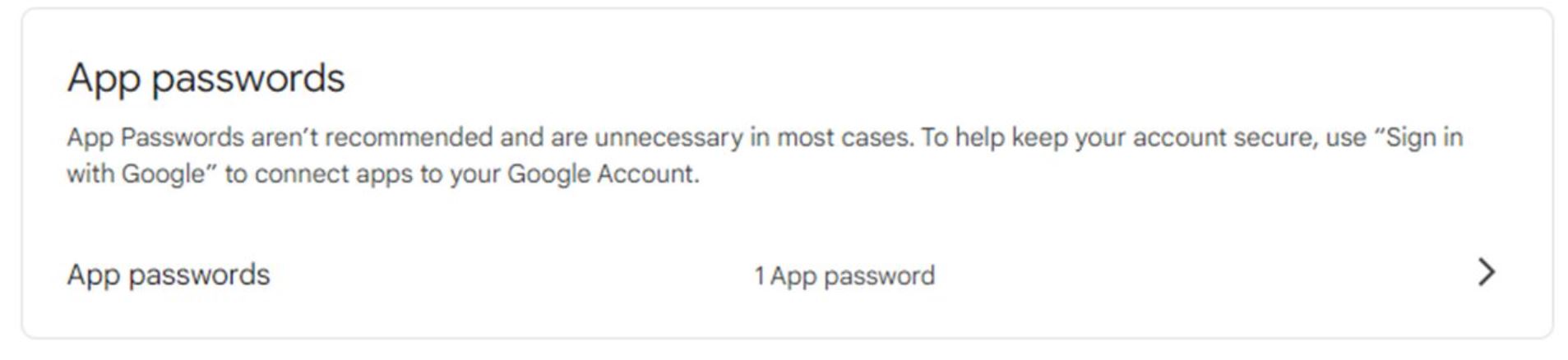
Changing your Google password revokes every app password, so make a new one after that. You will not see that option if your account uses only security keys, belongs to a work or school or has Advanced Protection. iPhones and iPads on iOS 11 or later do not need app passwords, according to Google. If Gmail account settings stay out of date after that, remove your account in your app and add it again with your new password.
How to use Sign in with Google instead?
Move to a mail app that supports OAuth, since it fixes Gmail settings out of date for good. Google's update notes say OAuth is preferred: re-add your account and choose Sign in with Google. For Thunderbird and other clients, they say to add your account again and set up IMAP with OAuth.
- Install new Outlook for Windows, Thunderbird or another client with Google sign in to fix Gmail settings out of date.
- Select Add account and enter your Gmail address. Gmail settings out of date errors end here for good.
- Complete Google's sign in and consent window. Do not paste a password.
- Wait for folders to load. Gmail settings out of date errors should not return. Compare counts with Gmail on web.
Microsoft says IMAP and POP users can hold data stored on their PC, so export events before you leave Windows Mail. If you move mail to Outlook, see how to add Gmail to Outlook.
How to fix Gmail settings out of date on Android or iPhone?
If Gmail settings are out of date on a phone, start with updates. Google's Gmail help says older app versions hold errors that newer ones fix.
- Open Google Play or App Store and install your latest Gmail app. Old versions keep Gmail settings out of date.
- Correct your date and time. Google lists a wrong clock as a cause of connection errors.
- Open your phone settings, select Accounts, then Google and your Gmail account. Turn Sync on for Gmail and select Sync now.
- If you use another mail app on your phone, remove your Gmail account there and add it with Sign in with Google.
How to save Gmail mail before you fix Gmail account settings out of date?
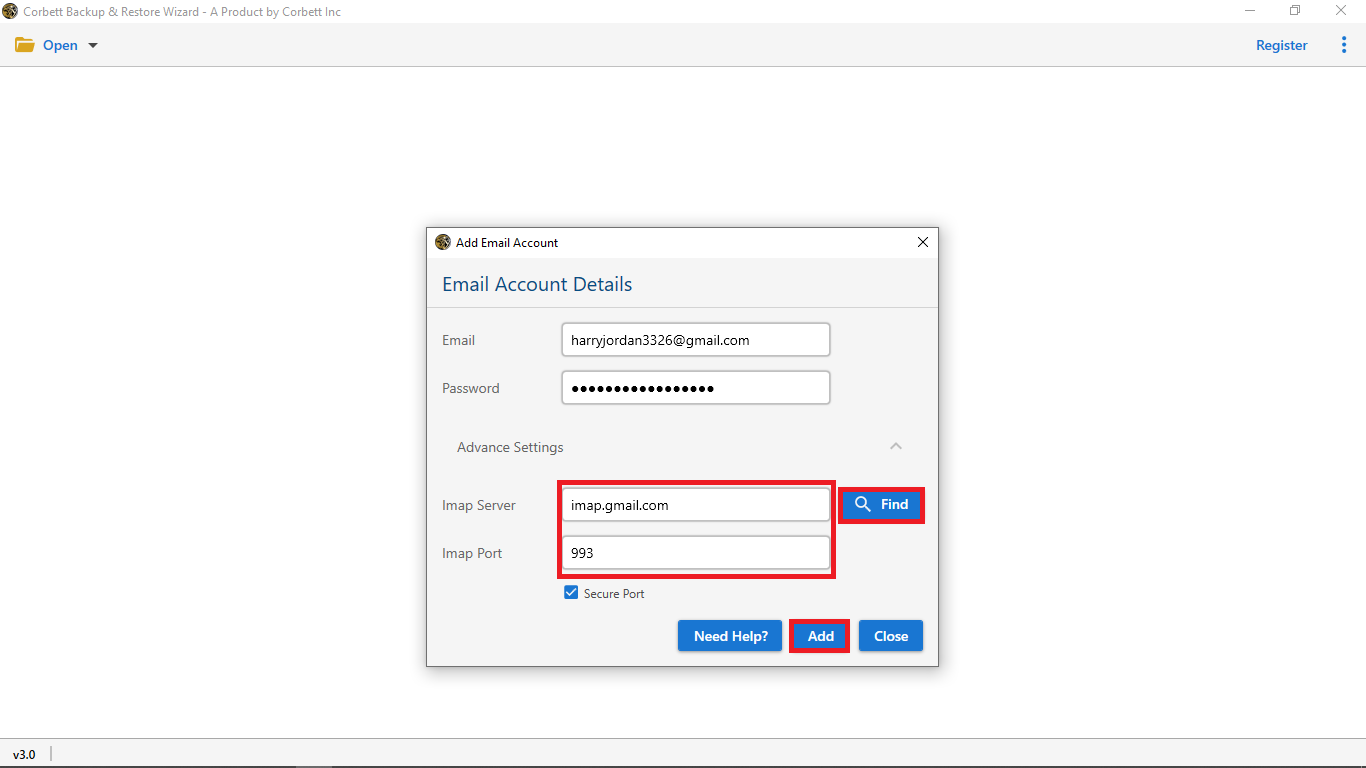
Use Corbett Gmail Backup Tool to keep a copy while your mail app is broken. Its page says it downloads a personal @gmail.com account to Windows as PST, MBOX, EML, MSG, PDF, HTML, CSV or TXT, turns labels into folders and keeps attachments. It connects with a 16 character app password and finds IMAP host itself. It does not need a mail client. Free demo saves 10 emails per folder.
Steps to save Gmail with software
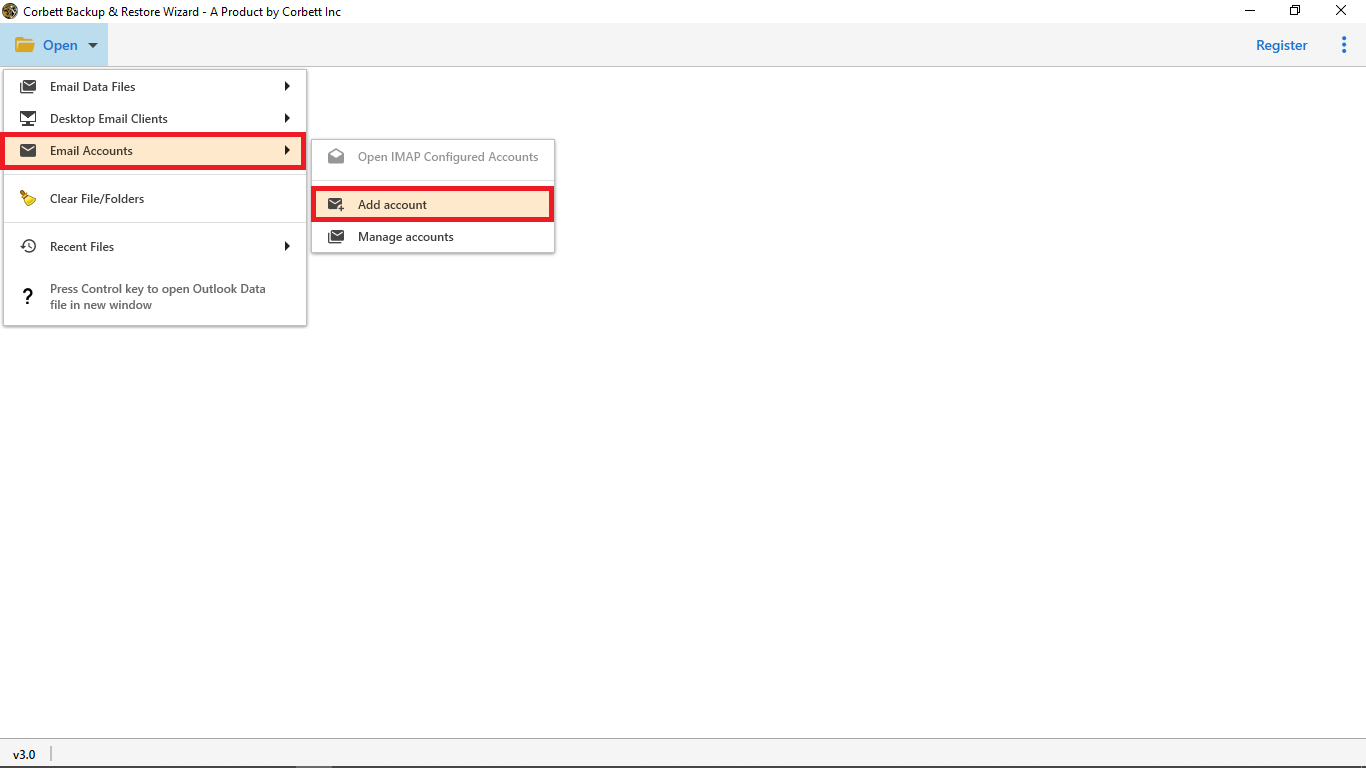
- Install Corbett Gmail Backup Tool on your Windows PC and run it as administrator. Select Open.
- Select Email Account, then Add Account and choose Gmail.
- Enter your Gmail address and paste your 16 character app password.
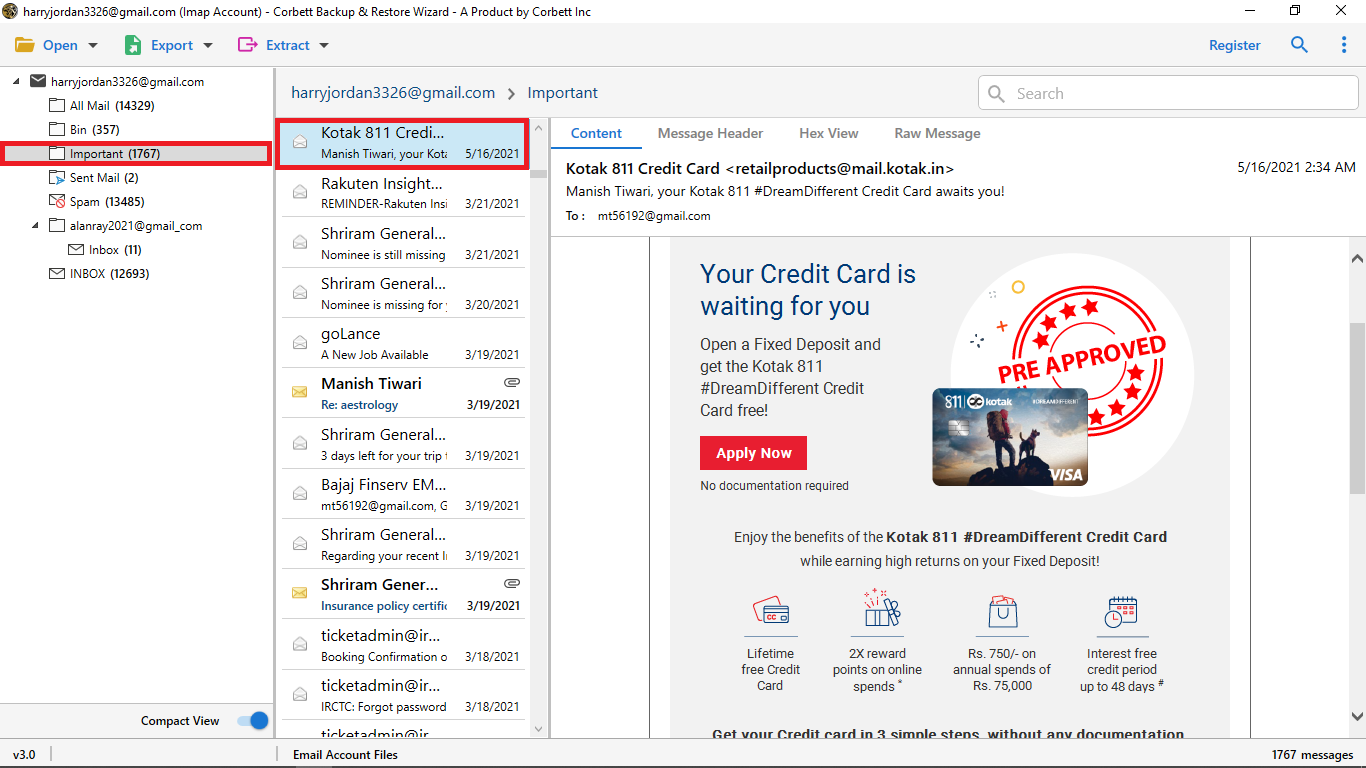
- Preview labels and untick Spam and Trash if you do not need them.
- Set date, sender or attachment filters if you need less mail.
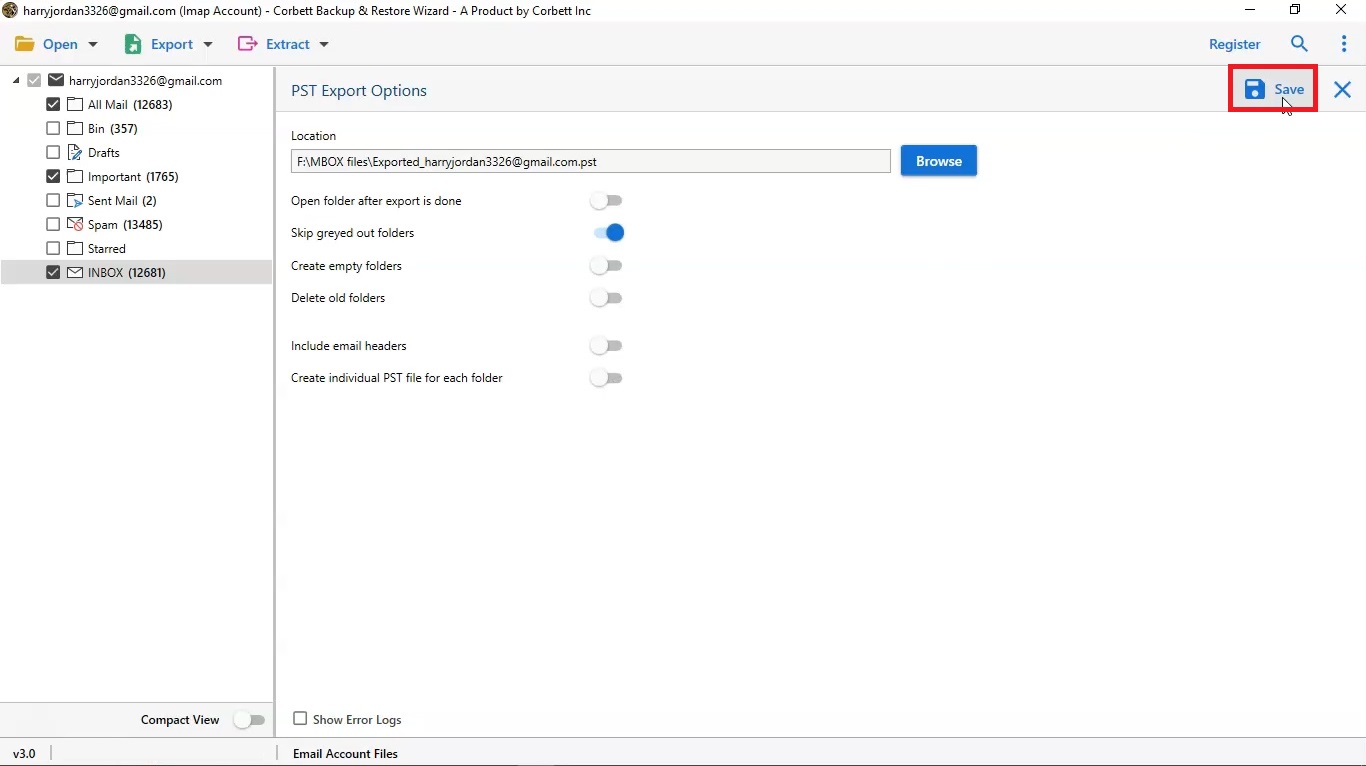
- Select Export, choose PST, MBOX, EML or PDF and set a save location.
- Select Save, then open your files to check counts while Gmail settings stay out of date in your app.
Backing up first protects your mail while Gmail account settings are out of date. Lifetime licence starts at $99 with a 30-day money-back window. Gmail allows 15 mail clients at once, so sign out of old devices if your connection is refused. A work or school address on Google Workspace follows different rules, and an admin controls IMAP there. To sync Gmail into Outlook later, see how to export Gmail contacts too.
Which fix for Gmail account settings out of date is best?
Try Fix account first when Gmail account settings are out of date. Move to Sign in with Google if your app supports it. Use an app password when it only offers a password box.
| Fix for Gmail account settings out of date | Works now | Needs | Best for | Cost |
|---|---|---|---|---|
| Fix account in Mail | Only while Mail opens | Gmail password | Quick retry | Free |
| App password | Yes | 2-Step Verification | Apps without Google sign in | Free |
| Sign in with Google (OAuth) | Yes, preferred | App with OAuth | Long term fix | Free |
| Less secure apps access | No, ended | None | Nothing | None |
| Enable IMAP in Gmail | No, switch removed | None | Nothing | None |
| Corbett Gmail Backup Tool | Yes, for a local copy | Windows PC, app password | Saving mail first | Free demo, then from $99 |
Why do Gmail account settings stay out of date after a fix?
Three causes repeat. You changed your Google password, so every app password stopped working. Your app still holds an old password it saved. Your device clock is wrong. Create a new app password, remove your Gmail account in your app and add it again, then correct your date and time. If Gmail settings stay out of date, move to Sign in with Google.
What to do after you fix Gmail account settings out of date?
Compare counts in your mail app with Gmail on web, and check that Gmail settings out of date errors stay gone after you restart your app. Remove old app passwords you no longer use at myaccount.google.com, so Gmail account settings out of date errors cannot return from stale codes. Keep a local copy of mail, since syncing is not a backup.
Our view
Windows Mail is gone, so fix means app password or a new sign in. We skip less secure apps advice because it no longer works. Save your mail first, then fix.
Key takeaways
- Gmail account settings are out of date errors come from Google blocking old sign-in methods and Windows Mail ending on 31 December 2024.
- Select Fix account first when Gmail settings are out of date, then use an app password or Sign in with Google.
- Less secure apps access and Gmail's IMAP switch are gone, so do not look for them.
- App passwords need 2-Step Verification and stop working after a Google password change.
- Corbett Gmail Backup Tool saves Gmail labels as folders with an app password. Free demo saves 10 emails per folder.
Questions about Gmail account settings out of date
How do I fix Gmail account settings are out of date?
Select Fix account in your Mail app and sign in again to clear Gmail settings out of date. If your app only has a password box, make a Google app password.
Why are my Gmail account settings out of date?
Your mail app holds a sign-in Google no longer accepts, such as an old password or less secure app access.
Does Windows Mail work when Gmail settings are out of date?
No. Microsoft ended support for Windows Mail and Calendar on 31 December 2024. New Outlook for Windows replaces them.
Can I turn on less secure apps to fix Gmail settings out of date?
No. Google ended it, and its notes say Workspace support stopped on 1 May 2025. Use Sign in with Google or an app password.
Where is Enable IMAP in Gmail?
It is gone for personal accounts. Corbett's page says Google removed that switch in January 2025 and IMAP is always on.
How do I create a Gmail app password?
Turn on 2-Step Verification, open myaccount.google.com/apppasswords, name your app and copy your 16 characters.
Why can I not see App passwords in my account?
Google hides it for accounts with security keys only, work or school accounts and Advanced Protection.
Do I lose emails when Gmail account settings are out of date?
No. When Gmail settings are out of date, your mail stays in Gmail. Only your app lost sign in. Save a copy first if you want a safe backup.
How many emails does free demo save?
Demo mode saves 10 emails per folder. Full edition lifts that cap.
Which Windows versions does software need?
Corbett's page lists desktop Windows 7 up to 11 plus Windows Server 2008 to 2025. There is no Mac or Linux build.
