Hotmail Not Working? Here’s How to Fix It

In short: Hotmail is now Outlook.com, so you sign in at outlook.com. If you cannot sign in anywhere, reset your password or verify your identity, since a locked or long-inactive account is the usual cause. If the web works but your mail app keeps asking for the password, that is the real 2026 change: Microsoft switched off Basic Authentication, so apps now need Sign in with Google style OAuth or an app password.
First, Hotmail is now Outlook.com
One fact clears up a lot of confusion. Microsoft retired the Hotmail brand and moved every account to Outlook.com. Your @hotmail.com, @live.com or @msn.com address still works and all your old mail is still there, but you sign in through Outlook.com rather than any Hotmail page. If you want the background, here is the full answer on whether Hotmail is still around. With that settled, the fixes below depend on one thing: where exactly it fails.
Two kinds of Hotmail not working
Before trying fixes at random, work out which problem you actually have, because the two need completely different solutions.
- You cannot sign in anywhere, including at outlook.com in a browser. That points to the account itself: a wrong or forgotten password, a security lock or a deactivated account.
- The web works, but your mail app fails. If outlook.com loads fine yet Outlook, Apple Mail or your phone keeps asking for the password, the account is fine. The problem is authentication, which is new for 2026.
Match your case to one of the two sections below.

Backup and Recovery Specialist, Corbett Software
“Half the Hotmail tickets I see in 2026 are not broken accounts at all. The person signs in fine on the web, but their mail app keeps rejecting the correct password. Microsoft turned off the old password method for apps. Once you switch the account to the Google style sign-in or an app password, it just works.”
Cannot sign in to Hotmail anywhere
If outlook.com itself will not let you in, work through these in order.
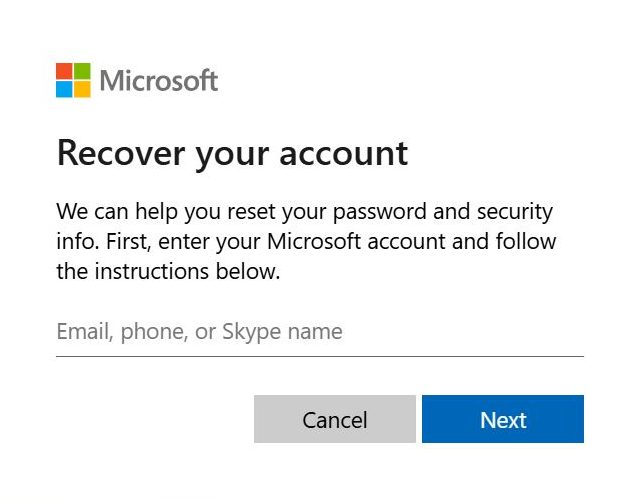
- Reset the password. Open the Microsoft password reset page, enter your Hotmail address, choose a recovery method such as phone or alternate email, enter the code and set a new password.
- Fix two-step verification. If a code never arrives, sign in at account.microsoft.com, open Security then Two-step verification and update your phone or alternate email. If your old phone is gone, turn two-step off and back on with current details.
- Recover a locked account. Unusual activity can lock an account. Verify your identity when prompted. If that fails, complete the Microsoft account recovery form with an alternate email and details such as past passwords.
- Reactivate an inactive account. Microsoft deactivates accounts left unused for about two years. Sign in and follow any Reactivate prompt to restore it.
Important: once an inactive account is deleted, the address and its mail cannot be recovered. If an old account still opens, sign in occasionally to keep it alive, then back it up so a future lockout never costs you the mail.
Signs in on the web but not in your app
This is the most common 2026 problem, yet no older guide explains it. Microsoft switched off Basic Authentication, the old method where an app sends your normal username and password. Rejections began in March 2026 and the method was fully retired by the end of April 2026. So your password can be completely correct and the app still fails with repeat prompts or a message that the server does not support password authentication.
There are two ways to fix it.
Best option, re-add the account as Outlook.com. Modern versions of Outlook, Apple Mail and Thunderbird sign in through Microsoft securely when you choose the Outlook.com account type. Remove the failing account and add it again this way, with no app password needed.
If your app cannot do that, use an app password:
- Turn on two-step verification at account.microsoft.com/security, since app passwords only appear once it is on.
- Open Advanced security options.
- Under App passwords, choose Create a new app password.
- Enter that password in your mail app in place of your normal one.
Hotmail IMAP, POP and SMTP settings
When adding a Hotmail address to any client by hand, use these. The username is your full email address. The password is the app password or the Outlook.com sign-in.
| Setting | Incoming (IMAP) | Outgoing (SMTP) |
|---|---|---|
| Server | outlook.office365.com | smtp-mail.outlook.com |
| Port | 993 | 587 |
| Security | SSL/TLS | STARTTLS |
| Username | full email address | full email address |
| Password | app password or OAuth | app password or OAuth |
Prefer POP3? Use outlook.office365.com on port 995 with SSL for incoming. Keep the same SMTP settings for sending.
Set up Hotmail in Outlook, Apple Mail and Thunderbird
In every case the smooth path is the Outlook.com account type, which uses the secure Microsoft sign-in.
- Outlook. Go to File then Add Account, type the Hotmail address and follow the Microsoft sign-in. It sets IMAP up for you.
- Apple Mail. Open Mail then Add Account, choose Microsoft Exchange or Outlook.com and sign in. Apple Mail uses the secure login by default.
- Thunderbird. Add the account and set the authentication method to OAuth2 for both incoming and outgoing. For the full walkthrough, see how to add Hotmail to Thunderbird.
Is Hotmail down right now?
Sometimes it really is Microsoft, not you. If sign-in fails for everyone and errors appear on every device at once, check the Microsoft 365 service status page or a live outage tracker. During a confirmed outage there is nothing to fix at your end. Wait for Microsoft to resolve it, then sign in again.
Keep a copy of your Hotmail emails
Every fix above restores access, but the deeper lesson is that a free account can be locked, deactivated or lost. A local copy means a future sign-in problem costs you time, not your mail, because your emails already live on your own computer.
The Corbett Hotmail Backup Tool signs in to your account and saves the whole mailbox to your PC as PST, PDF, MBOX or EML, with attachments and folder structure kept. It previews the mail first, filters by date or sender, then a free demo edition runs on every edition of Windows.
Frequently asked questions
Why am I unable to access my Hotmail account?
Hotmail is now Outlook.com, so sign in at outlook.com. If that fails, the usual causes are a forgotten password, an unverified two-step code, a security lock from unusual activity or a deactivated account after long inactivity.
Why does my Hotmail work on the web but not in my mail app?
Because Microsoft switched off Basic Authentication in 2026. Your normal password no longer works in apps. Re-add the account using the Outlook.com type. If that is not offered, generate an app password after turning on two-step verification.
How do I reset my Hotmail password?
Open the Microsoft password reset page, enter your Hotmail address, choose a recovery method like phone or alternate email, enter the code and set a new password. Sign in to Outlook.com right after.
Will my Hotmail emails be deleted if the account is deactivated?
Yes. Microsoft deactivates accounts left unused for about two years and eventually removes the mail. Reactivating during the grace period restores access, but data lost after deletion cannot be recovered without a backup.
What are the correct Hotmail server settings?
Incoming is outlook.office365.com on port 993 with SSL (or POP on 995). Outgoing is smtp-mail.outlook.com on port 587 with STARTTLS. The username is your full address with an app password or the Outlook.com sign-in.
Can I still get my Hotmail email if I cannot sign in on the web?
If the lock is only on the web, the address can still work in a mail app set up with the settings above. If the account itself is locked or deactivated, recover it first, then a backup keeps a copy for next time.