Quick Answer
Import MBOX to Zimbra in 2 ways. Use Thunderbird or MBOX converter software.
Thunderbird suits a small file and needs Zimbra IMAP turned on. Software suits large files and filters. Zimbra Import/Export takes TGZ files only.
Test one folder first.
You want to import MBOX to Zimbra Mail but Zimbra has no button to upload MBOX files to Zimbra directly. A MBOX file retains a full folder as one long text file and Zimbra's web client does not open that layout. Below are three ways to upload MBOX files to Zimbra, settings you need and fixes for common errors.
Can Zimbra import MBOX files directly?
No. Zimbra's web client cannot upload MBOX files to Zimbra on its own. Zimbra's Import / Export screen lists TGZ, CSV and ICS as importable files in Preferences, then Import / Export. A University of Oxford page adds that screen can take EML files or an archive of many emails. Neither page names MBOX.
That leaves two paths to upload MBOX files to Zimbra: a mail application that talks to Zimbra over IMAP or software that reads MBOX files and uploads mail to an IMAP account. That guide also says Synacor stopped supporting Zimbra OSE in December 2023 so check your Zimbra version before you upload MBOX files to Zimbra.
What do you need before the upload?
To upload MBOX files to Zimbra, you need your MBOX file, a Zimbra login with IMAP switched on and enough mailbox quota. Oxford's page warns that you may not have enough quota for a large archive so check space first.
- Your MBOX file. Thunderbird retains one without a file extension and a Google Takeout file ends in
.mbox. - Your Zimbra address, password and server name from your admin or host.
- IMAP access. Zimbra uses IMAP on port 143 and encrypted IMAPS on port 993.
- A backup copy of your MBOX file before you upload MBOX files to Zimbra.
If sign in fails, ask your admin to switch on IMAP for your account or class of service. Check Zimbra's firewall port list if a firewall blocks sign in.
How to import MBOX to Zimbra with Thunderbird?
Add your MBOX file into Thunderbird Local Folders, add Zimbra over IMAP, then drag folders across. It can upload MBOX files to Zimbra for free when a file is small. Old guides say to use Thunderbird's open from file option but that opens one saved message only.
- To upload MBOX files to Zimbra, install Thunderbird. Add ImportExportTools NG from Add-ons and Themes.
- Right-click a folder under Local Folders, select ImportExportTools NG, then Import mbox file.
- Choose to import one or more mbox files directly and select your MBOX file.
- Open Account Settings, select Account Actions, then Add Mail Account.
- Enter your Zimbra name, address and password. Select IMAP and enter your Zimbra server, port 993 and SSL/TLS. Then connect.
- Let Zimbra folders finish syncing. Create a folder in your Zimbra account to store your MBOX mail.
- Select messages in your Local Folders copy, then drag them to that Zimbra folder to upload MBOX files to Zimbra.
- Open Zimbra on web and check counts before you import another MBOX file to Zimbra Mail.
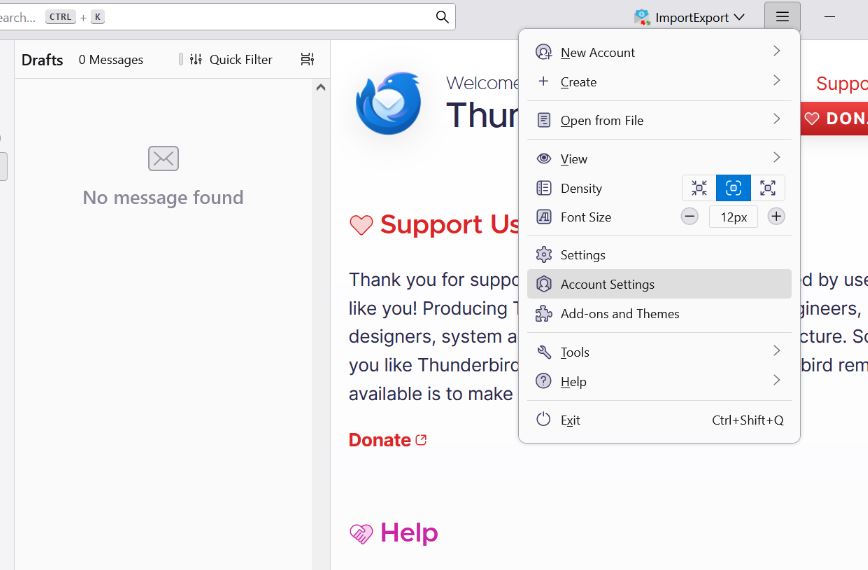
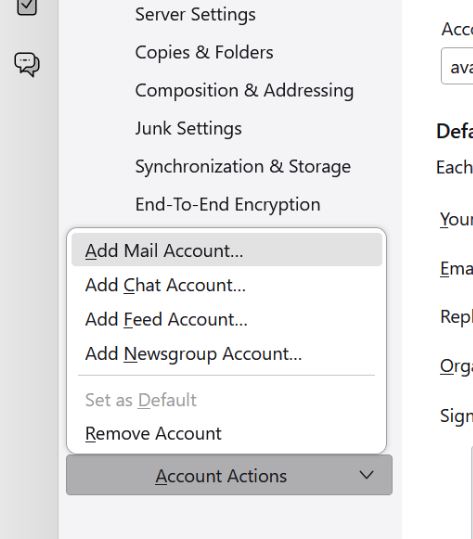
A University of Michigan guide uses same add-on steps and says to import big files one at a time, since they take minutes. A Mozilla Support thread shows another route: close Thunderbird, copy an extensionless mbox file and any matching .sbd folder into your Local Folders directory under Mail, then restart. In that thread one user imported a file and got one message only. A helper told them to check original file size first. Menu names differ by version so test one small MBOX file first.
How to upload MBOX files to Zimbra with software?
Use Corbett MBOX Converter to upload MBOX files to Zimbra in batch. Its page says it opens MBOX, MBX and MBS files from any application, retains folders, attachments and headers. It uploads mail to Gmail, Microsoft 365, Yahoo or any IMAP account. Zimbra accepts IMAP logins but that page does not name Zimbra so test one file on your demo. Filters select mail by date, sender, subject, attachments or size. Files are converted on your PC and never go to Corbett. It works on Windows 11, 10, 8.1, 8 and 7. Free demo converts 10 emails per folder.
Steps to upload MBOX files to Zimbra with software
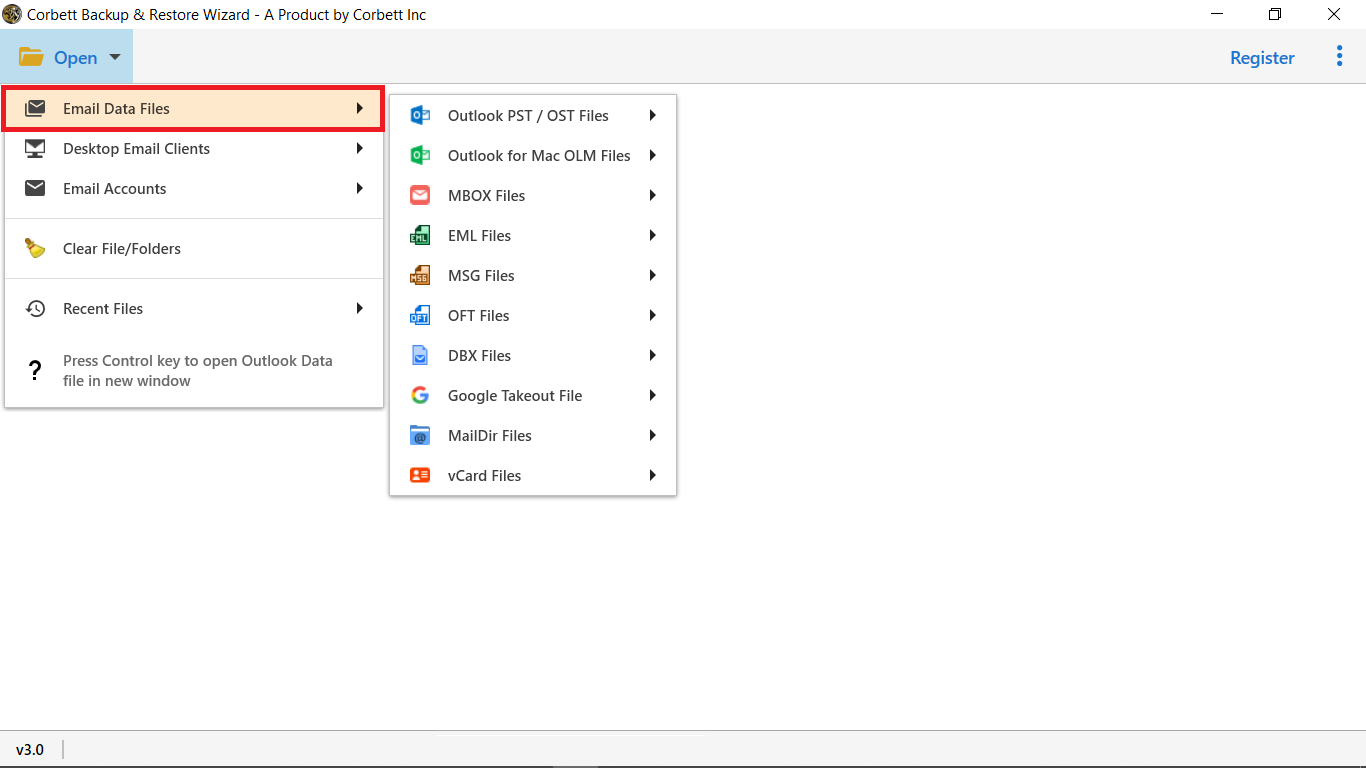
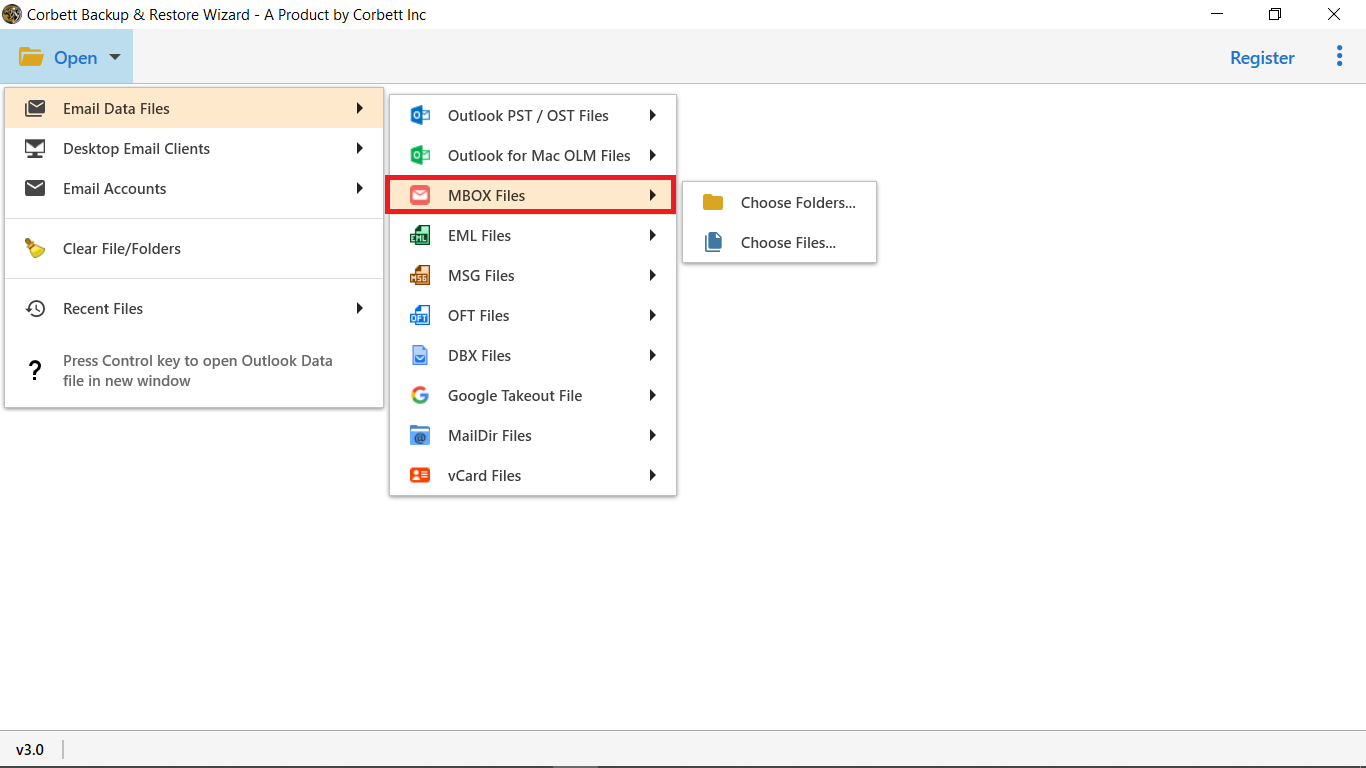
- To upload MBOX files to Zimbra, install Corbett MBOX Converter on your Windows PC and open it with Run as administrator. Select Open, then Email Data Files.
- Select MBOX, then Choose Files or Choose Folder.
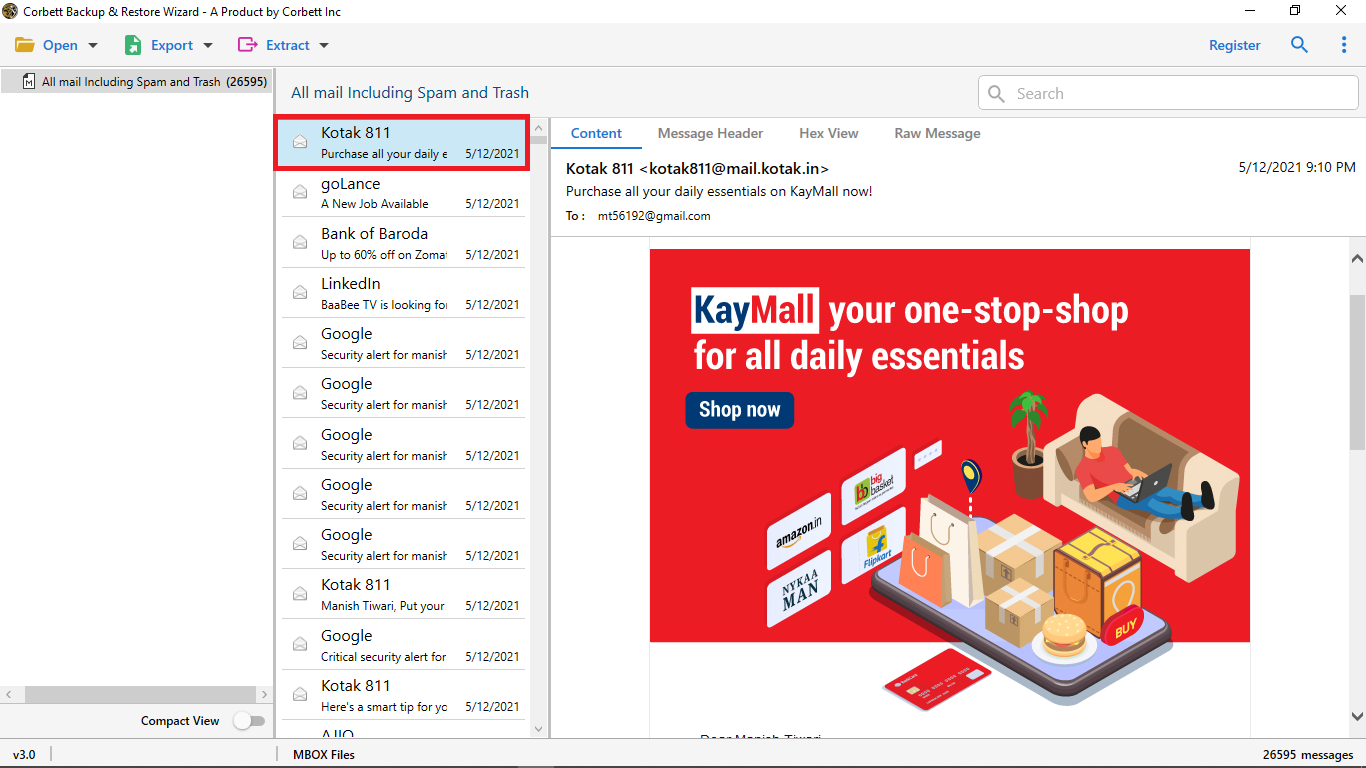
- Locate your file and open it. Your folders appear in a tree with message counts.
- Untick folders you do not need and preview messages in four tabs: Content, Message Header, Properties and Hex and raw.
- Set start and end dates, sender, subject, attachment or size filters if you need less mail.
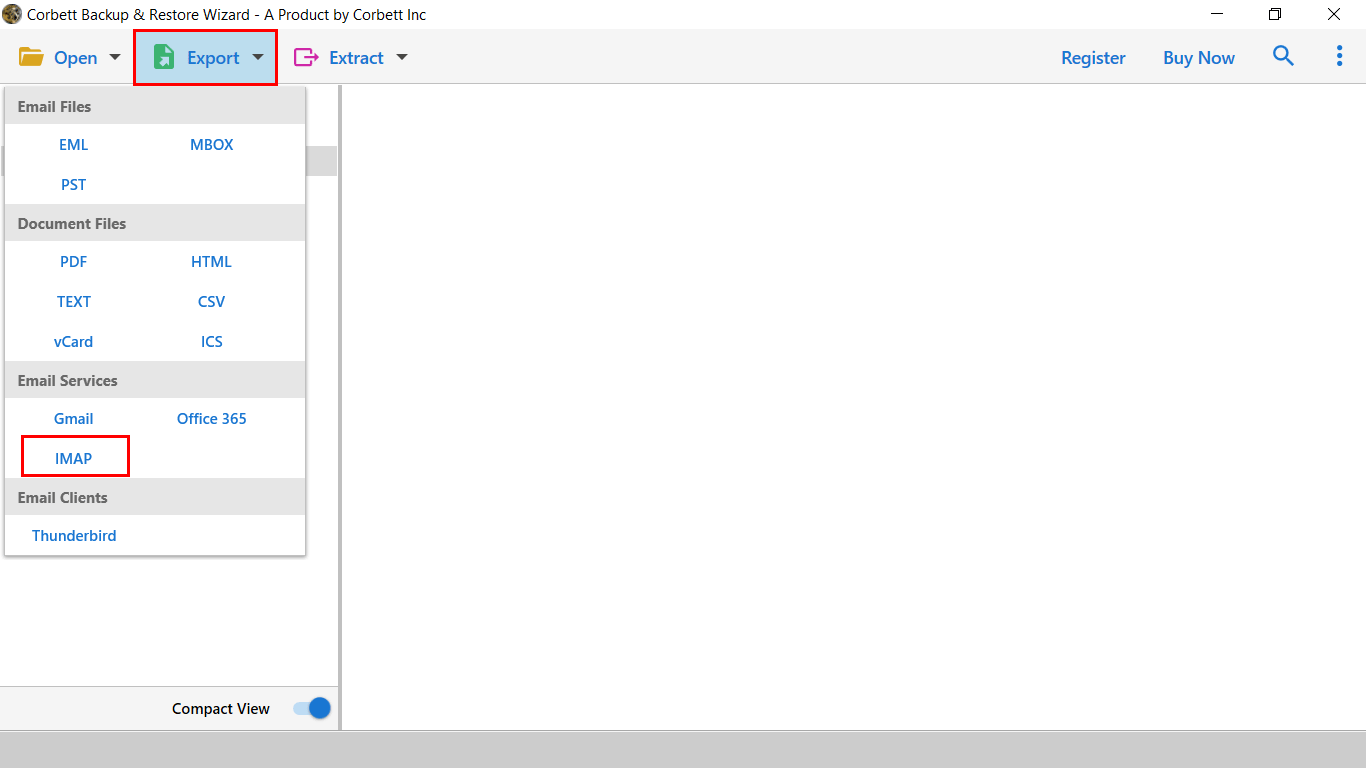
- Select Export, then choose IMAP.
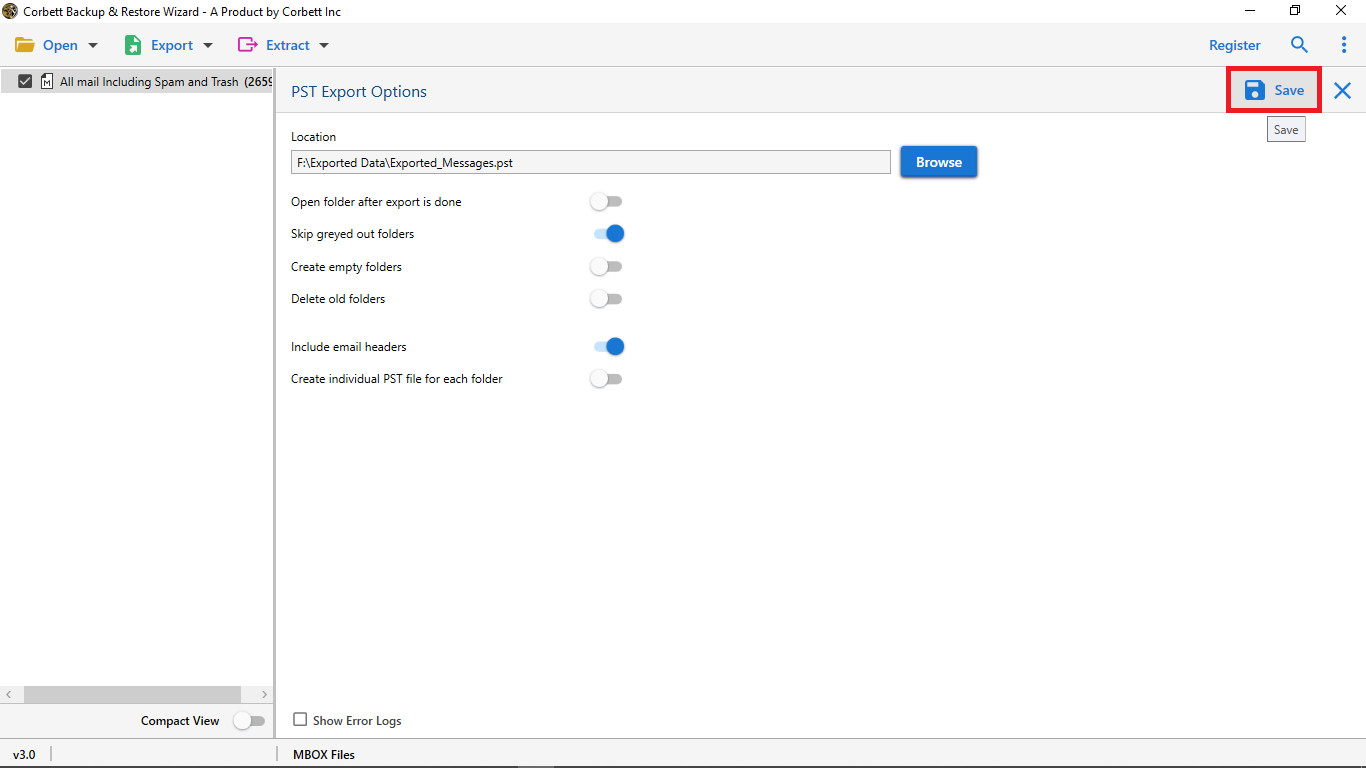
- Enter your Zimbra server, address and password, then select Save to upload MBOX files to Zimbra.
- Open Zimbra on web and compare folders and counts. Repeat to upload MBOX files to Zimbra from other folders.
Lifetime licence starts at $99 with a 30-day money-back window. Check an Apple Mail export before opening it: copy its full package and open its inner mbox file. To view old MBOX mail without moving it, see how to Import MBOX to Thunderbird account. To move a Zimbra mailbox out instead, use Corbett Zimbra TGZ Converter.
Which way to upload MBOX files suits you?
For one small file, use Thunderbird to upload MBOX files to Zimbra. For many files or filters, use software to upload MBOX files to Zimbra in batch. Zimbra's own Import / Export screen is for TGZ archives.
| Way to upload MBOX files | Opens MBOX | Needs | Filters | Cost |
|---|---|---|---|---|
| Zimbra Import / Export | No, TGZ, CSV and ICS | Zimbra web client | Data types only | Included |
| Thunderbird over IMAP | Yes, one file at a time | Thunderbird, ImportExportTools NG, IMAP on | No | Free |
| Corbett MBOX Converter | Yes, batch of files or folders | Windows PC, IMAP login | Date, sender, subject, attachments, size | Free demo, then from $99 |
Need MBOX mail in Outlook instead? See how to Import MBOX to Outlook. Moving Zimbra mail out? See how to Import Zimbra TGZ to Thunderbird.
Why does an MBOX upload to Zimbra fail?
Zimbra will not take MBOX in Import / Export
That screen takes TGZ, CSV and ICS files. Use Thunderbird over IMAP or software to upload MBOX files to Zimbra instead.
Thunderbird cannot connect over Zimbra IMAP
Check your server name, port 993 with SSL/TLS and full address. A Zimbra forum user in September 2022 could not switch on IMAP or POP options in a default class of service and got an attribute error. A moderator said those options should be on by default and that thread shows no fix so ask your admin to check your class of service.
Import shows one message only
Check size of your original mbox file. A Mozilla Support helper said a file with hundreds of messages cannot be 600 KB so that exported copy was bad. Copy an intact file with its .sbd folder instead.
Mailbox quota fills up
Oxford's page warns that a large archive may not fit your quota. Filter by date, import in parts or ask your admin for more space.
Folders look empty in Zimbra
Wait for uploads to finish, then check Zimbra on web. A mail application may show folders before messages arrive. Compare counts folder by folder.
What to do after the upload?
Retain your MBOX file until counts match, then upload MBOX files to Zimbra again for files you ignored. Check dates, attachments and folder names in a few messages. Remove duplicates if you ran an import twice. If you plan to move mail out again later, export a TGZ from Preferences, Import / Export as a second backup.
Our view
Zimbra's web client takes no MBOX so every route here goes through IMAP. Thunderbird is free and fits one file. Software fits big batches. Ask your admin to enable IMAP first.
Key takeaways
- Zimbra's Import / Export screen takes TGZ, CSV and ICS so it cannot upload MBOX files to Zimbra directly.
- Thunderbird can upload MBOX files to Zimbra over IMAP when files are small and software can upload MBOX files to Zimbra in batch.
- Thunderbird's open from file option opens one message, not a MBOX file.
- Check mailbox quota and IMAP access before you upload MBOX files to Zimbra.
- Corbett MBOX Converter can upload MBOX files to an IMAP account, retain folders and attachments and filter by date, sender or subject. Free demo converts 10 emails per folder.
Questions About MBOX Files in Zimbra
Can Zimbra import MBOX to Zimbra Mail directly?
No. Zimbra's Import / Export screen takes TGZ, CSV and ICS files.
How do I import emails into Zimbra from a TGZ file?
Open Preferences, select Import / Export, choose your TGZ file, set a destination folder and select Import.
Which ports do Zimbra IMAP settings use?
Port 143 serves IMAP and port 993 serves encrypted IMAPS.
Why does Thunderbird import only one message from my mbox file?
Your file may be damaged or small. Check its original size and copy an intact file with its folder.
How do I import MBOX to Zimbra?
To upload MBOX files to Zimbra, add your MBOX file to Thunderbird, add Zimbra over IMAP and drag folders across or use Corbett MBOX Converter to upload MBOX files to Zimbra in batch.
Can I import MBOX to Zimbra without software?
Yes. To upload MBOX files to Zimbra, use Thunderbird with ImportExportTools NG, add your Zimbra account over IMAP and drag folders across.
Can Corbett MBOX Converter upload MBOX files to Zimbra?
Its page lists any IMAP account as target and does not name Zimbra. Test one file on your demo to upload MBOX files to Zimbra.
