How to Transfer Yahoo Mail to Gmail – Tips To Migrate
Are you struggling with Yahoo Mail, or do you want to transfer Yahoo Mail to Gmail? Throughout this article, we will go through solutions that will help you migrate Yahoo Mail to Gmail account. We will cover all possible manual methods and an automated tool to import Yahoo email to Gmail. Let us move forward by knowing some reasons.
There are various reasons why users want to transfer Yahoo mail to Gmail accounts. Sometimes, using Yahoo Mail can be slow and take time to synchronize your email files. Not only this, but it also shows inappropriate ads that have no relevance at all. All such drawbacks and limited features of Yahoo Mail led users to switch their mailing platforms.
Still, Yahoo Mail has not come up with advanced features like cloud storage, apps, documents, etc., which are commonly available to all email clients. If you also got tired of the slow functionality of Yahoo Mail, keep continuing with the blog. In the upcoming section of the blog, we will look at the perfect solution to migrate Yahoo Mail to Gmail account.
People are attracted to the Gmail application due to its various advanced features. The procedure to transfer Yahoo Mail to Gmail is straightforward. Also, users will get multiple free services with a Gmail account, which include Google Drive, Google Docs, Sheets, Slides, etc. While Yahoo Mail does not provide all those features, that may be the reason why users are looking for a way to transfer Yahoo Mail to Gmail.
Quick Answer: How to Transfer Yahoo Mail to Gmail
To transfer Yahoo Mail to Gmail, generate a Yahoo app password, enable IMAP in Gmail, then either drag and drop messages between configured Outlook or Thunderbird accounts or use the Corbett Yahoo Mail Migration Tool for direct bulk transfer. The automated route preserves folder structure, attachments and headers and supports filters for date, subject and sender so the move stays selective and complete.
Transfer Yahoo Mail to Gmail Manually
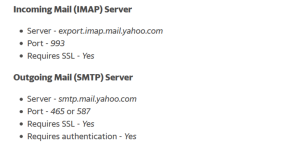
- Connect/Configure your Yahoo Mail account to a preferred email client using the settings provided below. [If you are using a Yahoo account key, then generate an app password and then use it as your account password.]

- Afterward, connect Gmail to the app as well. Before you do that, ensure enabling IMAP in Gmail first.
- Finally, drag and drop your email messages from Yahoo to Gmail.
You’re done with migrating your email messages from Yahoo Mail to Gmail with a manual approach. Unfortunately, this manual approach also possesses certain limitations that make it a quite risky choice for users. So, let’s take a look at these limitations.
Drawbacks of the Manual Approach
- You must keep your computer turned on throughout the entire migration process.
- To save a temporary copy of your Yahoo email archive, the desktop email app will need an ample amount of hard drive storage. Therefore, ensure you have enough storage before you start.
- Depending on the size of your data, the process might take you days or even weeks to complete. Due to this, the manual procedure is not recomended for accounts with over 10,000 items and/or 10GBs of used storage, however, even smaller accounts usually take several days for the entire migration process.
As you see both the above-shared manual approaches come with certain limitations that make them unappealing choices for users. Therefore, we have also brought you an expert-recommendation in the following segment of the article.
Expert Solution to Migrate Yahoo Mail to Gmail Account
Corbett provides a professional and reliable automated solution i.e., Yahoo Mail Migration Tool. It is the most preferred solution to accomplish the process. It allows to transfer all the data files without any hassle. Also, it provides multiple benefits during the data migration process.
Also, a video solution is available to assist users through the procedure to transfer Yahoo Mail folder to Gmail accounts. Users can easily watch the video to get detailed working of the software.
Steps to Transfer Yahoo Mail to Gmail Account
- Download & Run this software on your computer.

- Now, click on Email Account and then Add Account.
- After that, provide your Yahoo Mail account credentials.

- Then, preview the Mailbox data.

- Now, click on the Export button and select “Gmail” to transfer Yahoo mail to Gmail account.
- Users can apply the data filters as per requirement and click on the “Save” button.


So, this was the hassle-free tutorial on how to transfer Yahoo Mail to Gmail account. Furthermore, we have also shared some of the prominent astonishing features of this software in the following segment as well.
Prime Features of Automated Solution
- It allows you to batch transfer Yahoo Mail to Gmail account.
- Autofill account Port Number and Port Server.
- Filter Yahoo Mail messages by date, subject, To/From, etc.
- Migrate Yahoo Mail to Gmail with all data properties.
- Convert into various file formats like PDF, CSV, HTML, Text, etc.
So There You Have It
In the above blog, we have discussed the procedure to transfer Yahoo mail to Gmail account manually and using the best-automated procedure. The manual procedure to add Yahoo Mail to Gmail account is lengthy and time-consuming. So, we recommend you go with the automated solution that offers a safe and secure platform for good.
Similar Reads:
Frequently Asked Questions
1. Can I transfer Yahoo Mail to Gmail without losing emails?
Yes. Use a tool like Corbett Yahoo Mail Migration that copies messages over IMAP and preserves folder hierarchy, sent items and attachments. The original mail stays in Yahoo so the transfer is non destructive.
2. Do I need a Yahoo app password to migrate emails to Gmail?
Yes. Yahoo blocks third party clients from using the regular password, so generate an app specific password from Yahoo Account Security. The migration tool or email client uses this password during sign in.
3. How long does it take to move Yahoo emails to Gmail?
Speed depends on mailbox size, network bandwidth and Gmail rate limits. A 5 GB mailbox usually moves in two to four hours through an automated tool while the manual drag and drop route on a desktop client may stretch over a day.
4. Will labels and folders carry over from Yahoo to Gmail?
The Corbett tool maps Yahoo folders to Gmail labels so the structure is rebuilt on the Gmail side. Read and unread flags, dates and senders remain identical to the source mailbox after the transfer finishes.
5. Can I migrate selected Yahoo emails instead of the whole mailbox?
Yes. The tool offers date range, subject keyword and sender or recipient filters. You can pull only mails from a specific year or from one client and leave the rest untouched in Yahoo.
6. Is the Yahoo to Gmail migration safe and secure?
The tool uses an encrypted IMAP connection and runs locally on your computer. Credentials are not stored on any server and the transfer mirrors data without modifying the source Yahoo mailbox at any step.
7. Do I need to keep my computer running during the migration?
For manual drag and drop the desktop client must stay on for the full duration. Automated tools can resume after a pause but it is best to keep the computer awake until the entire transfer log shows complete.