
Quick answer
- Server first: Roundcube is only a web window. Your mail sits on your host's IMAP server, so copy server name and port from cPanel or Plesk. There is no
imap.roundcube.com. - Free ways: add that IMAP account to Thunderbird and drag folders to Local Folders, or download EML files from Roundcube mail and import them into a Local Folders subfolder.
- Bulk: Corbett Webmail Backup Tool downloads a Roundcube mailbox over IMAP to MBOX for Thunderbird, EML, PST and more, with filters.
You want to export Roundcube emails to Thunderbird, and many guides send you to a server that does not exist. Roundcube is webmail software that your host installs. It does not store your mail or give you its own mail server. Below are three ways to export Roundcube emails to Thunderbird, with real server settings and limits for every one.
How to find server settings before you export Roundcube emails to Thunderbird?
Ask your host for your IMAP server, port and login. In cPanel, open Email Accounts, then Connect Devices beside your address. Plesk shows same values under Mail, then your account.
- Log in to cPanel or Plesk with your hosting account.
- Open Email Accounts in cPanel, then select Connect Devices next to your address.
- Copy secure IMAP server name and port. Port 993 with SSL is common.
- Note your full email address as username and your mailbox password.
Your server name looks like mail.yourdomain.com or the host name in your panel. Use values from your own panel, never a made-up name. Corbett's Webmail Backup Tool page lists same panel locations. Webmail clients such as Roundcube, Horde and SquirrelMail all open one IMAP mailbox on server, so setup does not change when your host switches skin or client.
How to export Roundcube emails to Thunderbird over IMAP?
Add your Roundcube mailbox to Thunderbird with your host's IMAP settings. Folders sync, then you copy them into Local Folders for a safe offline copy. It costs nothing and needs no extra tools.
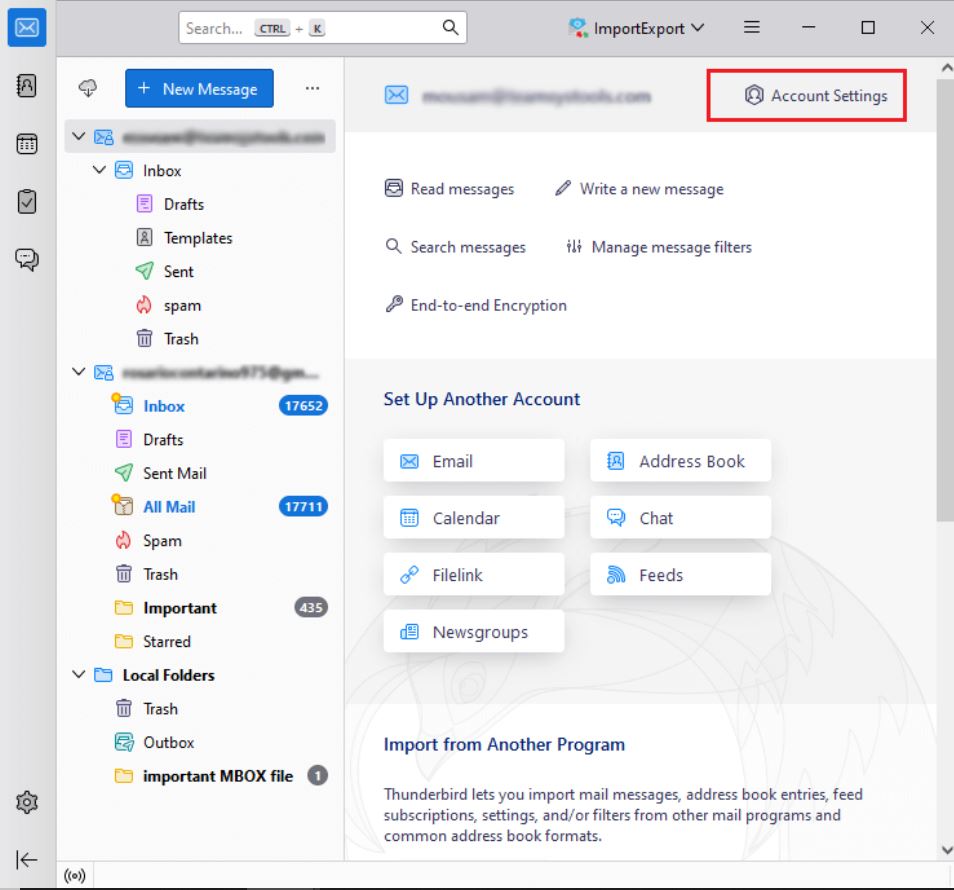
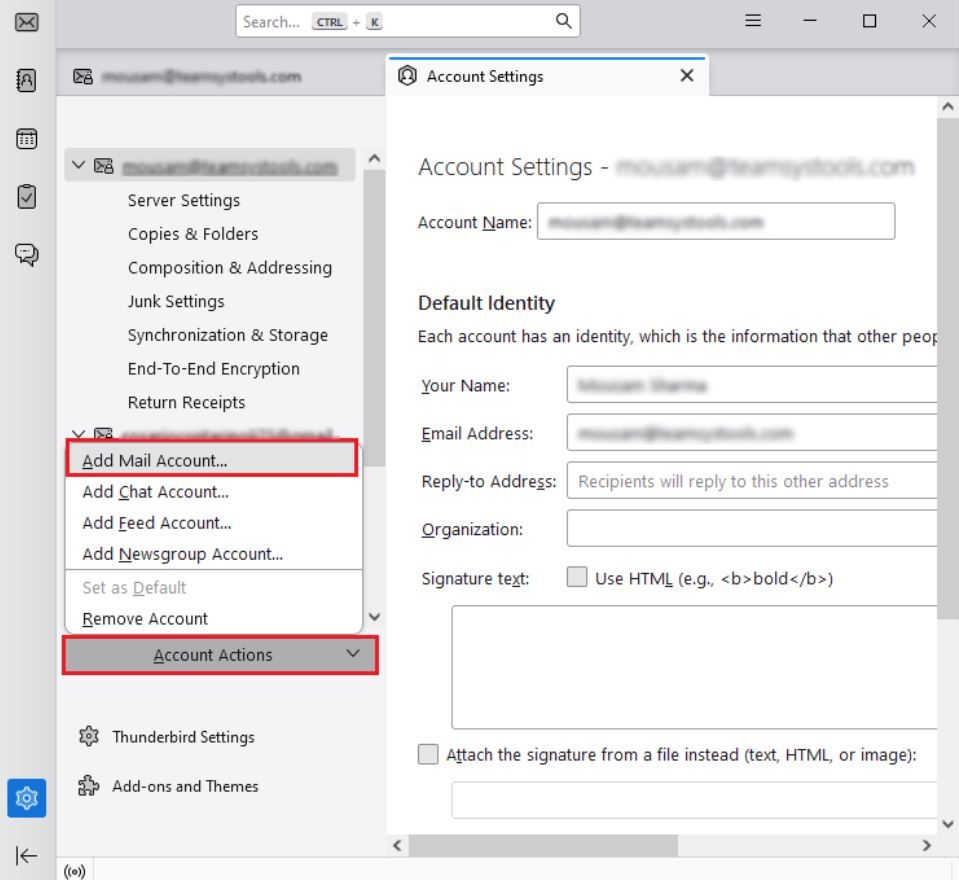
- Open Thunderbird and select Account Settings, then Account Actions and Add Mail Account.
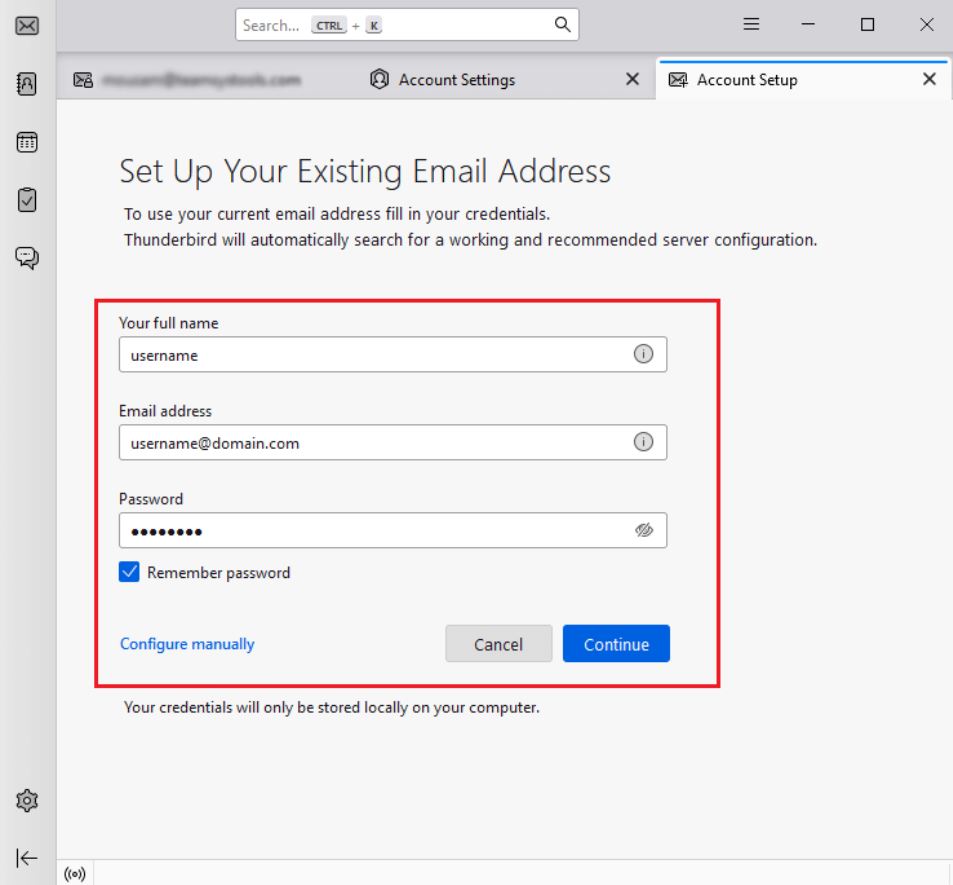
- Enter your name, email address and password, then select Configure manually.
- Set incoming server to IMAP with host name from your panel, port 993 and SSL/TLS.
- Set your outgoing server from same panel page. Port 465 with SSL/TLS or 587 with STARTTLS are common.
- Select Re-test, then Done. Wait for folders to sync.
- Select folders, right-click and copy them to Local Folders.
That last step matters, because IMAP mirrors your server. A message you delete in Thunderbird can vanish from your host too, so keep copies in Local Folders. Our guide on how to download IMAP emails from server covers sync settings for large folders.
Catch: a large Roundcube mailbox takes hours, IMAP must be on for your account and folders still depend on your server unless you copy them.
How to export Roundcube emails to Thunderbird as EML files?
Download Roundcube emails as EML, then import them into a Local Folders subfolder in Thunderbird. Use it for a few folders or when IMAP access is blocked.
- Log in to Roundcube and select a message. For many messages, hold Ctrl or Shift while you click.
- Select More (three dots) and choose Download (.eml). Many messages arrive as a ZIP file.
- To save a folder, select gear icon in folder list footer and choose Download folder.
- Unzip files into a folder on your PC.
- In Thunderbird, create a subfolder under Local Folders.
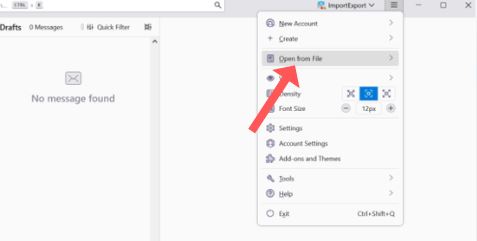
- Drag EML files from File Explorer into that subfolder. Install ImportExportTools NG for big batches, right-click your subfolder and import EML messages.
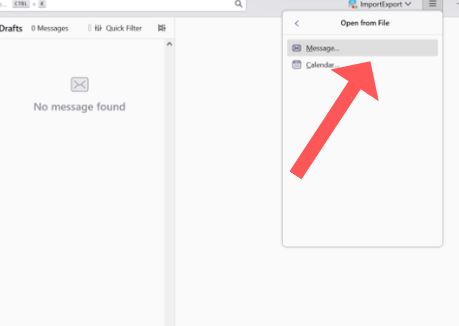
Bluehost documents how to download emails from Roundcube as EML and ZIP. Folder download is not in every version. A user asked cPanel in August 2023 how to export an entire Roundcube folder, and a cPanel support post shows a case opened and a workaround through Roundcube's zipdownload plugin on version 1.6.0. No release date was given there. On Thunderbird side, a Mozilla support question from November 2025 shows drag and drop plus ImportExportTools NG as answers, while an asker needed an automated way for thousands of EML files and lost folder hierarchy by hand.
Catch: with EML you rebuild Roundcube folders yourself, antivirus can slow large imports and one-by-one downloads are slow. Another Mozilla thread notes ImportExportTools NG can fail on large batches when file names total more than 4096 characters, with an import-all-in-directory option as workaround.
How to export Roundcube emails to Thunderbird in bulk?
Use Corbett Webmail Backup Tool to export Roundcube emails to Thunderbird. It pulls a Roundcube mailbox over IMAP and saves it as MBOX for Thunderbird. It talks to your host's IMAP server named in your hosting panel, so you need no SSH or file manager access. Other outputs are PST, EML, MSG, PDF, HTML, CSV and TXT. Folder tree, dates and read status stay intact, and filters cover date, sender, recipient, subject, words and attachments. Windows 7 to 11 and Windows Server 2008 to 2025 work, and a free demo is available.
Steps to export Roundcube emails to Thunderbird with software
- Install it on a Windows PC and start it as administrator.
- Select IMAP option. Enter incoming server, port 993, your full email address and password from your hosting panel.
- Tick Roundcube mail folders you want. Message counts show beside every folder.
- Add filters for dates, sender or attachments if you need less mail.
- Choose MBOX as output format and select a destination folder.
- Start backup, then import your MBOX files into Thunderbird. See our guide to import MBOX to Thunderbird.
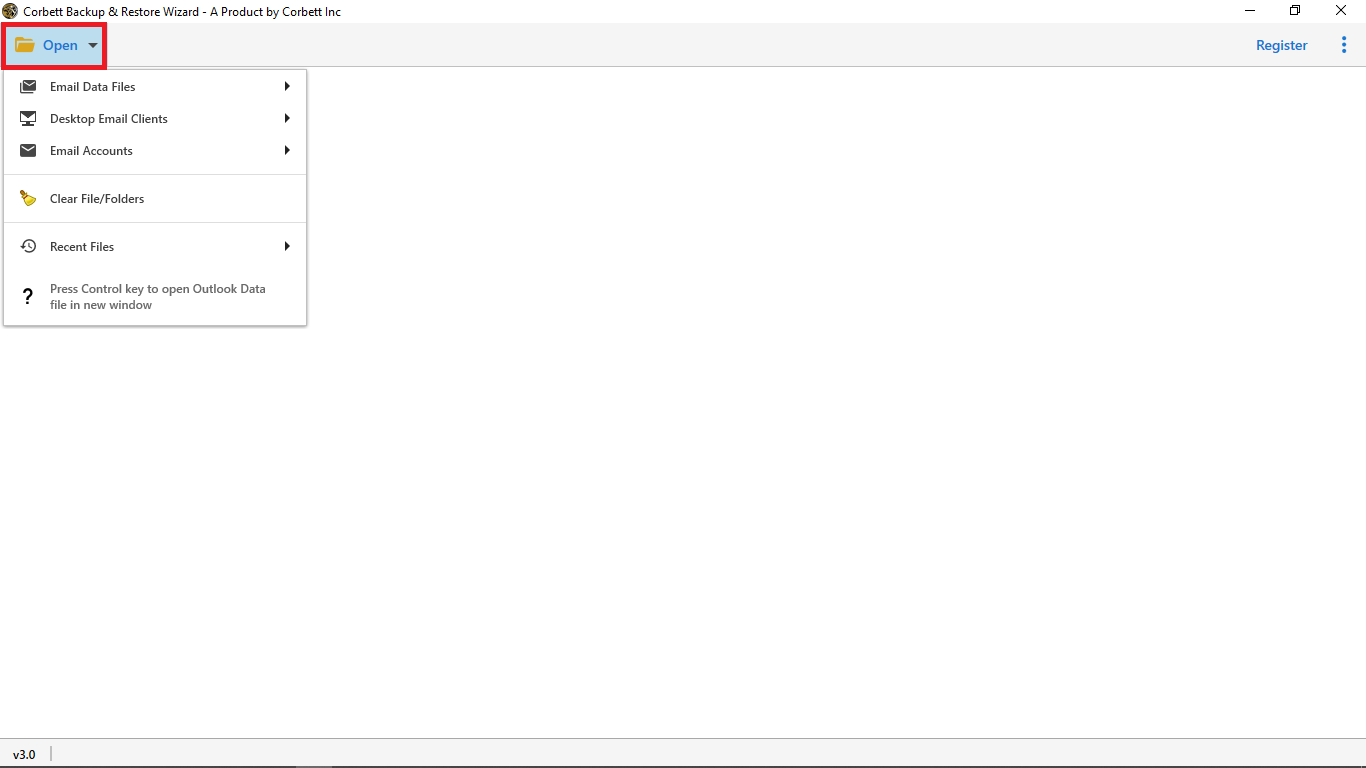
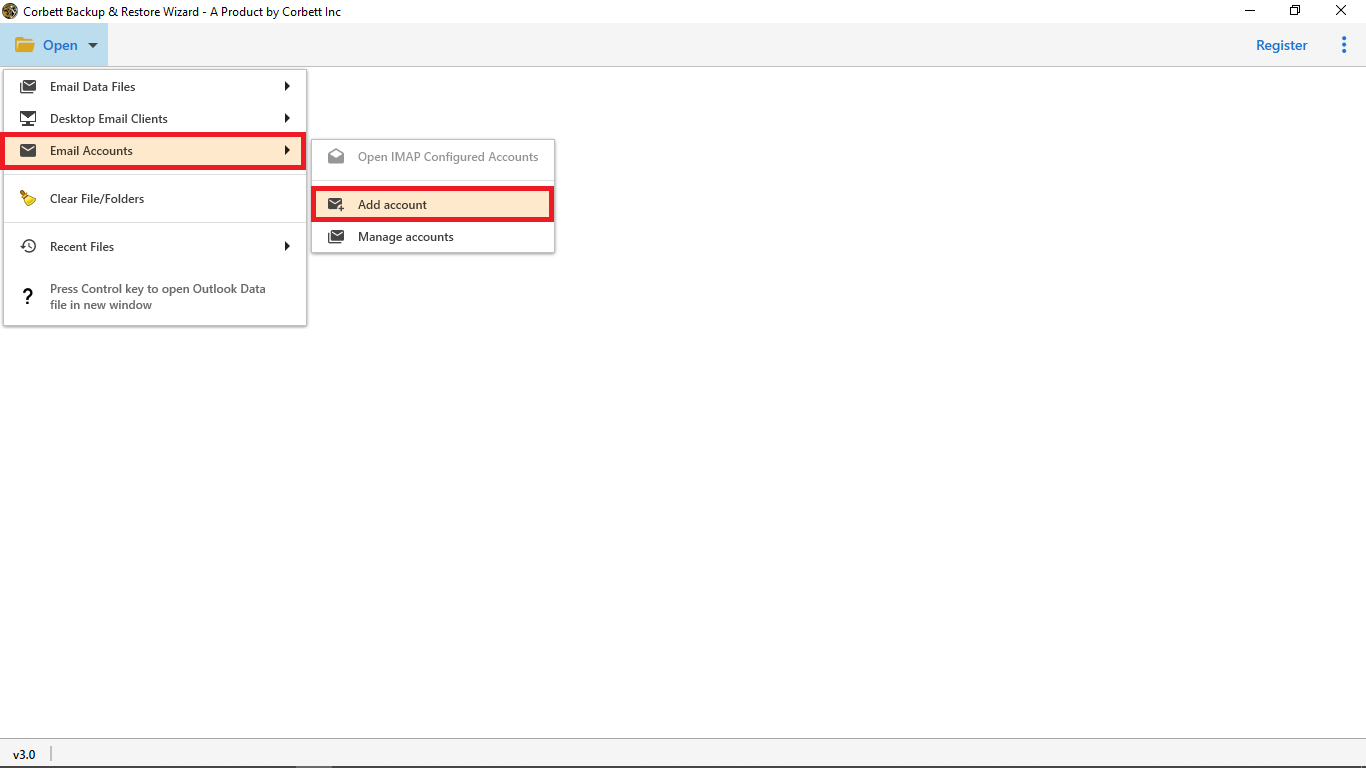
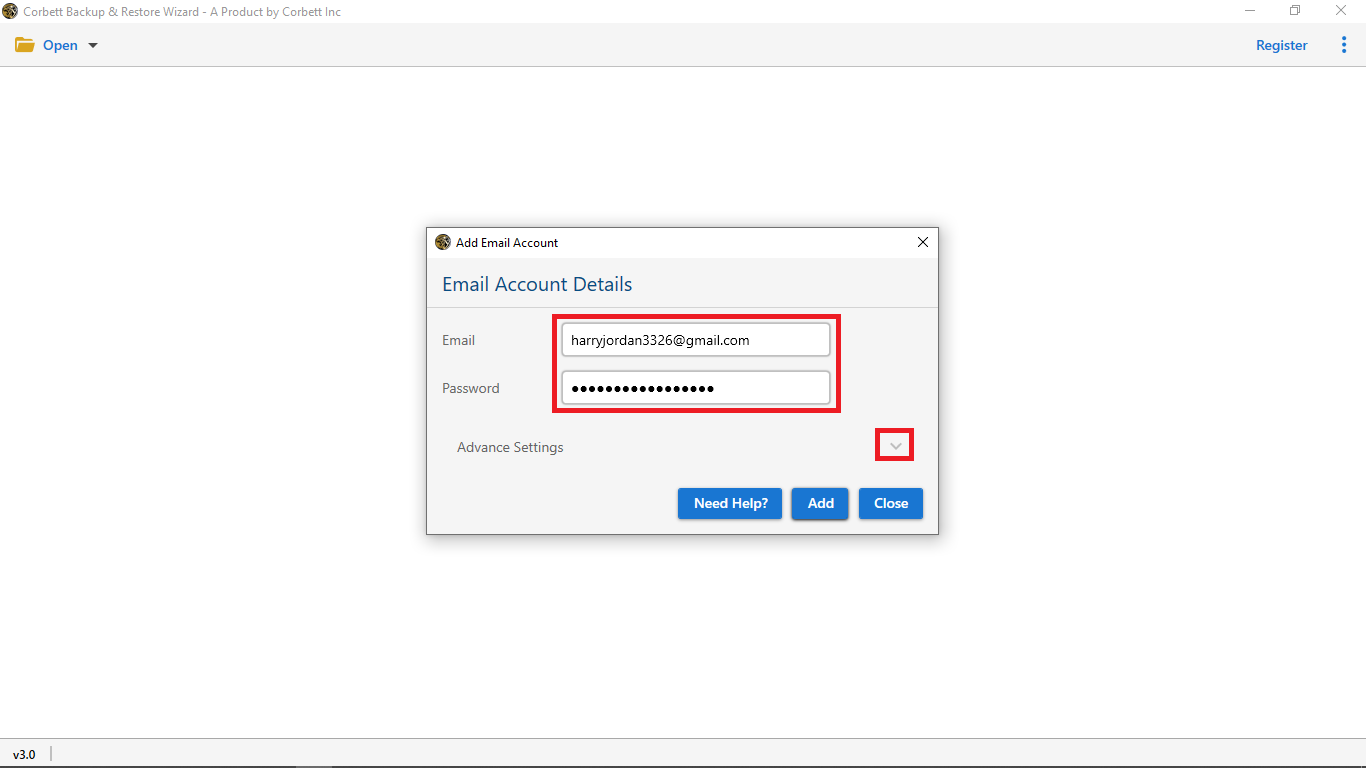
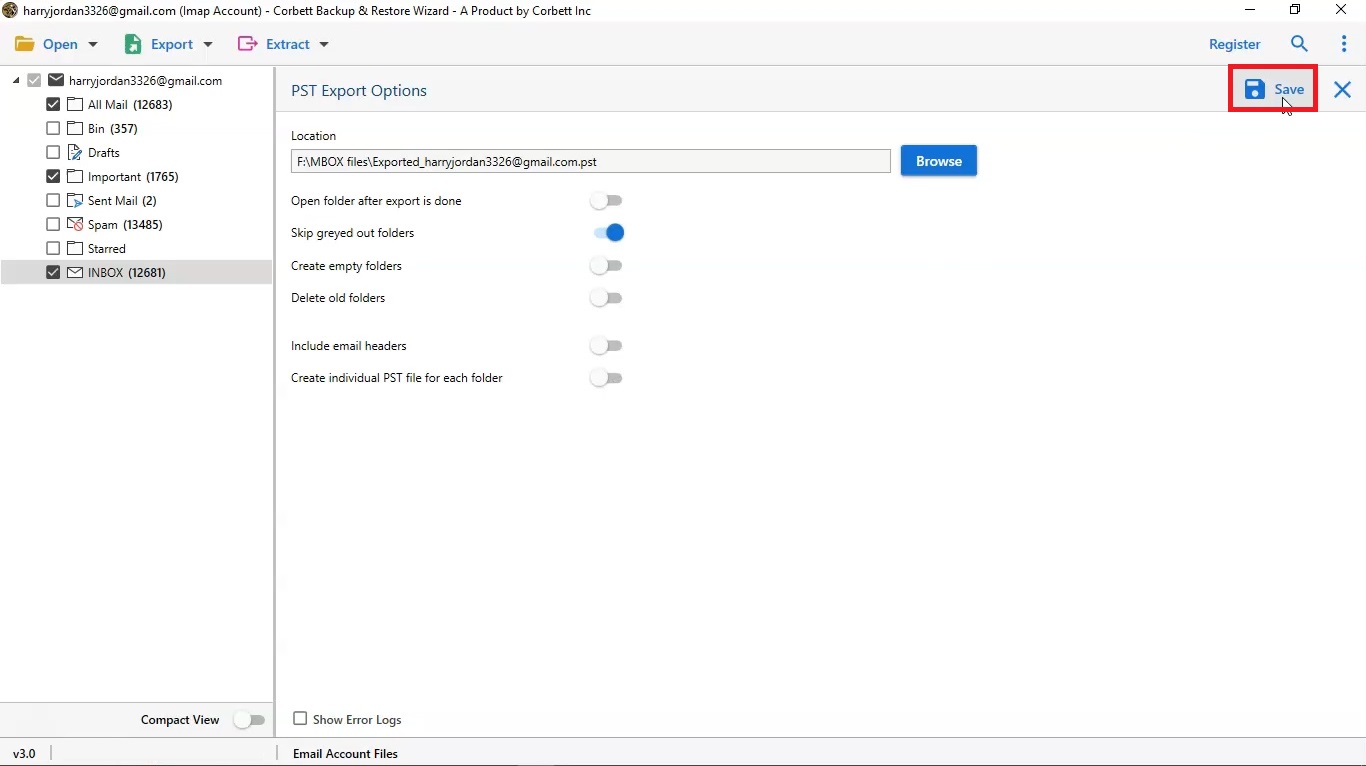
Its product page lists MBOX for Thunderbird and EML among outputs and does not name Thunderbird as a direct export target. Test an MBOX import of one Roundcube folder in free demo first. Port 143 works where port 993 is closed, and you can allow a self-signed certificate on that sign-in screen. Prefer Gmail? See how to move Roundcube to Gmail or move Roundcube to Outlook.
Which way to export Roundcube emails to Thunderbird is best?
Use IMAP for one mailbox, EML for a few folders and software for filters, big mailboxes or many files.
| Way to export Roundcube emails to Thunderbird | Needs | Folders kept | Volume | Cost |
|---|---|---|---|---|
| Thunderbird over IMAP | Host IMAP settings, Thunderbird | Yes, then copy to Local Folders | Folder by folder | Free |
| EML download and import | Roundcube login, Thunderbird, optional add-on | Rebuilt by hand | One message or ZIP at a time | Free |
| Corbett Webmail Backup Tool | Windows PC, IMAP login | Yes | Batch with filters | Free demo, then from $99 |
That IMAP idea works for other hosts. See how to move Hostmonster webmail to Gmail or export Hostmonster webmail to Outlook.
Why does Roundcube to Thunderbird transfer fail?
Thunderbird cannot find imap.roundcube.com
That name does not exist. Roundcube is webmail software, so use your host's IMAP server from cPanel or Plesk.
Download folder option is missing in Roundcube
Your Roundcube version may lack it. Select messages with Ctrl+A and download them as a ZIP, or ask your host to enable zipdownload plugin.
Thunderbird import is slow or stops
Antivirus scans every file Thunderbird writes. Add an exception for your Thunderbird profile folder. If a timeout prompt appears, select continue, not cancel, as one Mozilla reply advised.
Roundcube mail folders and attachments are lost after EML import
Drag and drop does not rebuild structure. Create one subfolder per Roundcube folder, or use MBOX from software.
Login fails when you export Roundcube emails to Thunderbird
Check that you use your full email address as username, and that your host has IMAP on. Try port 143 only where 993 is closed.
What to do after you export Roundcube emails to Thunderbird?
Compare folder counts and open Roundcube mail with attachments. Keep your hosting account until counts match, because mail tied to a hosting plan is wiped when you cancel it. Back up your Thunderbird profile with Thunderbird Backup Tool.
Our view
Try IMAP first because it costs nothing, then copy folders into Local Folders so your mail survives a cancelled hosting plan. EML downloads suit a folder or two. Beyond that, hand imports rebuild folders badly, and a tool that writes MBOX saves hours.
Key takeaways
- Roundcube is webmail software. Use your host's IMAP server, not
imap.roundcube.com. - Copy server name and port from cPanel Connect Devices or Plesk Mail.
- IMAP mirrors server changes, so copy folders to Local Folders in Thunderbird.
- To export Roundcube emails to Thunderbird as EML, use a Local Folders subfolder, drag and drop or ImportExportTools NG.
- Corbett Webmail Backup Tool saves Roundcube mail to MBOX and EML with filters, and its demo saves 10 emails per folder.
Questions about export Roundcube emails to Thunderbird
How do I export Roundcube emails to Thunderbird?
Add your Roundcube mailbox to Thunderbird over IMAP with host settings, download EML files and import them, or use backup software to save MBOX files.
What is Roundcube IMAP server name?
Roundcube has none. It is webmail software. Your host's IMAP server shows in cPanel under Connect Devices or in Plesk under Mail.
Can I download an entire folder from Roundcube?
Newer versions offer Download folder in folder actions as a ZIP of EML files. Older versions may need zipdownload plugin enabled by your host.
How do I import EML files into Thunderbird?
Create a subfolder under Local Folders and drag files into it, or install ImportExportTools NG and import EML messages there.
Does Thunderbird keep Roundcube folder structure?
IMAP keeps Roundcube folders. EML drag and drop does not, so create one subfolder per folder or use software with MBOX output.
Why is my Roundcube login failing in Thunderbird?
Use your full email address as username, confirm IMAP is on and copy server values from your hosting panel.
Does Corbett Webmail Backup Tool support Roundcube?
Yes. Its page lists Roundcube, Horde and SquirrelMail on cPanel or Plesk and says it talks IMAP to host's mail server.
Which formats does it save for Thunderbird?
MBOX for Thunderbird and EML, plus PST, MSG, PDF, HTML, CSV and TXT.
Will export delete my Roundcube emails?
No. All methods here copy mail. Your hosting mailbox stays as it was until you delete it.
Is there a Mac version of Corbett Webmail Backup Tool?
No. It is Windows only, for Windows 7 to 11 and Windows Server 2008 to 2025.
