
Quick Answer
Transfer Bell email to Outlook in 4 ways. Use IMAP, forwarding, backup software or migration software.
IMAP brings old folders into Outlook. Forwarding sends new mail only. Backup software saves a PST file. Migration software copies mail into Microsoft 365.
Check your Bell IMAP settings and test one folder first.
You want to move Bell mail to Outlook because your Bell address is years old and holds mail you cannot lose. You may plan to switch internet provider or you want one inbox. Bell lists server settings but forwarding moves only new mail and some guides copy wrong server names. Below are four ways to move Bell mail to Outlook, with real Bell settings and limits for every one.
What are Bell IMAP settings for Outlook?
To move Bell mail to Outlook, you need your Bell address, its password and server values. Bell publishes them on its support site. Note that sending uses a Sympatico name, not smtp.bell.net.
- Incoming IMAP server:
imap.bell.net, port 993, SSL required. - Incoming POP server:
pophm.sympatico.ca, port 995, SSL required. - Outgoing SMTP server:
smtphm.sympatico.ca, port 25 or port 587 if port 25 does not work. Sign-in is required. - Username: your full Bell email address. Password: your Bell email password.
For encryption on port 587, Bell says to choose STARTTLS or TLS if your app gives it and SSL if not. Bell recommends IMAP over POP. Its page lists no step to switch IMAP on for an account. It also says email applications like Outlook work only in listed countries so use web access when you travel.
How to transfer Bell email to Outlook over IMAP?
Add your Bell mailbox to Outlook as an IMAP account. Folders sync from Bell's server so old mail shows up in Outlook with no extra steps.
- Open Outlook, select File and then Add Account.
- Enter your full Bell address, select Advanced options and choose to set up your account manually, then select Connect.
- Choose IMAP.
- Enter
imap.bell.net, port 993 and SSL for incoming mail. - Enter
smtphm.sympatico.caand port 587 for outgoing mail, with sign-in on. - Enter your Bell password and select Connect, then wait for folders to sync.
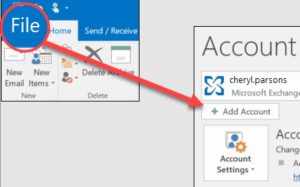
Screen names differ by Outlook version so follow labels you see. Use your Bell email address and password. A Bell staff reply in January 2026 told a user who got an "Invalid Credential" error to use IMAP or POP settings with Bell email address and password, not MyBell login. Catch: IMAP mirrors your server so a message you delete in Outlook can vanish from Bell too and a large mailbox takes hours.
How to forward Bell email to Outlook?
Forwarding sends new mail to your Outlook address. It does not move mail already in your Bell inbox. Use it to catch new mail while you finish another way.
- Sign in to Bell webmail and select gear icon at upper right.
- Choose Mail in left menu, then open Mail Forwarding.
- Enable Enable forwarding.
- Tick Forward and keep a copy to store mail in Bell too. Untick it to forward without a copy.
- Enter up to 10 addresses, including your Outlook address and select Save.
Bell's page shows no verification step for forwarding addresses so send a test message first. Retain a copy enabled while you check Outlook. A Bell community reply from January 2025 also suggests forwarding to another service as a workaround when you are abroad, since Bell mail servers are not available outside Canada.
How to move Bell mail to Outlook in bulk?
Use Corbett Webmail Backup Tool to convert a Bell mailbox to a PST file for Outlook. Corbett's page includes IMAP mailboxes without a page of their own and Bell mail is IMAP. Other outputs include MBOX, EML, MSG, PDF, HTML, CSV and TXT. You get your folder tree, dates and unread flags and can filter by date, sender, recipient, subject, words, attachment and size. It installs on Windows 7 to 11 and Windows Server 2008 to 2025 only. A free demo is available.
Steps to move Bell mail to Outlook with software
- Install it on a Windows PC and open it with Run as administrator.
- Select IMAP option and enter
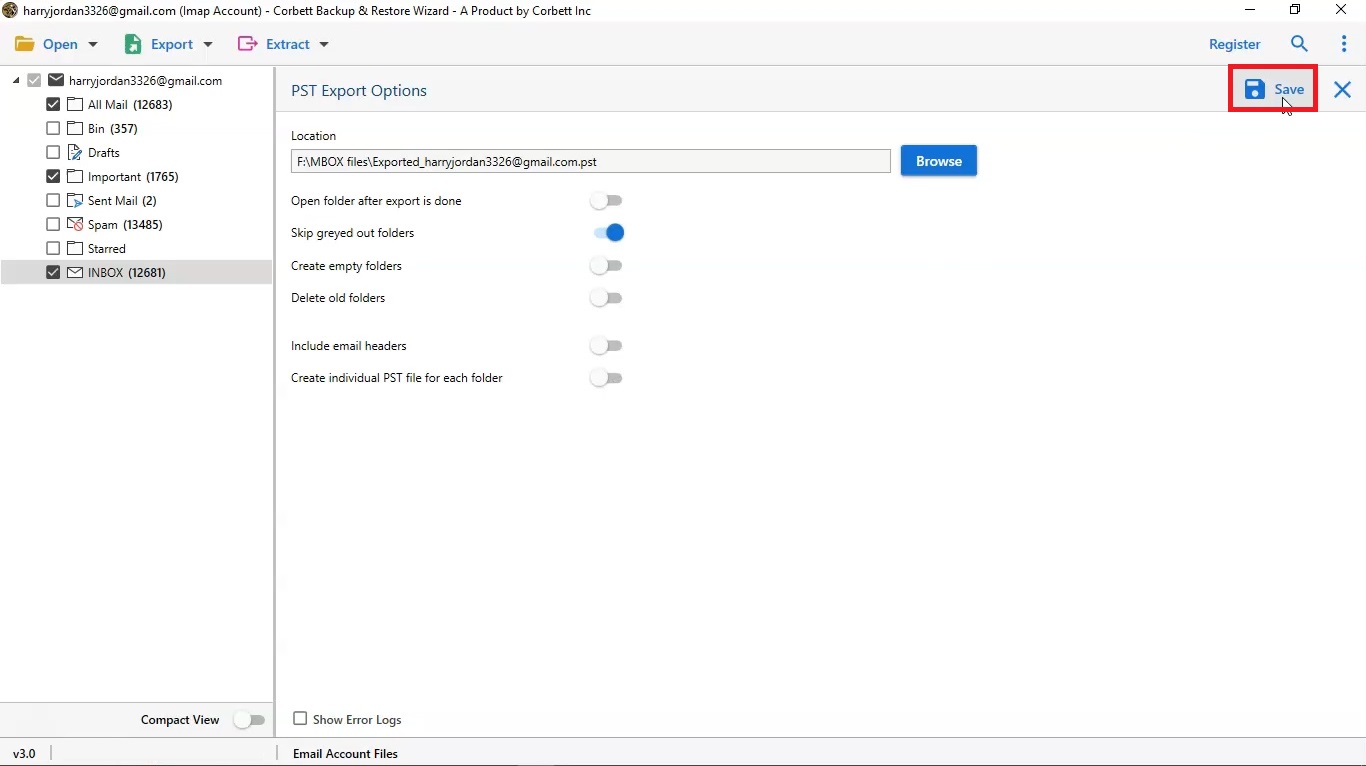
imap.bell.net, port 993, your full Bell address and password. - Tick folders to include. Message counts show next to folder names.
- Set date, sender or attachment filters if you want a smaller PST.
- Choose PST and a destination folder.
- Start backup, then open your PST in Outlook. See our guide to Open PST file.
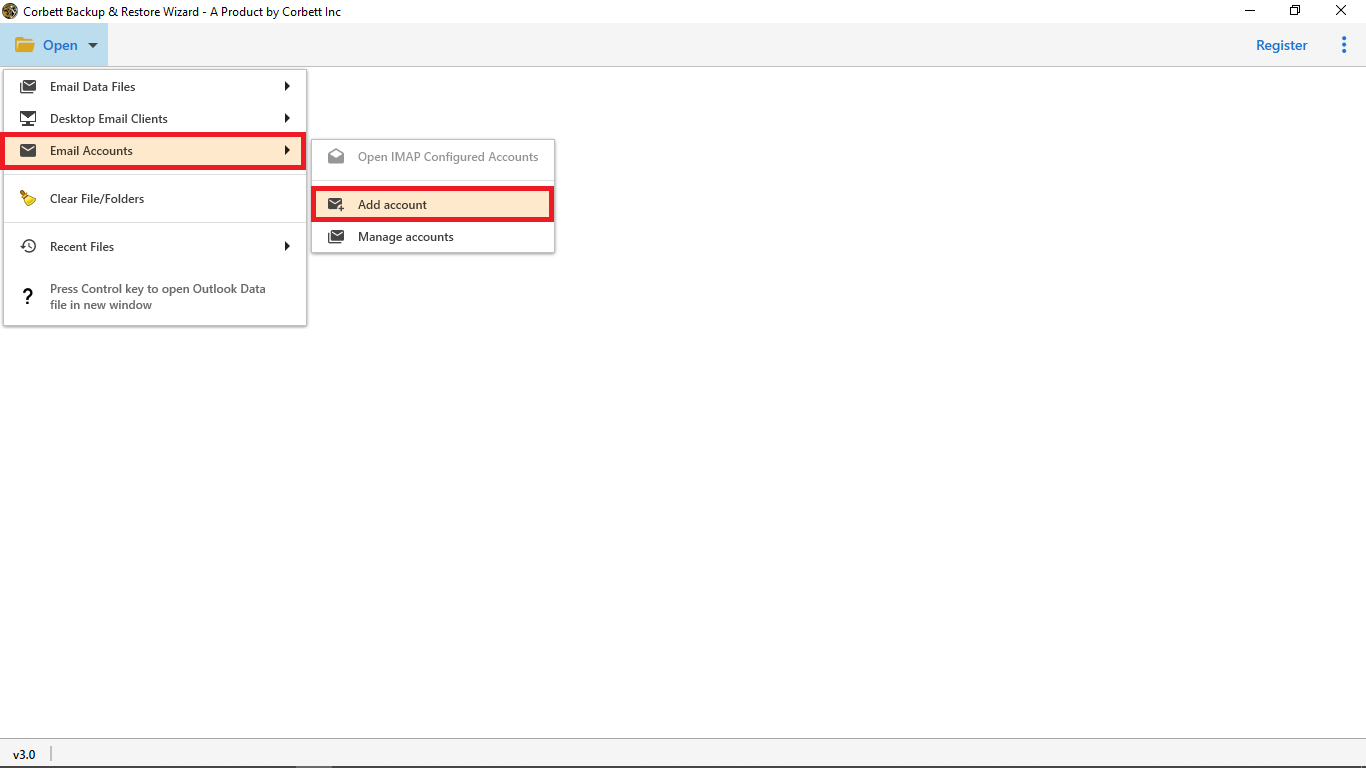
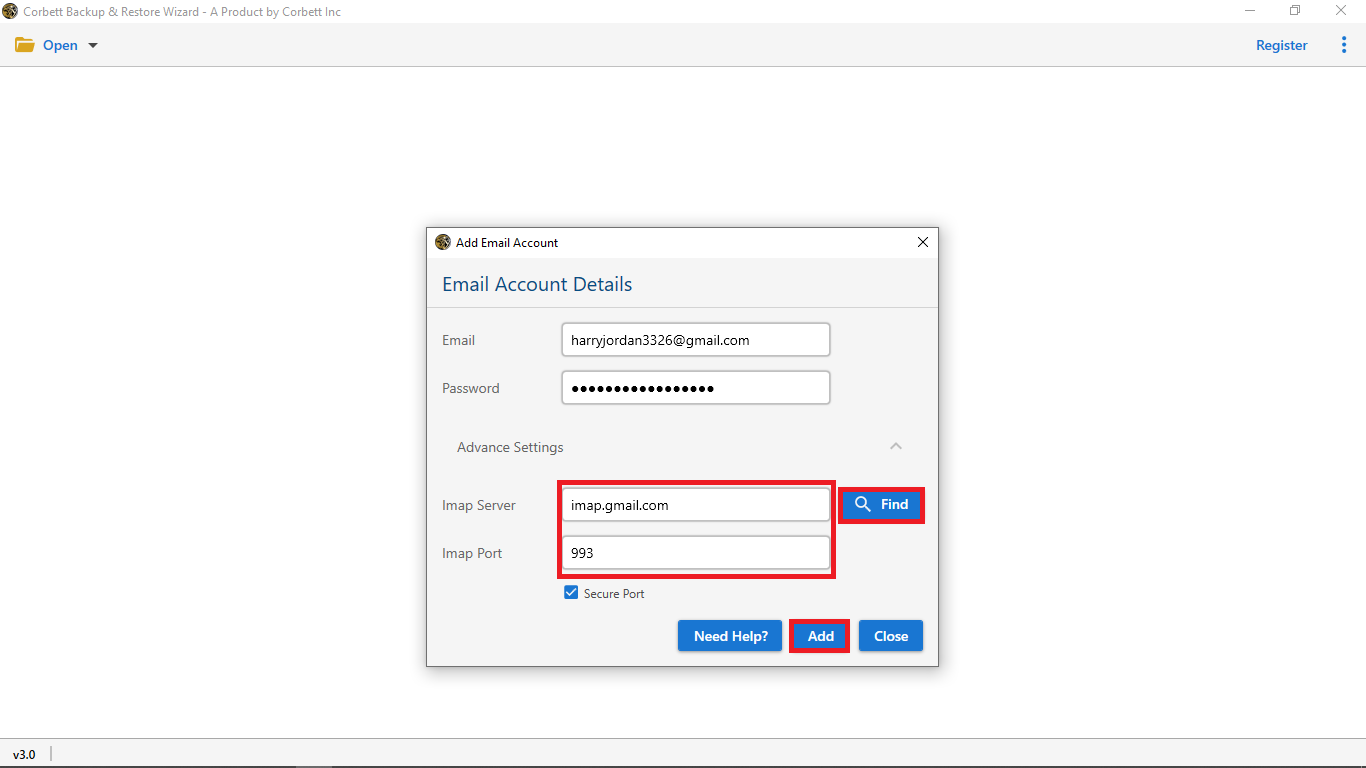
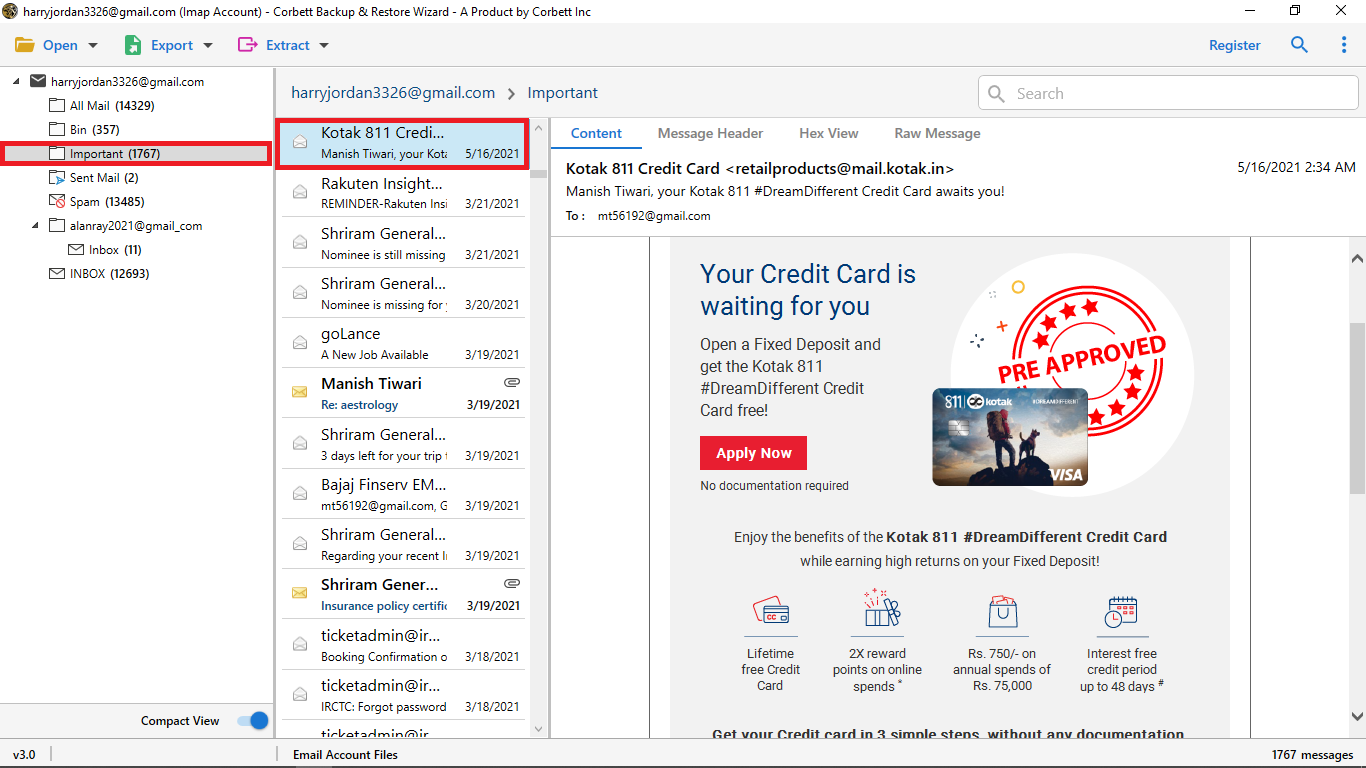
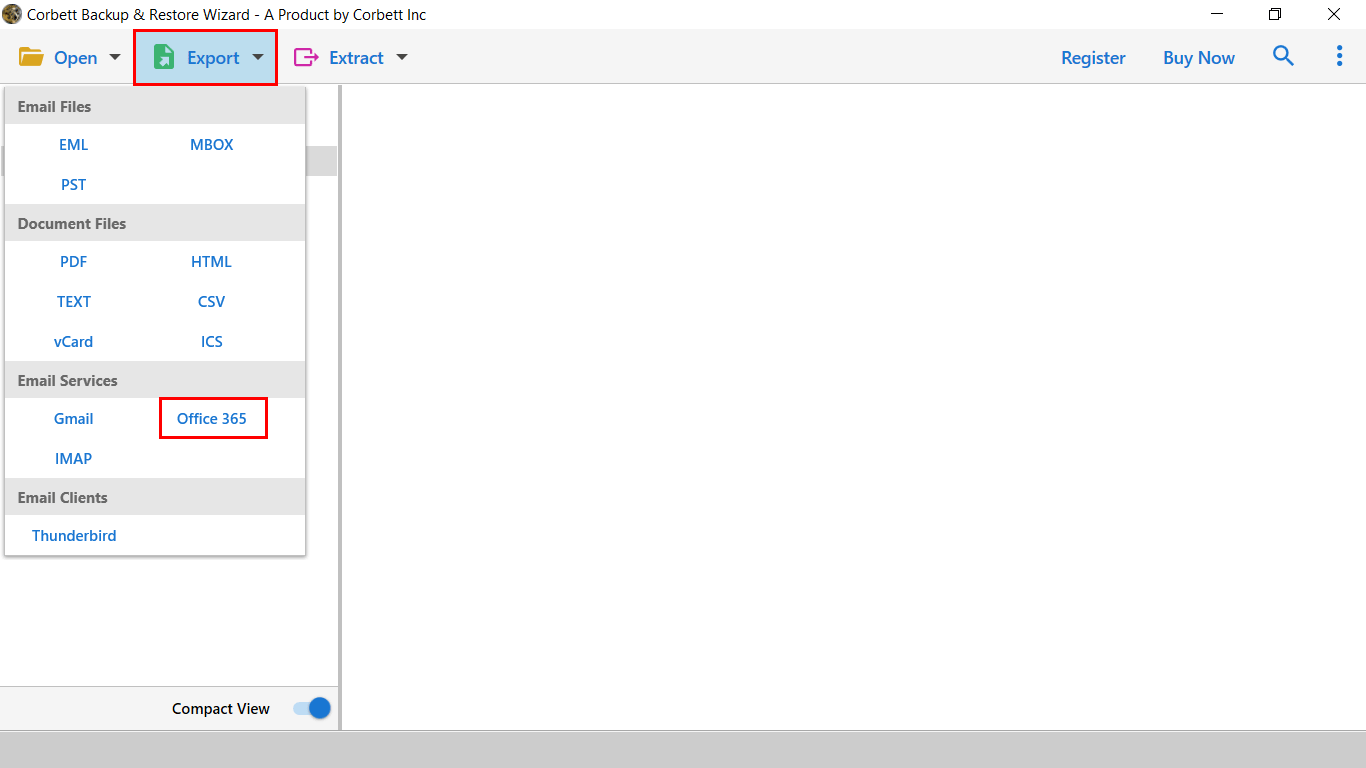
Corbett's page never names Bell so test one folder in free demo first. Port 143 works where port 993 is closed and a lifetime licence starts at $99. Moving mail from another Canadian or webmail host? See how to Export Hostmonster webmail to Outlook or Migrate 1&1 emails to Outlook.
How to move Bell mail to Outlook.com or Microsoft 365?
If you use Outlook.com or Microsoft 365, you can copy Bell mail straight into that mailbox. Corbett Email Migration Tool logs in to both accounts and moves mail between them. Its page lists Microsoft 365, Outlook.com and any IMAP host.
- Install Corbett Email Migration Tool on a Windows PC.
- Enter Bell as source:
imap.bell.net, port 993, your address and password. - Choose Microsoft 365 or Outlook.com as destination and sign in through Microsoft's consent window.
- Select folders and start. Open Outlook on web to check results.
Folders, dates and unread flags remain intact, duplicates are ignored and a CSV report lists results. Bell remains untouched because the software only copies mail. Bell is not named on Corbett's page so type server values by hand and try a free trial first. There is no scheduler so plan a single cutover. Our guide to Migrate Outlook emails to Office 365 shows a similar flow.
How to move Bell contacts to Outlook?
Mail transfer does not bring contacts. A Bell community reply says webmail imports and exports contacts as vCard or CSV files. Bell also lists a contacts sync server at dav.webmail.bell.net on port 443 with SSL.
- Sign in to Bell webmail and open Contacts or Address Book.
- Use its export option and save a CSV file.
- Open new Outlook, select People, then Import contacts.
- Select Browse, choose your CSV file, then select Import.
No Bell page prints exact menu names for contact export so use wording on your screen. In classic Outlook, a Bell community answer lists File, Open & Export, Import/Export, then Import from another application or file, then CSV. Microsoft recommends UTF-8 for CSV files so cancel and convert your file if names look wrong in preview.
Which way to move Bell mail suits you?
Use IMAP for daily reading, forwarding for new mail only and software for filters, big mailboxes or an online Outlook mailbox.
| Way to move Bell mail to Outlook | Needs | Old mail moved | Volume | Cost |
|---|---|---|---|---|
| Outlook IMAP account for Bell email | Outlook, Bell login | Yes, synced from server | Folder by folder | Free |
| Bell forwarding to Outlook | Bell settings | No, new mail only | Up to 10 addresses | Free |
| Corbett Webmail Backup Tool to move Bell mail to Outlook | Windows PC, IMAP login | Yes, as PST | Batch with filters | Free demo, then from $99 |
| Corbett Email Migration Tool for Microsoft 365 | Windows PC, both logins | Yes | Entire mailboxes with CSV user map | Free trial, then from $99 |
Those ideas work for other hosts. See how to Move Roundcube to Outlook or Migrate Thunderbird to Outlook.
Why does Bell email not work in Outlook?
Invalid credential error in Outlook
Bell staff told one user in January 2026 to use IMAP or POP settings with Bell address and password, not MyBell login. Test your password by signing in on web first. The same Bell community thread has no confirmed fix.
Outlook asks for an app password
Bell's settings page does not mention app passwords. In a Bell community thread, a user asked in February 2025 and got no fix. An earlier reply in March 2024 warned that an unexpected message asking for your IMAP password may be fraud and advised deleting it without opening links.
Mail stops working abroad
Bell says email applications work only in listed countries. A Bell community reply states servers are not available outside Canada and suggests webmail or forwarding to another service.
Outlook cannot send Bell email
Use smtphm.sympatico.ca for sending, not smtp.bell.net, with port 587 if port 25 is blocked and sign-in enabled.
Contacts will not import
Bell's webmail takes vCard or CSV files, per a community reply. Microsoft says to use UTF-8 for CSV so convert your file if names look wrong.
What to do after you move Bell mail to Outlook?
Compare folder counts, open mail with attachments and retain your Bell account until counts match. If you switch from Bell as internet provider, check how long Bell retains your mailbox before you cancel. Back up your PST file to a second drive.
Our view
IMAP brings old Bell mail into Outlook and forwarding is a stopgap for new mail only. Use your Bell address and password, not your MyBell login, since that mix-up causes invalid credential errors. Save a PST copy afterwards in case your Bell account ends.
Key takeaways
- To move Bell mail to Outlook, use
imap.bell.netport 993 with SSL andsmtphm.sympatico.cafor sending. - Forwarding moves new mail only, not old folders.
- Use your Bell address and password, not MyBell login.
- Email applications work only in countries Bell lists so use web access abroad.
- Corbett Webmail Backup Tool saves Bell mail to PST and its demo saves 10 emails per folder.
Questions About Bell Email in Outlook
What are Bell IMAP settings for Outlook?
Use imap.bell.net on port 993 with SSL required. Username is your full Bell email address. These Bell IMAP settings work in classic and new Outlook.
What is Bell SMTP server?
Use smtphm.sympatico.ca, port 25 or port 587 if port 25 does not work. Sign-in and TLS or SSL are required.
Why does Outlook say invalid credential for Bell?
Use your Bell address and password with IMAP or POP settings. Bell staff say MyBell login does not work.
Can I use Bell mail in Outlook outside Canada?
Bell says email applications work only in listed countries and a community reply says servers are not available outside Canada. Use webmail instead.
How do I transfer Bell email to Outlook?
Add your Bell account over IMAP to copy old folders. Forward new mail if you only need fresh messages. Backup software saves Bell mail to PST in bulk.
Does forwarding move old Bell email?
No. It sends new messages to up to 10 addresses. Mail already in your Bell inbox remains there.
Will transfer delete my Bell emails?
No. Every way here copies mail. Your mailbox remains as it was until you delete it.
