Quick Answer
Migrate Aruba emails to Gmail in 3 ways. Use Google Data import, Thunderbird or IMAP software.
Data import suits Workspace admins. Thunderbird suits one personal mailbox. Software suits big mailboxes.
Gmail POP fetching ended in January 2026. Check your Aruba IMAP settings.
You want to migrate Aruba mail to Gmail and Gmail's old Check mail from other accounts button no longer does it. Aruba retains messages on its own servers so they only move through IMAP. Below are three ways to migrate Aruba emails to Gmail, with Aruba server settings, real user problems and clear limits.
Why does Gmail fail to fetch Aruba mail now?
Google switched off POP fetching. Since January 2026 Gmail has dropped Gmailify or Check mail from other accounts, as The Register reported. Older guides had you add your Aruba address and a POP server under Gmail's account settings. That route cannot move Aruba mail to Gmail anymore.
POP also had a built-in weakness. It pulls mail from one folder and does not mirror your Aruba folders. IMAP mirrors them so every way to migrate Aruba mail to Gmail below uses IMAP.
What are Aruba IMAP settings for Gmail?
Domain mailboxes use imaps.aruba.it on port 993. Mailboxes ending in @aruba.it or @technet.it use a shorter host. Every tool that can move Aruba mail to Gmail asks for these values.
| Setting | Domain mailbox | @aruba.it and @technet.it | PEC |
|---|---|---|---|
| IMAP incoming | imaps.aruba.it, 993, SSL/TLS | imap.aruba.it, 993, SSL/TLS | imaps.pec.aruba.it, 993, SSL/TLS |
| POP3 incoming | pop3s.aruba.it, 995, SSL/TLS | pop3.aruba.it, 995, SSL/TLS | pop3s.pec.aruba.it, 995, SSL/TLS |
| SMTP outgoing | smtps.aruba.it, 465, SSL/TLS | smtp.aruba.it, 465, SSL/TLS | smtps.pec.aruba.it, 465, SSL/TLS |
| Username | Full email address | Full email address | Full PEC address |
| Webmail | Webmail.aruba.it | Webmail.aruba.it | Webmail.pec.it |
These values come from an Aranzulla guide, which adds that SSL/TLS needs a mail application with TLS 1.2 and that IMAP must be enabled on a domain mailbox. Aruba's IMAP page says to delete old POP3 configurations before you switch a mailbox to IMAP. It also says IMAP comes with most hosting plans and can be bought from your customer area. Confirm every value with Aruba before you rely on it.
How to migrate Aruba emails to Google Workspace?
Your Workspace super admin can move Aruba mail to Gmail with Google's Data import tool. It copies mail from an IMAP server into Workspace mailboxes so you can migrate Aruba mail to Gmail for many users at once. Personal @gmail.com addresses cannot use it.
- Create Workspace users that match your Aruba addresses and switch on IMAP in Aruba before you migrate Aruba to Gmail.
- Open Google Admin console as super admin and go to Data import.
- Choose IMAP as source. Enter
imaps.aruba.itas server, then test your connection. - Add users by hand or upload a CSV with every Aruba address, its password and Workspace address.
- Set a start date, exclude folders you do not need and start your import.
- Start a delta import for mail that arrived after your first pass, then close your import.
Menu names differ so check them on screen. Catch: Aruba mailboxes without IMAP fail at the connection test and one pass copies mail but never moves your address. You still repoint your domain's MX records to Google when you quit Aruba.
How to migrate Aruba emails to Gmail with Thunderbird?
Add Aruba and Gmail to Thunderbird as IMAP accounts, then copy folders from one to the other. That route suits personal Gmail and costs nothing.
- Open Thunderbird, go to Account Settings and select Add Mail Account.
- Enter your Aruba address and password, then select Configure manually. Choose IMAP, enter your Aruba host with port 993 and SSL/TLS.
- Add your Gmail account the same way and sign in through Google when a window opens.
- Wait while both accounts sync. Enable local sync for your Aruba account under Synchronization & Storage or folders show headers only.
- Select Aruba messages, right-click and choose Copy To, then a Gmail folder. You can also drag an entire folder onto your Gmail account.
- Check Gmail in a browser, then compare Aruba to Gmail counts with Aruba webmail.
Copy messages and never move them until your Aruba to Gmail counts match. Gmail converts folders to labels so scan your labels. Catch: Thunderbird copies over your own internet line so you move Aruba mail to Gmail slowly and a large mailbox takes hours and Thunderbird must remain open.
How to move Aruba mail to Gmail in bulk?
Corbett IMAP Migration Tool logs in to your IMAP mailbox and uploads mail to Gmail so you can migrate Aruba mail to Gmail in one batch. Per its page, it detects server address and port, retains headers and folder hierarchy and sends nothing through Corbett servers. Free demo migrates 10 items per folder on a Windows PC.
Steps to move Aruba mail to Gmail with software
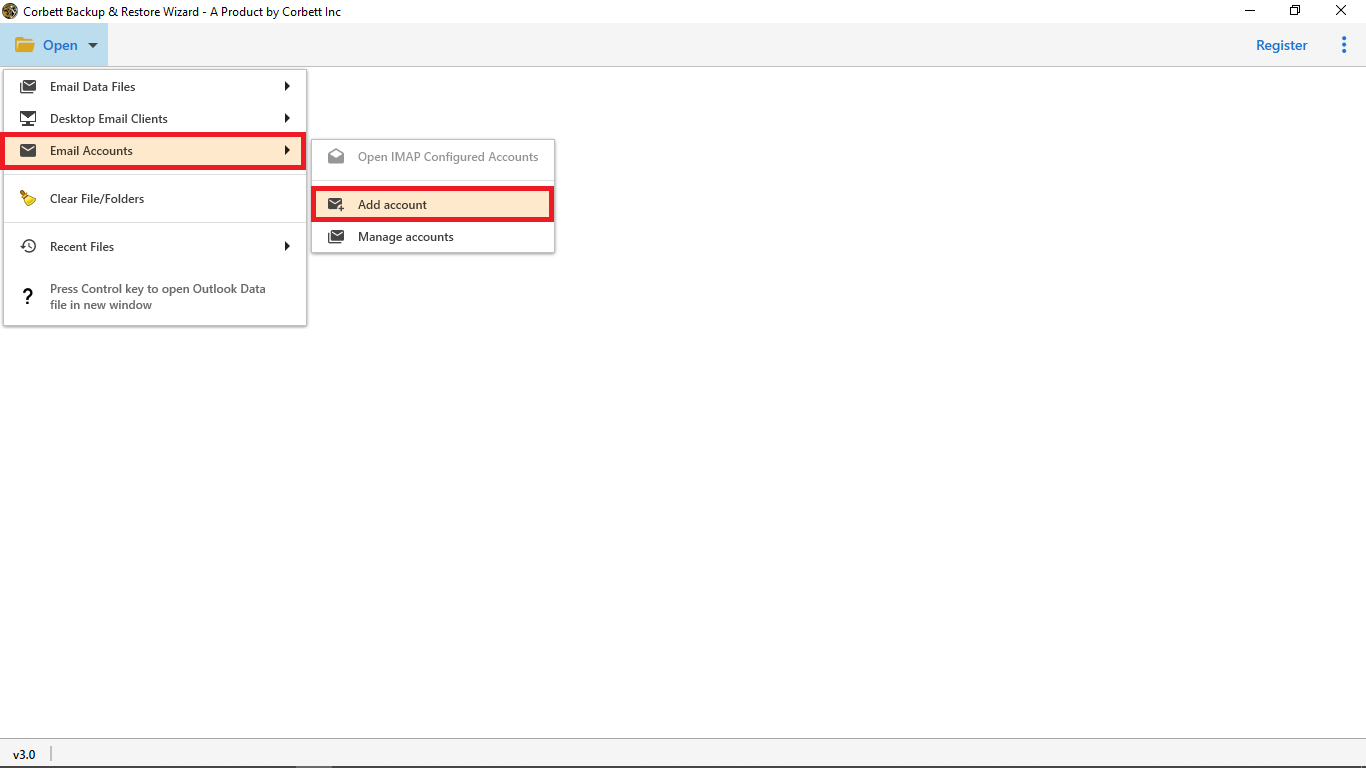
- Install it on a Windows PC and select Open, then Email Accounts and Add Account.
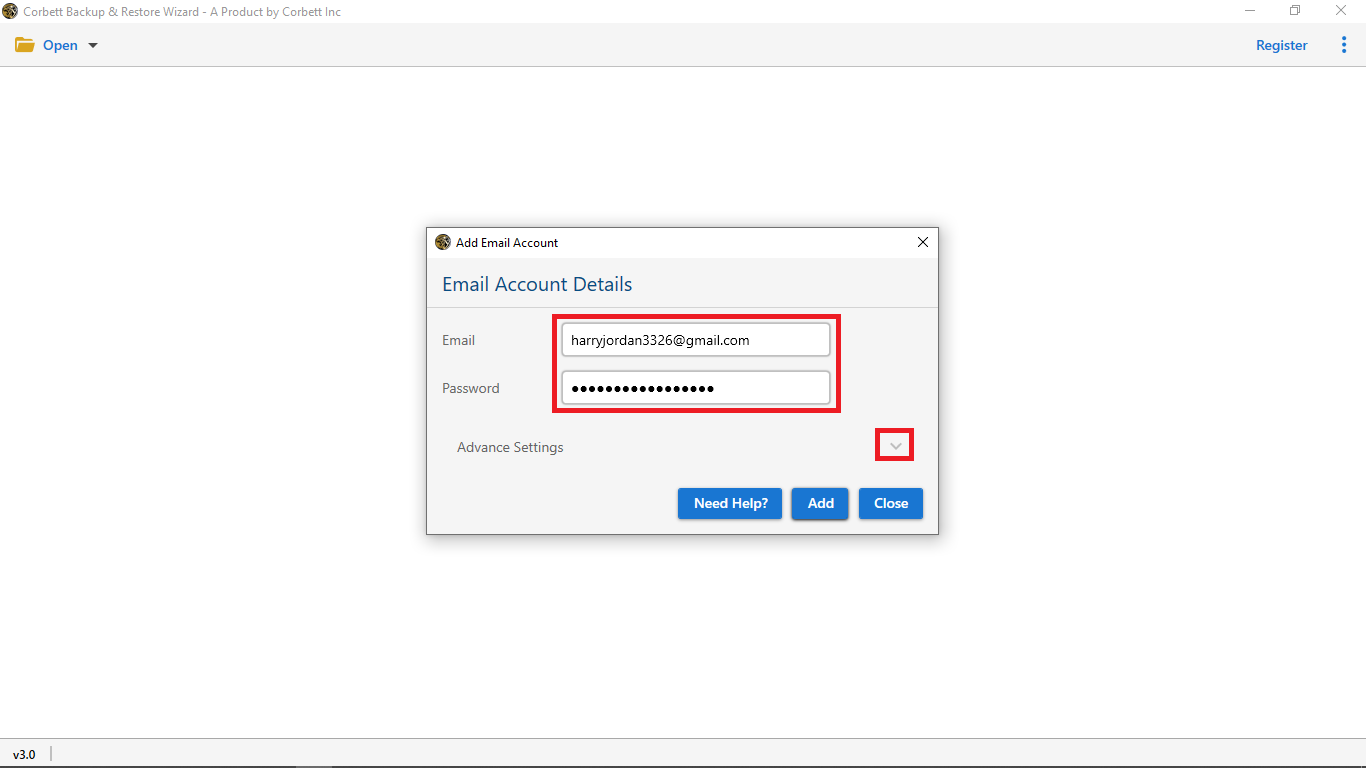
- Enter your Aruba address and password with your Aruba host from settings table. Select Add.
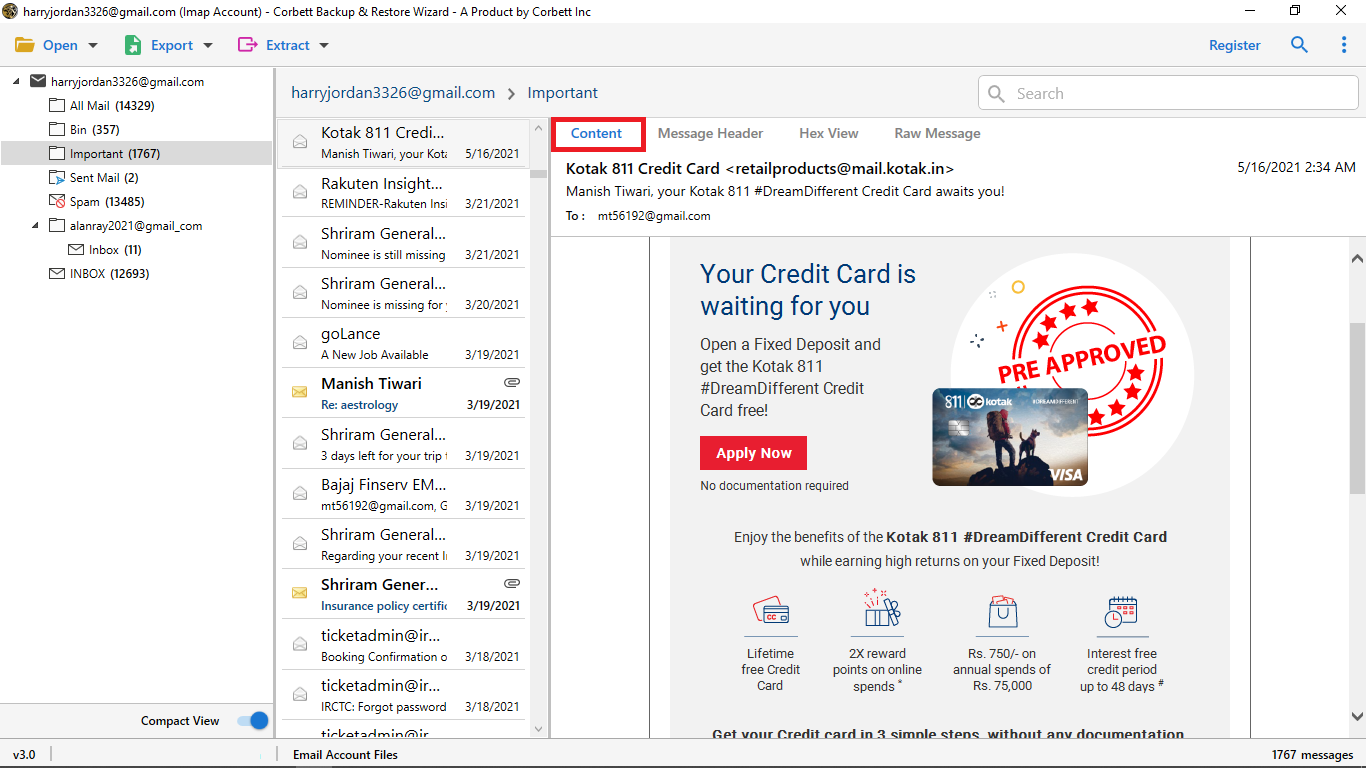
- Preview Aruba folders and messages before you migrate.
- Add date or other filters if you want less mail.
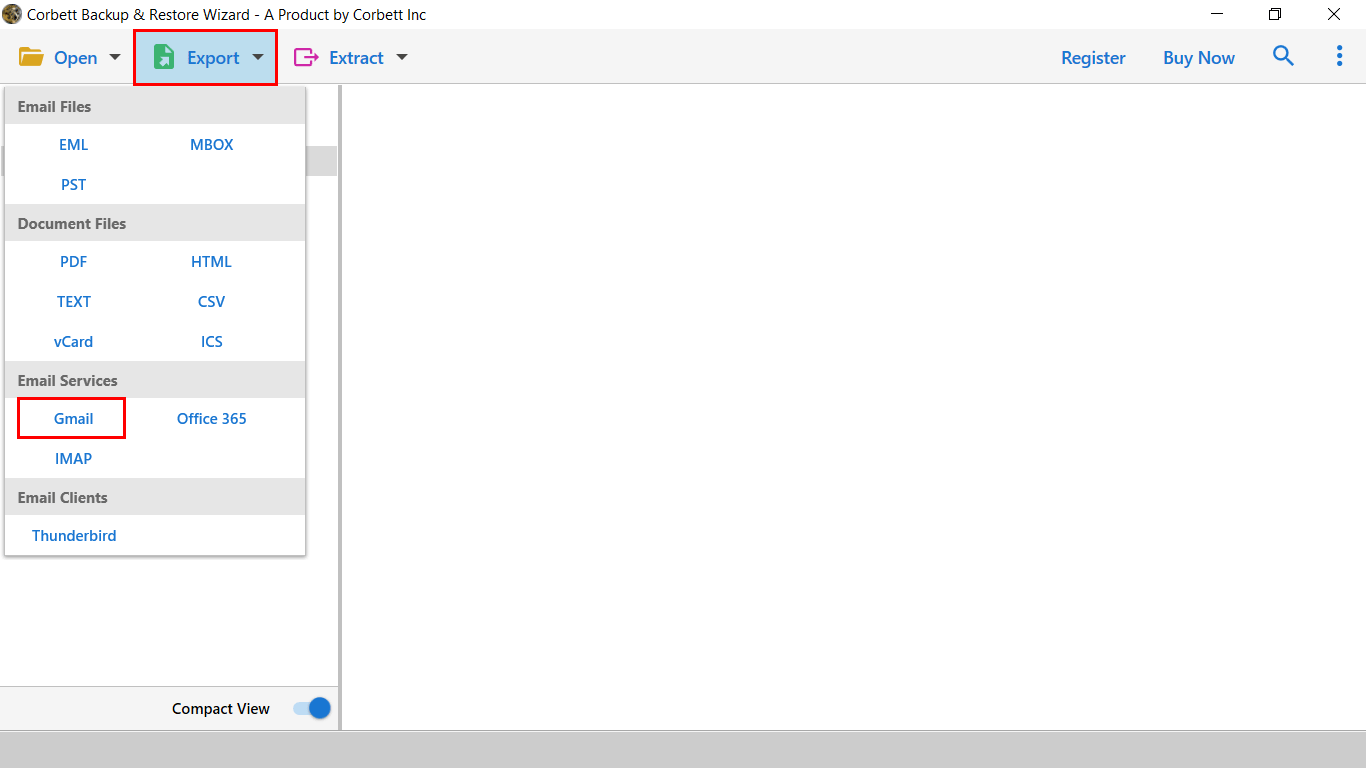
- Select Export, then choose Gmail to migrate Aruba to Gmail.
- Enter your Gmail address and password. Create a Google App password first when 2-step verification is on.
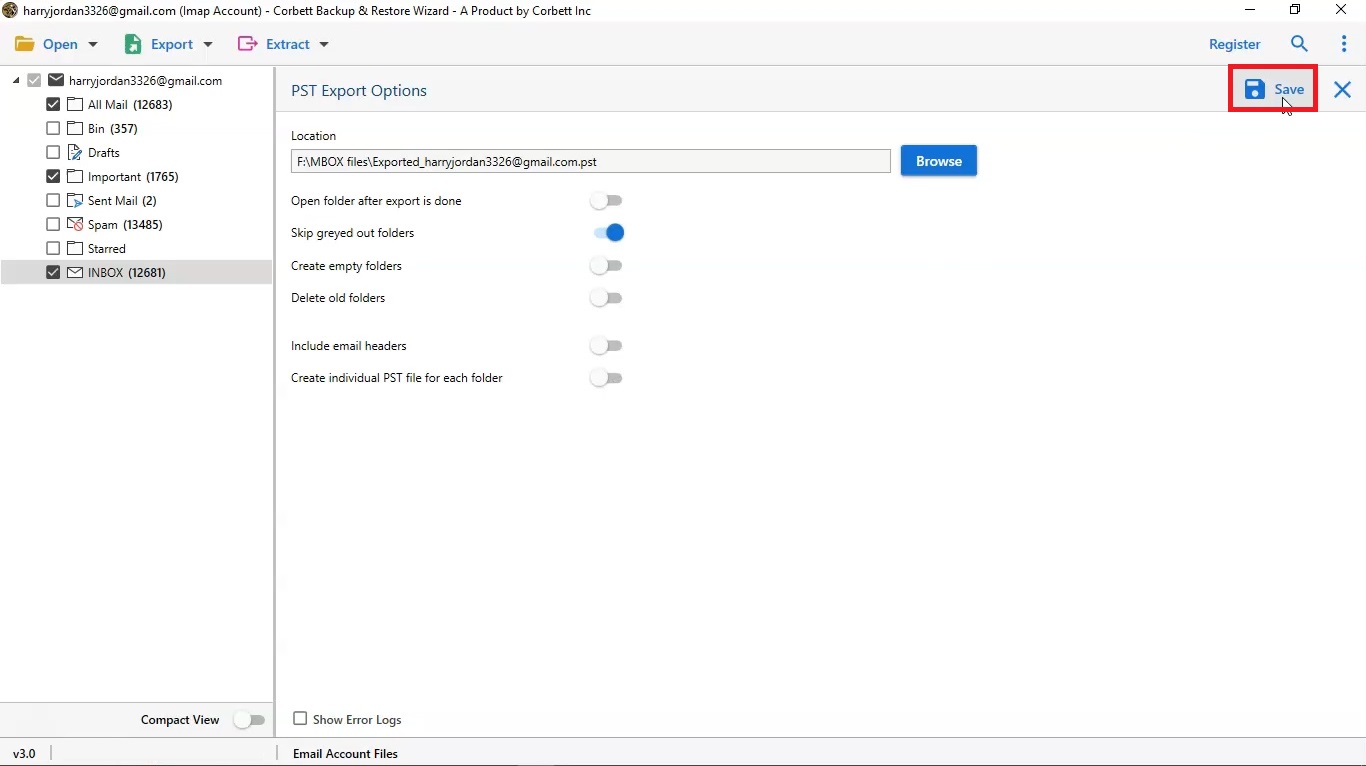
- Select Save to start. When it ends, open Gmail and check that Aruba to Gmail migration kept folders as labels.
Its page does not name Aruba so test a demo on one Aruba folder first. Pricing starts at $99 for a lifetime licence, with 30 days to get your money back. Your Aruba mailbox remains usable while it works. To migrate another provider, see how to Migrate Rackspace email to Gmail or Migrate IMAP to Gmail.
Which way to move Aruba mail suits you?
Use Google Data import to move Aruba mail to Gmail at a Workspace business, Thunderbird for one personal mailbox and software for large mailboxes or date filters.
| Way to move Aruba mail to Gmail | Works for | Needs | Volume | Cost |
|---|---|---|---|---|
| Gmail Add a mail account (POP) | Nothing now | None | None, ended | None |
| Google Data import | Workspace accounts | Super admin, IMAP on | Many users | Free |
| Thunderbird with IMAP | Personal and business | Both logins, Thunderbird | Folder by folder | Free |
| Corbett IMAP Migration Tool | Personal and business | Windows PC, both logins | Batch with filters | Free demo, then from $99 |
IMAP also moves mail from other hosts. See how to Migrate BT Internet emails to G Suite.
Why does the Aruba move to Gmail fail?
Login fails with correct password
A user on HubSpot community in June 2020 got "failed authentication" on correct Aruba credentials, over IMAP port 993 and SMTP port 465. One commenter got it working by enabling forwarding in Aruba and HubSpot staff told that user to check whether Aruba needs an app-specific password. Check that IMAP is enabled on your mailbox and that you use your full address as username.
POP3 and IMAP clash
Aruba says to delete old POP3 configurations before you use IMAP. A leftover POP3 setup can pull mail out of your mailbox while you copy it. Remove POP3 settings from every old device first.
Mailbox is full
Aruba mailboxes start at 1 GB on many plans. A full mailbox stops new mail so move Aruba mail to Gmail first, compare folder counts, then clean old mail in webmail.
Aruba to Gmail migration shows no folders
Imported Aruba folders arrive as Gmail labels. Open your label list on left, not Inbox. A free Google account gives 15 GB for Gmail, Drive and Photos together so check free space before a big move.
PEC mailboxes behave differently
PEC addresses use imaps.pec.aruba.it and may need a dedicated password when 2-step verification is on. We have not tested PEC receipts in Gmail so copy a few PEC messages first and check them.
What to do after the move?
After you move Aruba mail to Gmail, compare folder counts between Aruba webmail and Gmail and spot check old messages that carry attachments. Retain your Aruba plan until counts match. Forward new Aruba mail to Gmail while you update contacts. Want a second copy of your new mailbox? Try Clone Gmail account.
Our view
Google took away the easy route so so every path now uses IMAP. Workspace admins should use Google Data import. Personal users can copy folders in Thunderbird for free or use software when the mailbox is big. Switch on IMAP in Aruba first and test one folder.
Key takeaways
- POP fetching ended in January 2026 so you cannot migrate Aruba mail to Gmail with POP.
- Aruba IMAP is
imaps.aruba.iton port 993 for domain mailboxes. - Workspace admins use Google Data import. Personal users use Thunderbird or software.
- Delete old POP3 settings before you switch an Aruba mailbox to IMAP.
- Corbett IMAP Migration Tool can move Aruba mail to Gmail in batch with filters.
Questions About Aruba Mail in Gmail
What are Aruba IMAP settings?
Domain mailboxes use imaps.aruba.it, port 993, SSL/TLS. Addresses ending @aruba.it use imap.aruba.it.
What are Aruba SMTP settings?
Domain mailboxes use smtps.aruba.it, port 465, SSL/TLS, with your full address as username.
How do I enable IMAP in Aruba?
Delete old POP3 configurations, then set your mailbox to IMAP4. IMAP comes with most hosting plans and you can buy it in your customer area.
Can I migrate Aruba PEC mail to Gmail?
PEC uses imaps.pec.aruba.it. Test a few messages first, since we have not checked PEC receipts in Gmail.
How do I migrate Aruba emails to Gmail?
To move Aruba mail to Gmail, use Google Data import for Workspace, Thunderbird over IMAP for a personal account or IMAP migration software for bulk moves.
Do Aruba folders become Gmail labels?
Yes. After Aruba to Gmail migration, every Aruba folder shows as a label.
Can I migrate Aruba emails to Gmail by date?
Yes. You can migrate Aruba mail to Gmail by date, since Google Data import takes a start date and Corbett IMAP Migration Tool filters by date and other fields.
