Corbett

EML to PST Converter

Outlook 2021, 2019, 2016 and older versions get PST files from EML mail through Corbett EML to PST Converter, in bulk or by selection. Attachments, meta data and folder structure stay intact. Other outputs: MBOX, PDF, HTML, TEXT, CSV, vCard and ICS, plus 100+ IMAP services. Free trial included.

Download free demo Purchase now

4.8 out of 5 from 1,863 reviews

Conversion runs on this PC. Corbett saves no data on a backend.

Free demo, scanned clean on VirusTotal and a 30-day money-back window.

Lifetime licence from $99 Trial converts 10 EML files

PST facts

Outlook Users Need EML to PST Converter

Outlook keeps mail in PST files, while EML messages sit loose on disk. EML to PST Converter loads those messages and builds PST files for Outlook 2021, 2019, 2016 and older versions, with attachments and folder structure kept.

Preserved in PST

  • Folder structure
  • Attachments
  • Meta data
  • Email headers
  • Message bodies
  • Dates and times
  • Senders and recipients

Supported EML items

  • Single EML files
  • Folders of EML files
  • Bulk batches
  • Selected files only
  • Files of any size
  • Mail with attachments
  • Mail with meta data

Outputs

  • PST for Outlook
  • MBOX
  • PDF
  • HTML
  • TEXT
  • CSV
  • vCard and ICS
  • 100+ IMAP services

Not included

  • Outlook profiles
  • Account passwords
  • Mail rules
  • Signature settings

Why Move EML Mail Into Outlook as PST

Outlook opens one EML message at a time and has no folder import for them. A PST is a single data file that carries thousands of messages with their folders, which makes backup and transfer simple.

Core features

Inside a Job: EML to PST Converter at Work

Upload the files, check the folders, preview the mail, filter it and select PST.

EML file loading screen

Browse

Upload EML Files or Folders

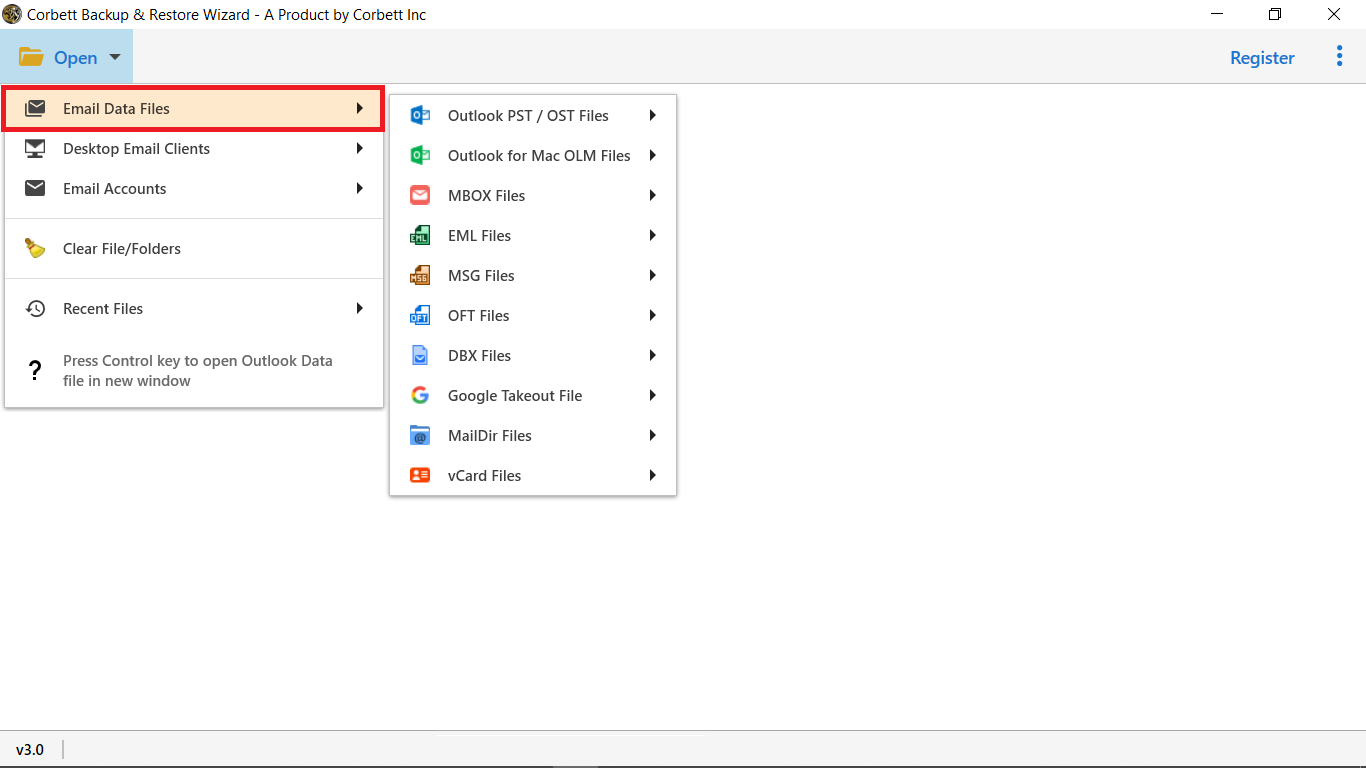
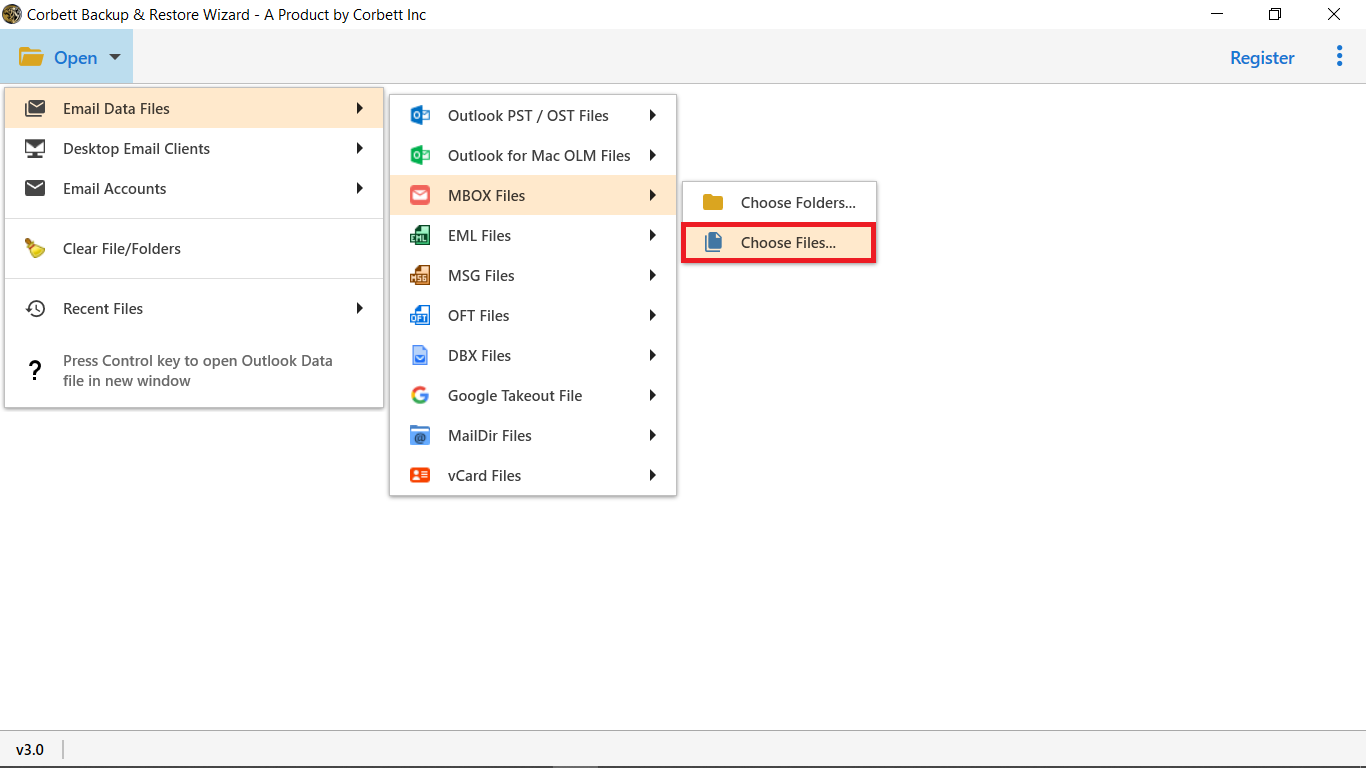
Go to Open, then Email Data Files, then Upload EML File. Single files and full folders both load, and the software scans them straight away.

  • Scan starts after loading
  • No file size restriction
  • Terabytes processed
  • Preview panel lists attachments
EML folder tree with selection checkboxes

Folder selection

Check the Folders for the PST

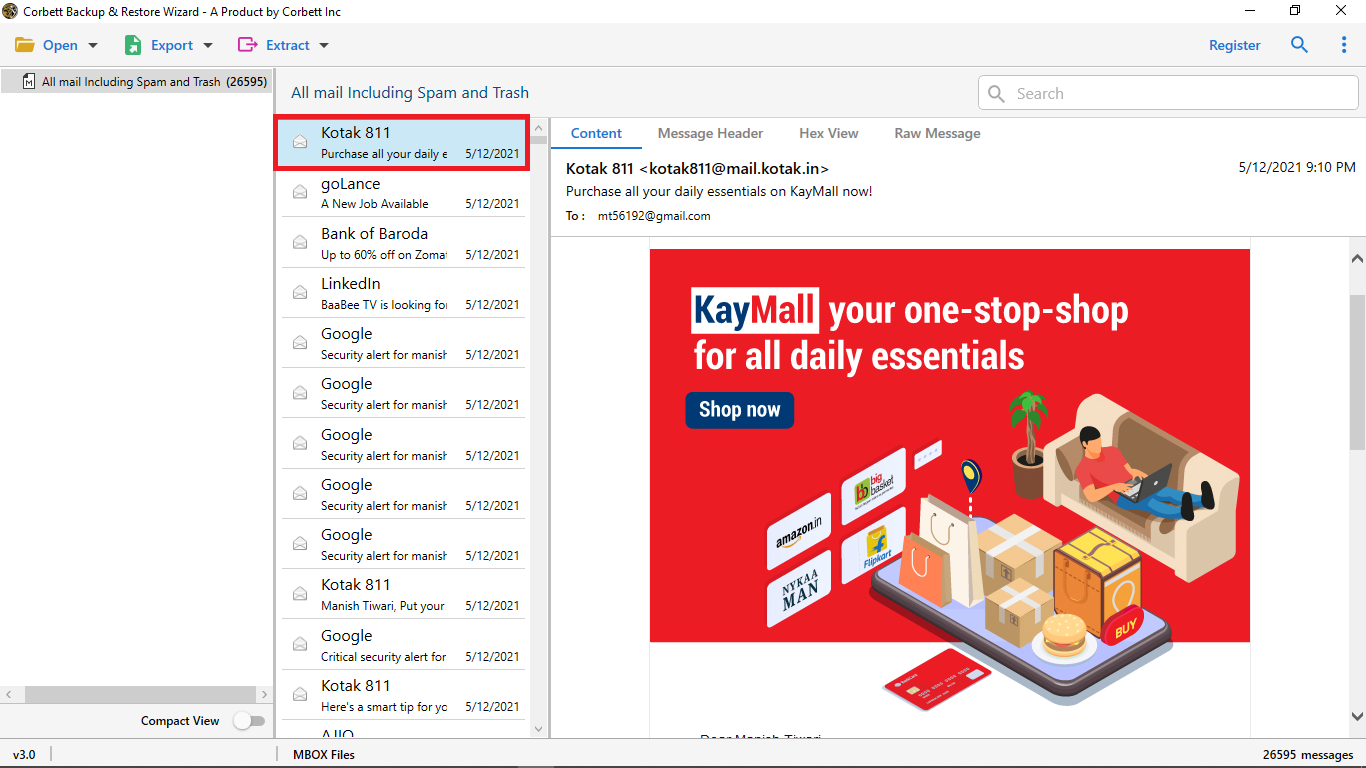
The preview panel lists loaded EML mail with all attributes. Tick the folders to include and leave the others out of the PST.

  • Mail shown with attributes
  • Folder tree from the source
  • Bulk or selective choice
  • Excluded folders skipped
Message preview with hex and raw views

Message preview

Preview EML Mail With Five Views

Five preview modes expose an EML file, attachments and meta data included, before any PST is created.

  • Content shows the body with attachments
  • Message header shows sender, recipients, subject and date
  • Properties reports meta data of the message
  • Hex view and raw message present the code saved in the mail
Search filters for selective conversion

Selective backup

Filter EML Data Before the PST

Refine by Subject, Address, Contact, Date, To and From, Time, Name, File Size or Attachment. Selective export builds a smaller PST.

  • Subject and Address
  • Contact and Name
  • Date and Time
  • To and From
  • File Size
  • Attachment
Export format and destination options

Output options

Set PST Options and Other Outputs

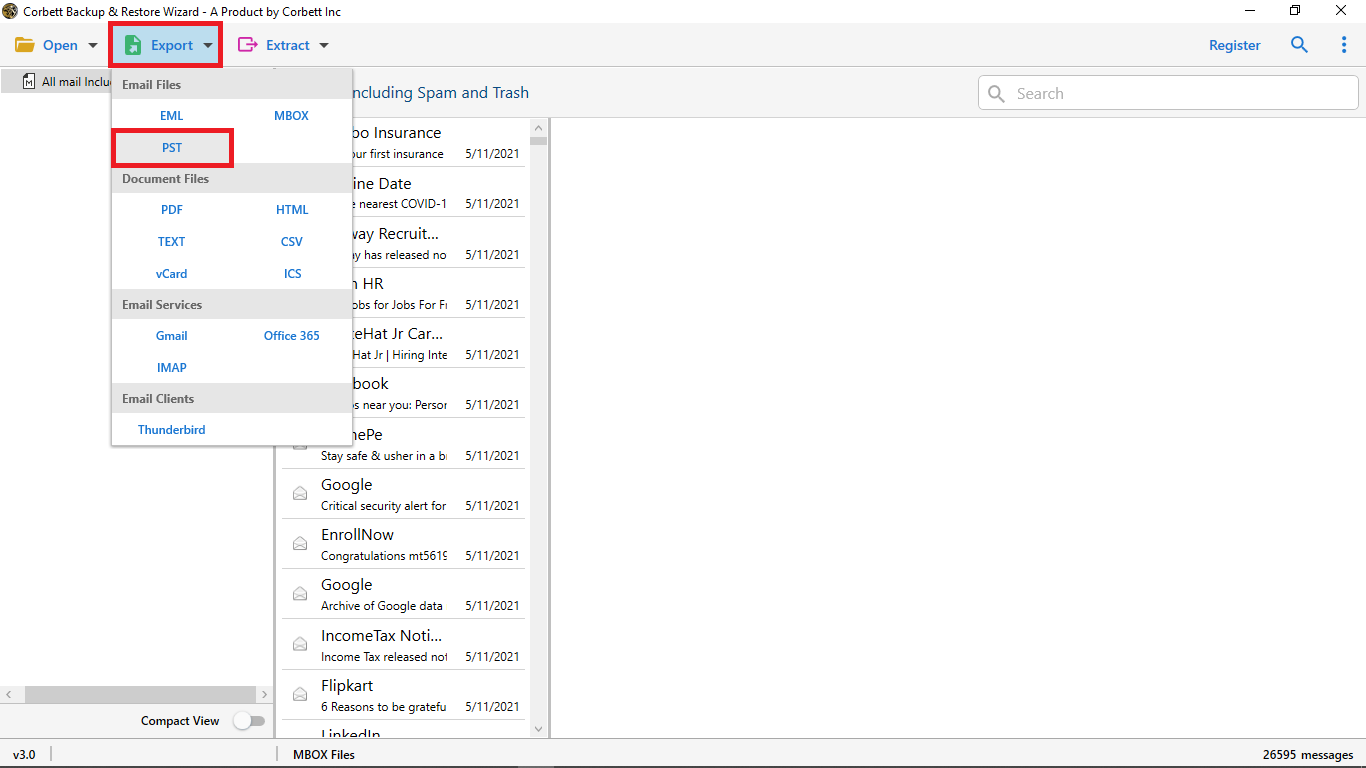
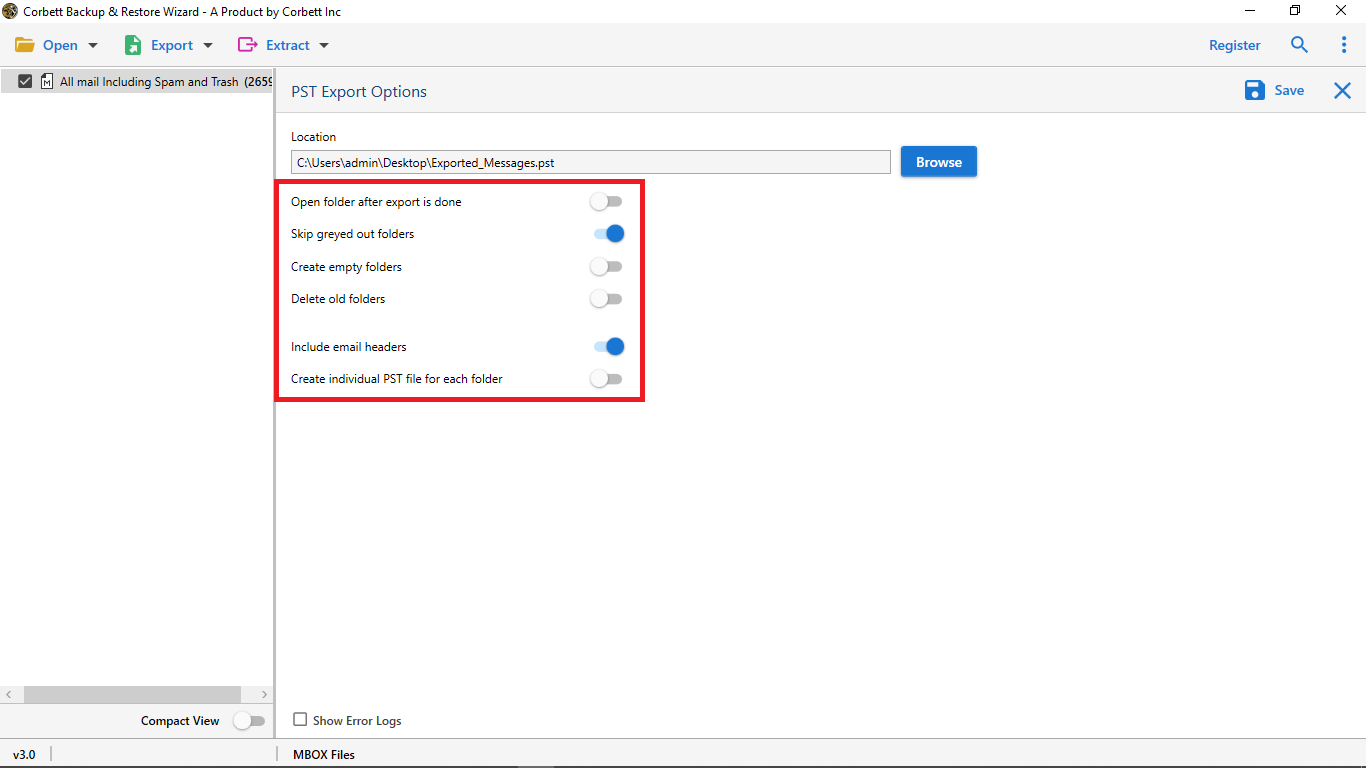
Under Export, select PST and tune the options: delete old folders, omit folder structure, add the email header, skip grayed out folders or build an individual PST for every folder.

Before converting

Checks Before the First PST Run

Three details worth settling first.

Outlook version

Know the target Outlook

PST output suits Outlook 2021, 2019, 2016 and older releases. Confirm the version before sharing the file.

Large sets

Consider one PST per folder

A single PST can grow large. The individual PST option keeps every folder in its own file.

Folder rules

Choose what to leave out

Old folders, folder structure, header and grayed out folders all have switches. Set them before pressing Save.

After conversion, open the PST with Import PST to Outlook and Import old emails into Outlook.

Free trial

Run the Free EML to PST Converter Trial

Install the trial and convert 10 EML files to PST. Open the result in Outlook before buying.

Download free demo

Before purchase

Hand Import or EML to PST Converter

Dragging EML messages into Outlook works for a few. Folder trees, filters and big batches need the software. The table shows where the manual route ends.

Task Manual import Converter
Cost Free $99 one time
A few messages Drag into Outlook Works too
Folder structure Rebuilt by hand Kept intact
Large batches One message at a time Bulk in one run
Separate PST files Not available One PST per folder option
Header and attachments Depends on the drag Included on request
Selective export Sorted by hand Filters by date, sender, size
Outlook versions Current install only Outlook 2021 and older

Green rows mark where manual import is enough.

For a handful of files Outlook alone works. A walkthrough is in Import EML files to Outlook .

Specifications

What EML to PST Converter Needs to Run

Download details

Version
4.1
Download size
47.6 MB
Trial limit
10 EML files
Delivery
Link and key by email
Licence
Personal: 2 PCs. Business: 10 PCs. Enterprise: 50 PCs
Download Now

System

Hard disk
100 MB free space
RAM
4 GB minimum
Processor
1 GHz minimum, 2.4 GHz for speed
Interface
English
Input
EML files and folders

Supported editions

Windows 11, 10, 8 and 7 in 32-bit and 64-bit, plus Windows Server 2016, 2012 R2 and 2008.

Launch with Run as Administrator. No macOS build.

Corbett has built Windows email utilities since 2020. Support is open around the clock on live chat and email.

Working process

See the Software Run

Prefer screenshots? The EML to PST guide covers the screens in order.

EML to PST walkthrough

Common questions

Answers on PST Conversion

Steps, size limits, options and what the trial converts.

How do I create a PST from EML files?

Start the software and choose Upload EML File from Email Data Files under Open. Once the scan ends, click Export, select PST, add filters and press Save.

Does the toolkit limit file size?

No. The toolkit processes terabytes of data with full accuracy.

Are folders and files kept in order?

Yes. The exact file and folder structure carries over into the PST.

Can addresses be extracted alone?

Yes. Select the Extract option and click Email Addresses.

Can I preview EML files with attachments?

Yes. The preview panel shows the mail with attachments and other meta data.

Which Outlook versions open the PST?

Outlook 2021, 2019, 2016 and older versions.

Which options does the PST export offer?

Delete old folders, omit folder structure, include email header, skip grayed out folders and create an individual PST for every folder.

Which licence editions exist?

Personal covers 2 machines, Business covers 10 and Enterprise covers 50 PCs.

What does the trial convert?

10 EML files to PST. The full version removes the limit.

Does Corbett store my data?

No. Conversion runs on your PC and Corbett does not save your data on a backend.

Can EML mail be stored in IMAP services?

Yes. More than 100 IMAP services are supported, with all data fields kept.

Which other formats are available?

MBOX, PDF, HTML, TEXT, CSV, vCard and ICS.

Does it run on Windows Server?

Yes. Windows 11, 10, 8 and 7 work, and so do Windows Server 2016, 2012 R2 and 2008.

Who answers support questions?

Through live chat and email, at any hour.

How do I get the download?

Email carries a link and the activation key after payment confirmation.

Step by step

Posts for EML to PST Moves

Guides for EML files, PST files and Outlook.

Moving between accounts is the job of the Email Migration Tool . Server cutovers use the IMAP Migration Tool. Other converters are listed under the email converter tool. Broken files belong to the email recovery software. Files open free in the email viewer software. Related converters: PST File Converter Tool and EML to MBOX Converter. Also see the EML Converter Tool, MBOX Converter, Thunderbird Migrator, Gmail Migration Tool and Gmail Backup Tool.

User testimonials

EML to PST Converter Reviews

1,863 ratings from users who built PST files from EML mail.

4.8 out of 5

Collected across 1,863 reviews pulled from feedback forms and support replies. Every quote below is unedited.

Better than free web tools

Earlier, my friend suggested converting EML to PST online, and I tried the free online service, but they are not accurate and store data for more than 48 hours on the server. I was looking for a reliable solution and found this toolkit In addition, Corbett offers active customer support through live chat. Overall satisfied with the purchase!

Mike Stegner

No hassles with PST

Thanks to this simple tool by CorbettSoftware, I was able to convert my EML files into PST format without any hassles. After looking for manual solutions (which obviously didn’t work), I found this EML to PST Converter software.

Michael Corner

Doubts cleared

Hands down to this great EML to PST converter tool. I was really confused about the accuracy of the toolkit. But thanks to this amazing app, I was able to get done with my work without any issues.

James Mercado

Get started

Turn EML Files Into PST Today

Get the free trial, convert 10 EML files and open the result in Outlook. The full edition costs $99 once, with a 30 day return window.

Download free demo Purchase now

Outlook 2021 and older · 47.6 MB · money back in 30 days