Restored an archive team wide
I had to restore a large amount of data from old backup data. The software allows me to recover multiple emails at once to desirable email platforms. It saved our team a lot of time and effort.
Corbett
Corbett Email Recovery Software restores saved mail into a live account. Load a PST, OST, MBOX, EML or MSG backup file and send it to Gmail, Microsoft 365, Yahoo or any IMAP mailbox from Windows. Folders, attachments and dates stay intact. Try free demo first.
Download free demo Purchase now
Backup files open read only. Nothing inside them is altered or moved.
Free demo, scanned clean on VirusTotal and a 30-day money-back window.
Lifetime licence from $99 Demo restores 10 emails per folder
Quick answer
Email recovery software opens a backup file that sits on your disk and restores its emails into a live mailbox. Corbett Email Recovery Software reads PST, MBOX, EML and more offline, then sends mail into Gmail, Microsoft 365, Yahoo, IMAP or Thunderbird on Windows.
What it opens
PST, OST, OLM, MBOX, EML, MSG, OFT, DBX, Google Takeout, Maildir and vCard backups
Where it restores
Gmail, Microsoft 365, Outlook.com, Yahoo, IMAP and Thunderbird
Who uses it
IT admins, small businesses and home users with an old backup file
Core features
Five screens of Corbett email restore software, in restore order.
Backup files
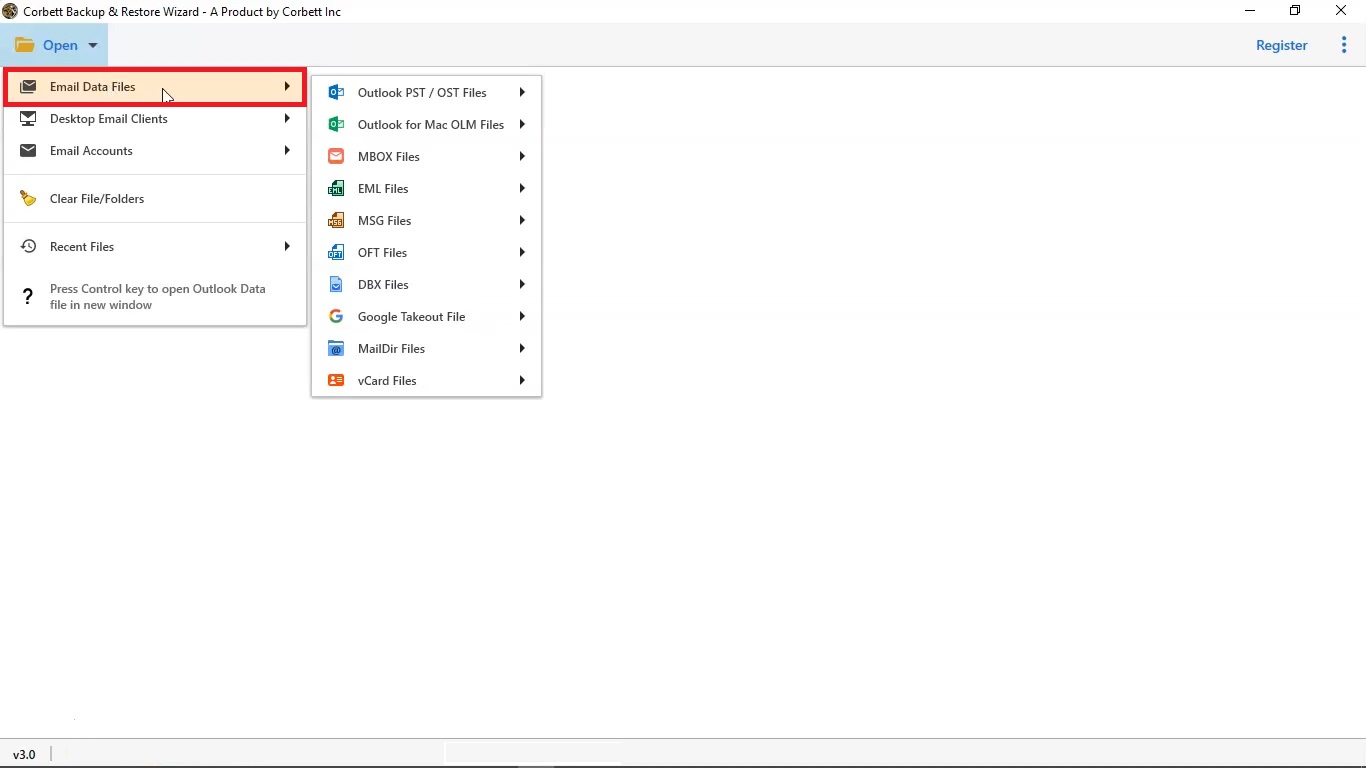
Open Email Data Files and email recovery software lists Outlook PST and OST, Outlook for Mac OLM, MBOX, EML, MSG, OFT, DBX, Google Takeout, Maildir and vCard files. Choose files one by one or load a full folder.
No mail client needs installing, so a spare PC with no Outlook still restores emails from a PST. Your backup opens read only and stays as it was.
Folder selection
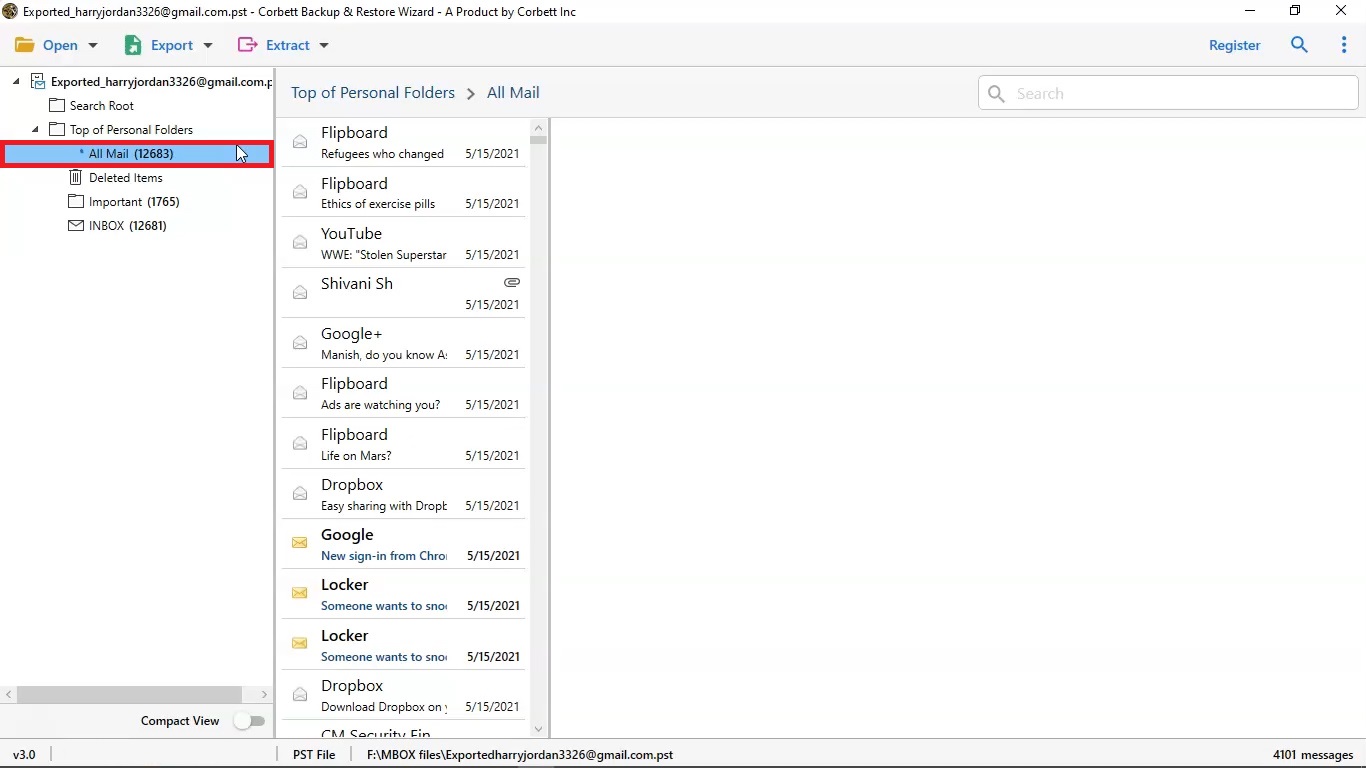
Your backup loads in a checkbox tree with a count beside every folder. Restoring one lost folder works like restoring an entire archive, which helps when your live mailbox already holds most of your mail.
Click any message and email recovery software previews it with content, message header, hex and raw views. Quick Search highlights keywords in yellow, and Advance Search offers All Search and Emails Search for name, subject, To, Cc and content.
Destination
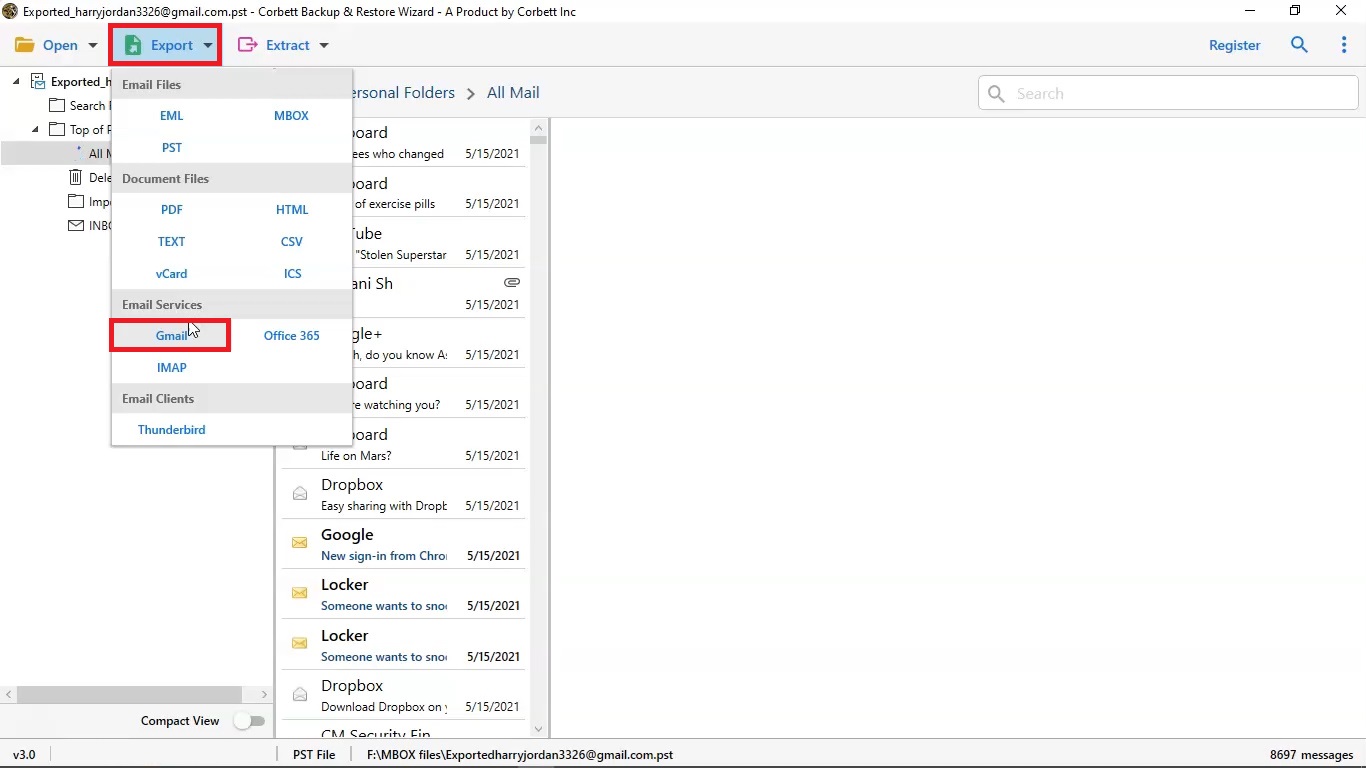
Select Export and Email Services lists Gmail, Office 365 and IMAP, while Email Clients lists Thunderbird. Yahoo and Outlook.com restore through matching screens.
Your destination can differ from your original account. A backup from a closed work address can restore emails into a personal mailbox, and a Thunderbird archive can go into Microsoft 365.
Restore options
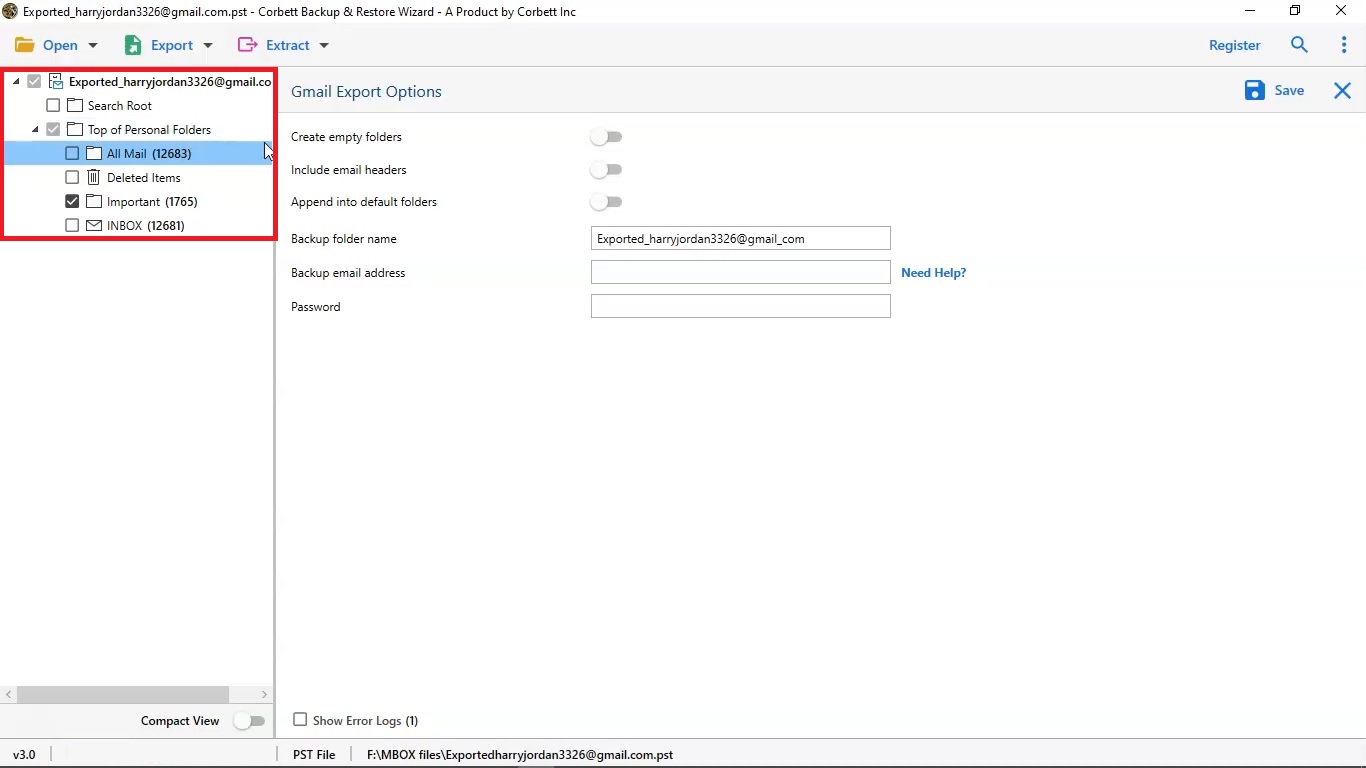
Switch on create empty folders, include email headers and append into default folders. Append puts restored mail into matching Inbox and Sent folders instead of a new folder.
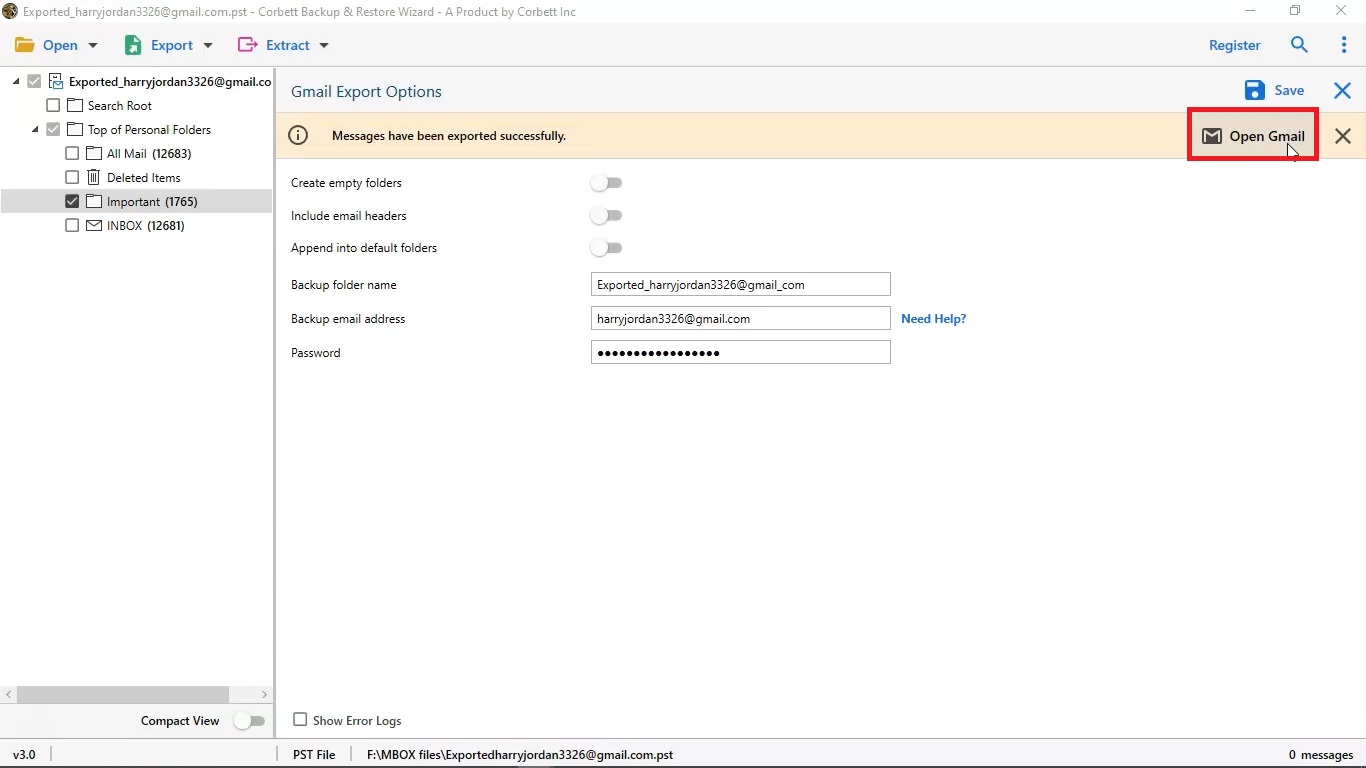
Type a folder name for restored mail, add your email address and password, then press Save. Gmail and Microsoft 365 sign in with OAuth 2.0 on your provider consent screen, so passwords stay out of Corbett.
Finish
A live progress panel shows every folder as it uploads. A log and CSV report list what restored and what failed.
When a message says exported successfully, select Open Gmail and check your restored folder. Duplicate detection skips messages already present, so a repeat session does not stack copies.
Before you start
Email recovery software restores from a backup file only. Check your situation below before you download.
| Situation | Supported | What it means |
|---|---|---|
| You hold a PST, MBOX, EML or MSG backup | Yes | Open your file and restore emails into a live account with folders kept |
| You need a different account | Yes | Mail from a closed work address can land in a personal Gmail account |
| Backup file stays untouched | Yes | Backup opens read only, so restore it again whenever you like |
| Mail deleted with no backup | No | Nothing exists to restore. Check provider trash and retention windows first |
| Damaged PST file | No | Repair a corrupt file first. Email recovery software expects a healthy file |
| Scheduled or incremental restore | No | A second session restores your full selection again |
| Mac and Linux | No | Email recovery software installs on Windows only |
No backup yet? Email Backup Software saves one from a live account, and Repair PST file without ScanPST tool covers damaged files.
Backup files
Select Open, then Email Data Files, and email recovery software lists every backup type it reads. Mix several files in one session.
| Backup source | File types | Made by |
|---|---|---|
| Outlook for Windows | PST and OST files, plus MSG and OFT | Outlook export, archive or cached mailbox |
| Outlook for Mac | OLM files | Outlook for Mac export |
| Thunderbird and Apple Mail | MBOX files | Mail client export or backup tool |
| Single message files | EML files | Drag and drop saves or backup tools |
| Outlook Express and Windows Mail | DBX files | Old Windows mail stores |
| Google Takeout | Google Takeout mail file | Google account data export |
| Maildir | Maildir folders | Linux and server mail stores |
| Contacts | vCard files | Phone and address book exports |
Not sure what a backup file holds? Open it first in Free PST Viewer Tool, Free MBOX Viewer Software or Free Google Takeout Viewer. All three leave your file untouched.
Restore destinations
Choose Export, then your destination, sign in once and restore emails. Your destination can differ from your backup account.
| Destination | Examples | Sign-in |
|---|---|---|
| Gmail | Personal Gmail and Google Workspace (G Suite) | OAuth 2.0 or app password |
| Microsoft 365 | Office 365 and Outlook.com mailboxes | OAuth 2.0 or admin impersonation |
| Yahoo Mail | Yahoo accounts with two-step verification | App password |
| Any IMAP host | Shared hosting, ISP mail and custom domains with IMAP on | Email, password and server name |
| Thunderbird | Desktop profile on your PC | Select your profile |
| Many users | One row per user in a CSV list | Bulk sign-in |
Moving mail between two live accounts instead? Open Email Migration Tool for that job.
File or mailbox
Email recovery software works from a file into an account. Match your job below to where your mail sits.
File to mailbox
A PST, MBOX or EML backup that must go back online. Email recovery software does that job.
Mailbox to file
Mail still sits in a live account? Open Email Backup Software to save it as files.
File to file
A backup that needs another format first? Use Email Converter Tool to convert it.
Mailbox to mailbox
Moving mail between two live accounts? See Email Migration Tool.
All four jobs share one download. Select your mode once software opens. To read a file with no output at all, use Email Viewer Software.
Working process
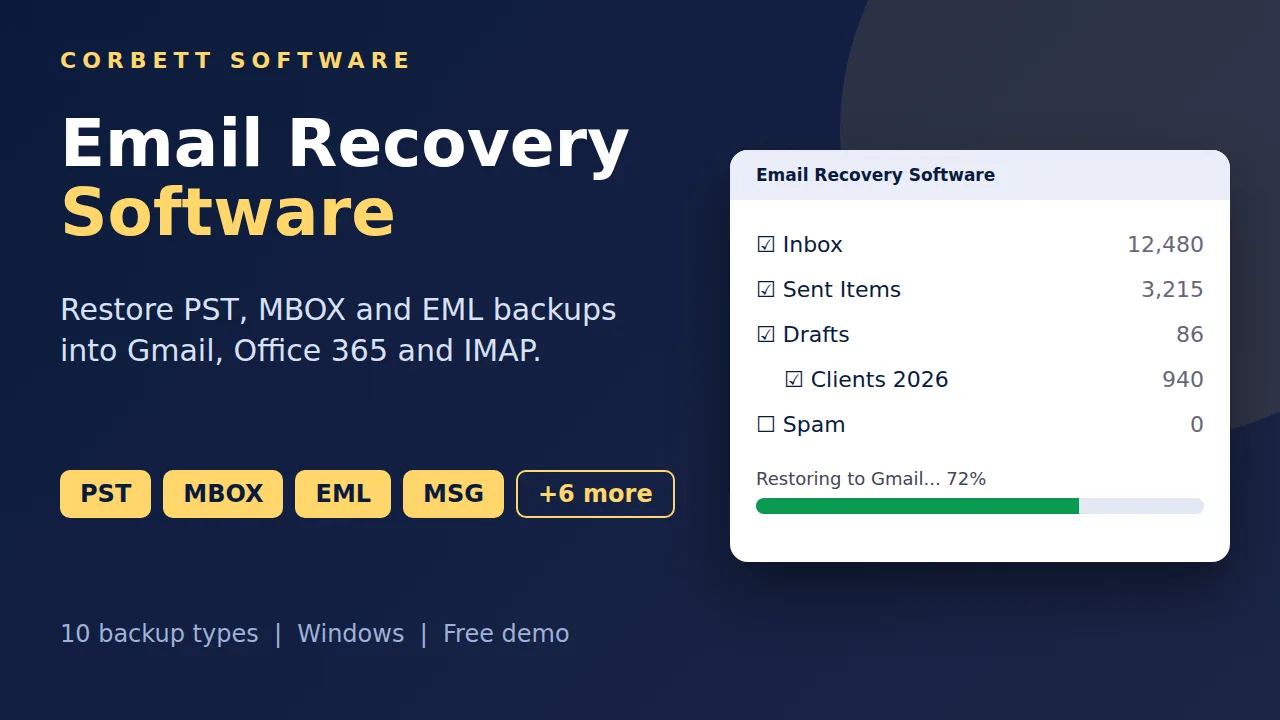
Four steps restore emails from a backup file into a mailbox. Try them on one folder in free demo first.
Open your backup file
Start email recovery software, select Open, then Email Data Files and choose your file type. Select Choose From A Folder or Choose Files and press Open.
Select folders to restore
Your backup loads as one folder tree. Tick lost folders only, then preview emails and set filters to keep your restore focused.
Choose your destination
Select Export, then Gmail, Office 365, IMAP or Thunderbird. Mark your folders and set options such as create empty folders.
Sign in and restore
Enter your destination email address and password, press Save and watch live progress. Select Open Gmail to check your restored mail.
Want screenshots for every click? Follow Gmail restore guide.
Working process
Prefer text? Open Gmail restore guide for every click with screenshots.
More options
Small options that save hours when you restore emails in bulk.
OAuth 2.0 sign-in
Modern authentication for Gmail and Microsoft 365
Office 365 admin access
Impersonation restores user mailboxes with one admin login
Bulk user mapping
Many destination accounts from one CSV list
Append to default folders
Restored mail joins Inbox and Sent in place
Create empty folders
Rebuild your full folder tree
Include email headers
Keep full header data with every message
Smart filters
Date, sender, subject and size
Quick and advance search
Find emails before you restore
Four preview views
Content, header, hex and raw message
Duplicate skip
Repeated emails restore once
Proxy support
Connect through your own proxy server
Auto retry
Failed items try again on their own
Live progress
Watch every folder as it restores
Log and CSV report
See what restored and what failed
USB and NAS sources
Restore from external and network drives
Free demo
Test Email Recovery Software on a Backup File
Install free demo, load a backup, select one folder and sign in to your destination. Free demo restores 10 emails per folder, so your mailbox is quick to check.
Download free demoTry before you buy
Free demo of email recovery software loads, previews and searches your full backup. Only restore is capped.
| Feature | Free demo | Full version |
|---|---|---|
| Load backup files and folders | Yes | Yes |
| Preview, search and analysis views | All available | All available |
| Emails restored per folder | 10 | Unlimited |
| File size and user limit | Restore stops at 10 per folder | None |
| Price | Free | From $99 one time |
Use cases
Anyone who must restore emails from a backup file into a live mailbox.
People with an old PST backup
Restore emails from an Outlook export into Gmail or Outlook.com and read years of mail on any device.
Small businesses changing provider
Restore emails from a mailbox archive into Microsoft 365 or a new IMAP host after a domain or server change.
IT admins after a tenant move
Restore emails from leftover PST and MBOX archives into correct user mailboxes for all employees.
Teams handling leavers
Restore emails from a former employee archive into a shared or successor mailbox with folders in place.
Users of a new PC
Restore emails from Thunderbird or Outlook backups into your fresh email account.
Records and compliance staff
Restore emails from archived EML and MSG files into a mailbox where search and retention rules apply.
Why Corbett
Reasons buyers choose Corbett email restore software.
No subscription
Lifetime price from $99
Backup stays safe
Your file opens read only
Direct connection
No Corbett server in between
Ten backup file types
PST, MBOX, EML, MSG, OLM and more
No size limit
Any file size and any user count
No mail client needed
Restore with no Outlook
Smart filters
Date, sender, subject and size
30-day refund
Money-back window after purchase
Manual or tool
Microsoft PST import documentation and Google GWMMO documentation describe free routes. Both suit managed accounts and carry limits.
| Task | Free routes | Email Recovery Software |
|---|---|---|
| Cost | Free | From $99 one time |
| Outlook installed | Needed for GWMMO and Outlook import | Not needed |
| Personal Gmail | GWMMO needs Workspace accounts | Gmail and Workspace both work |
| Admin rights | Microsoft PST import needs a Mailbox Import Export role or global admin | Mailbox login works |
| PST size | Microsoft import asks for PST files under 20 GB | No limit set by Corbett |
| Filters | Folder level only | Date, sender, subject and size |
| Many users | Repeat for every mailbox | One batch from a CSV list |
| Small test restore | Possible in Outlook | Free demo restores 10 per folder |
Free routes win on cost and small tests only.
Global recognition
Users rate Corbett email recovery software 4.6 out of 5 from 683 reviews; these software directories list it.
 CNET
CNET Download.io
 UpdateStar
 TopSoftware Advisor
 SaaSHub
 Uptodown


Specifications
Download details
System
Supported editions
Windows 11 (64 bit), 10, 8 and 7 in 32-bit or 64-bit, plus Windows Server 2016, 2012 R2 and 2008.
Start it with Run as Administrator.
Corbett has built Windows email utilities since 2020. Setup trouble and first-use questions go to our support desk.
User testimonials
Email recovery software earns 683 reviews on software index sites and customer feedback.
Collected across 683 reviews from software review sites and customer messages. Three reviews below are unedited.
I had to restore a large amount of data from old backup data. The software allows me to recover multiple emails at once to desirable email platforms. It saved our team a lot of time and effort.
I used this tool to recover permanently deleted emails from backup files. The software interface is simple and easy to use. I highly recommend this tool as it also offers a trial version to test software before purchase.
The advanced search feature helped me recover specific emails. I restored emails to Thunderbird without any errors. It is a standalone application that does not need any email client or extra setup.
Before restoring
Three short checks keep your email restore clean.
Create your destination mailbox
Add every user to your new provider first. Email recovery software writes into accounts that already exist.
Create app passwords
Gmail and Yahoo block normal passwords when two-step verification is on. Create an app password first, as Google app passwords help explains.
Check free storage
Restored emails need room in your destination account. Free space in your provider quota before you load a large backup.
Best practice
An email restore only helps if your mail arrives complete. Four habits keep your data safe through it.
Keep your backup
Store your backup file until folder counts match. Keep 3 copies on 2 types of media with 1 copy off site.
Start with one folder
Restore one small folder first and open a few messages. Catch a wrong setting before a large job.
Restore emails for lost folders only
A full restore into a mailbox that holds most of your mail wastes time. Tick only folders you lost to avoid repeats.
Know provider limits
Google lists a 25 MB attachment limit for personal Gmail, as Gmail attachment help explains, and Microsoft skips PST items above 150 MB. Oversized messages may not restore.
Common questions
Backup files, destinations, limits and licence answers.
Email recovery software opens a backup file such as PST, MBOX or EML and restores its emails, attachments and folders into a live mailbox. Corbett Email Recovery Software does that on Windows.
No. Email recovery software restores a backup file into a mailbox, and with no file there is nothing to restore. Check your webmail trash folder first, then any retention window your provider offers.
Select Open, then Email Data Files and your file type. Choose your file and press Open. Tick folders to restore, select Export, choose Gmail, Office 365, IMAP or Thunderbird, enter your email address and password, then press Save. Free demo lets you test every step first.
Outlook PST and OST, Outlook for Mac OLM, MBOX, EML, MSG, OFT, DBX, Google Takeout, Maildir and vCard files all sit under Email Data Files. Choose one file or a full folder.
Gmail and Google Workspace, Microsoft 365 and Outlook.com, Yahoo, any IMAP host and Thunderbird. Your destination can differ from your backup account.
Select Open, Email Data Files and Outlook PST/OST Files, then choose your PST file. Tick folders, select Export, choose Gmail, sign in and press Save. Outlook is not needed on your PC.
Yes. Select Export, then Office 365, and sign in with your mailbox. Microsoft PST import documentation also covers a free import service, which asks for PST files under 20 GB and a Mailbox Import Export role or global admin.
Select Open, Email Data Files and MBOX Files, choose your file, select Export, then Gmail. Thunderbird and Apple Mail backups both load as MBOX.
Select Open, Email Data Files and EML Files, then Choose Folders to load a directory. Select Export, choose IMAP, enter your email address and password and press Save. Server name and port fill in on their own for most hosts.
Yes. Google Takeout File sits in Email Data Files beside PST and MBOX. Load it, select your folders and restore into Gmail or any other destination.
No. Email recovery software reads PST files by itself. Google GWMMO documentation notes that GWMMO needs an Outlook edition that matches your Outlook version.
Yes. Gmail and Google Workspace both work. Google GWMMO documentation says GWMMO users need Workspace accounts.
No. Your backup opens read only. Nothing is added, moved or deleted inside it, so you can restore it again later or keep it as an archive.
Yes. Sign in to whichever mailbox should receive your mail. A backup from a closed work address can land in a personal Gmail account.
Yes. Your backup loads in a checkbox tree, so tick folders you lost and skip all others. Date, sender and subject filters narrow your restore further.
No. Email recovery software compares messages and skips ones already present. Restoring only lost folders also saves time on a mailbox that already holds most of your mail.
Yes. Folder hierarchy, attachments, dates, headers and read status carry over to your destination.
It puts restored emails into matching folders such as Inbox and Sent in your destination. Without it, restored mail arrives in a new folder named in your restore options.
Yes. Put one row per user in a CSV list and email recovery software matches every backup to its destination account. Microsoft 365 admins can also sign in with impersonation.
Yes. Email recovery software signs in to Gmail and Microsoft 365 with OAuth 2.0 on your provider consent screen. Yahoo and similar services want an app password, as Google app passwords help explains for Google.
No. A damaged PST needs repair before a restore. Repair PST file without ScanPST tool walks through repair.
Email recovery software restores emails, attachments and folders into your mailbox. For contacts and calendars, convert them to vCard and ICS files with Email Converter Tool.
Corbett sets no file size limit, though big archives take longer because your provider limits upload speed. Google lists a 25 MB attachment limit for personal Gmail accounts in Gmail attachment help, and Microsoft skips PST items above 150 MB in its import service.
Yes. Quick Search highlights keywords in yellow, Advance Search offers All Search and Emails Search, and a built-in viewer shows content, message header, hex and raw views.
No. Email recovery software opens a file on your disk and connects straight to your mail provider. Corbett never holds or forwards a message.
No. Email Recovery Software installs on Windows 7 to 11 and Windows Server 2008 to 2025 only.
Free demo loads your full folder tree and gives you every filter and preview. Restore stops at 10 emails per folder, enough to test your destination before you buy.
Windows 11 (64 bit), 10, 8 and 7, plus Windows Server 2016, 2012 R2 and 2008.
Personal licence covers 5 machines, Business covers 25 and Enterprise covers 100. All three are one time payments with lifetime validity.
Yes to both. Every licence includes 24/7 customer support, and refunds are accepted within 30 days of purchase.
Step by step
Every page below covers one restore route and answers questions it raises.
Restore to Gmail and Yahoo
Restore to Office 365 and IMAP
Restore to Thunderbird and Outlook
Check a backup before restoring: Open PST file, Open MBOX file, Open Google Takeout files, Google Takeout not working and PST is not an Outlook data file. Need another format first? Use Email Converter Tool, or move live mail with Email Migration Tool.
Get started
Test Email Recovery Software on one folder first. Full access is from $99 in a single payment, and refunds are open for 30 days.
Download free demo Purchase now
87.4 MB · Windows 11 to 7 and Windows Server 2025 to 2008 · 30 day money back