Hierarchy stayed intact
I tried the Corbett PST File Converter Software to import PST file into Gmail account. This is the best choice for me because it maintains the file hierarchy and folder structure during the conversion process.
Corbett
Corbett PST File Converter opens Outlook PST files on Windows and saves mail as PDF, EML, MBOX, HTML, TXT or CSV and contacts and calendars as vCard and ICS. Folders, dates and attachments stay in place and Outlook does not need to be installed. Try free demo first.
Download free demo Purchase now
Works offline on your PC. Corbett never sees your PST file or messages.
Free demo, scanned clean on VirusTotal and a 30 day refund window.
Lifetime licence from $99 Demo converts 10 emails per folder
Conversion scope
PST file ties Outlook data to one program. Teams switch email clients, move to Gmail or Microsoft 365 or need a few emails for a case file. PST converter saves your data in formats those places accept and leaves your PST as it was.
PST holds
6PST input types
4Outputs
7Not needed
4New Outlook cannot import PST files
Microsoft guide to exporting Outlook items to a PST file says importing a mailbox or calendar from a PST is not supported in new Outlook yet and calendar and contacts saved in PST files are not available there. PST File software opens your file with no Outlook at all.
Related pages include OST Converter, MBOX Converter, MSG Converter and OLM Converter. Other mail files sit on email converter tool page.
Core features
Five screens of Corbett PST converter software, in conversion order.
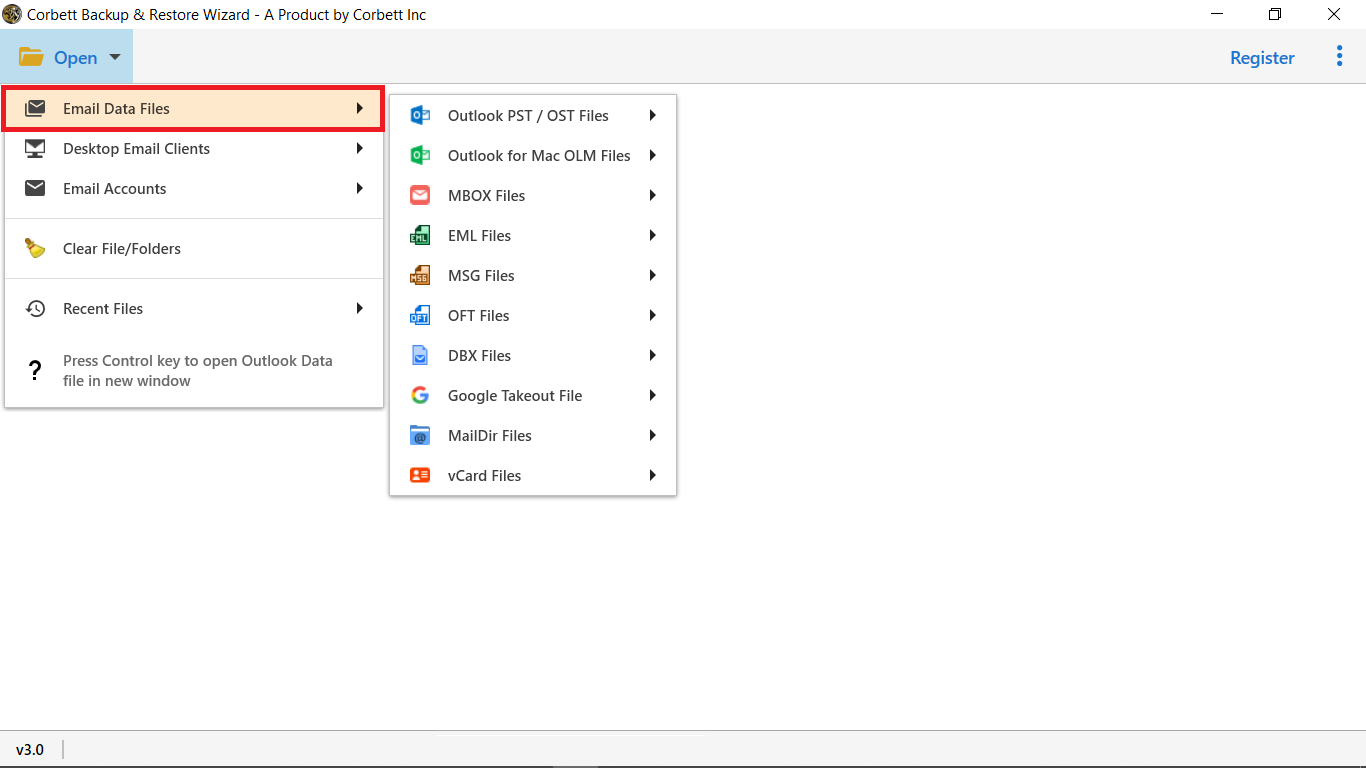
Source files
Select Open, then Email Data Files and choose PST File. PST converter fills its panel with your data and Desktop Email Clients finds default Outlook profile on your PC.
No Outlook install is needed so a spare PC with no Outlook still works. PST file converter opens your file and leaves it as it was.
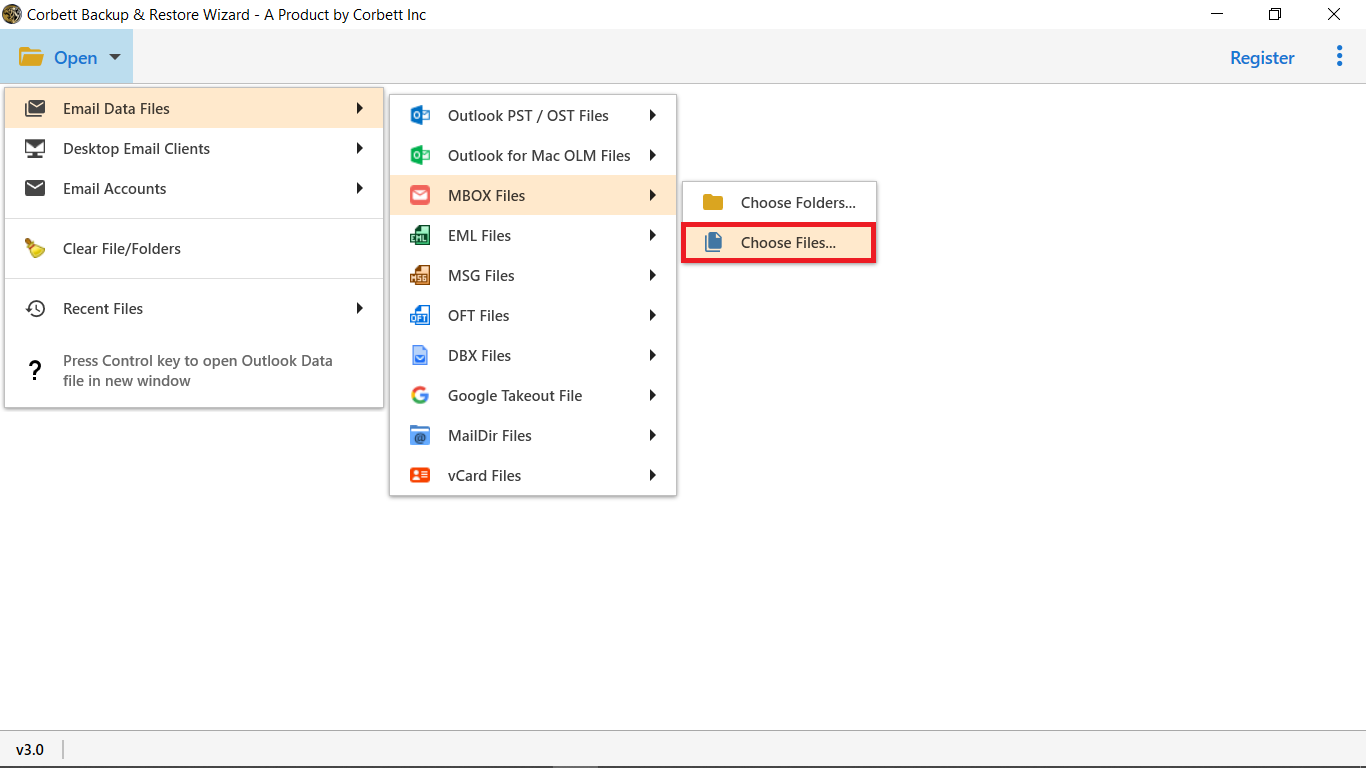
Batch loading
Select Choose Files for one or a few PST files. Select Choose Folders to load an entire directory of PST files in one step.
Loaded files appear in one tree so PST converter handles several PST files, large ones included, in a single session. No file size limit applies.
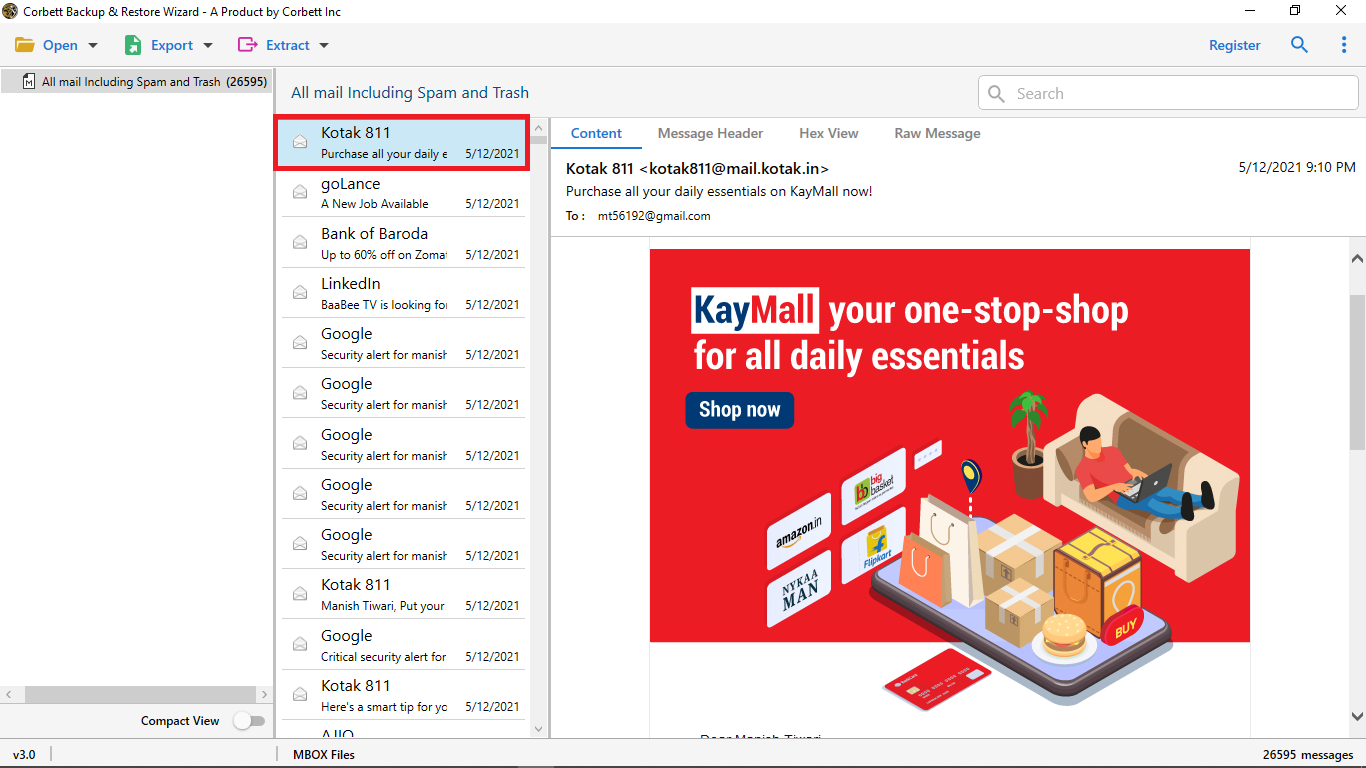
Message preview
Click any message and a reading pane opens beside four analysis views. Admins use them to confirm correct folders before an export starts.
Content shows body and address fields. Message header lists From, To and Subject. Properties reports item attributes, while hex and raw message views show stored values and code.
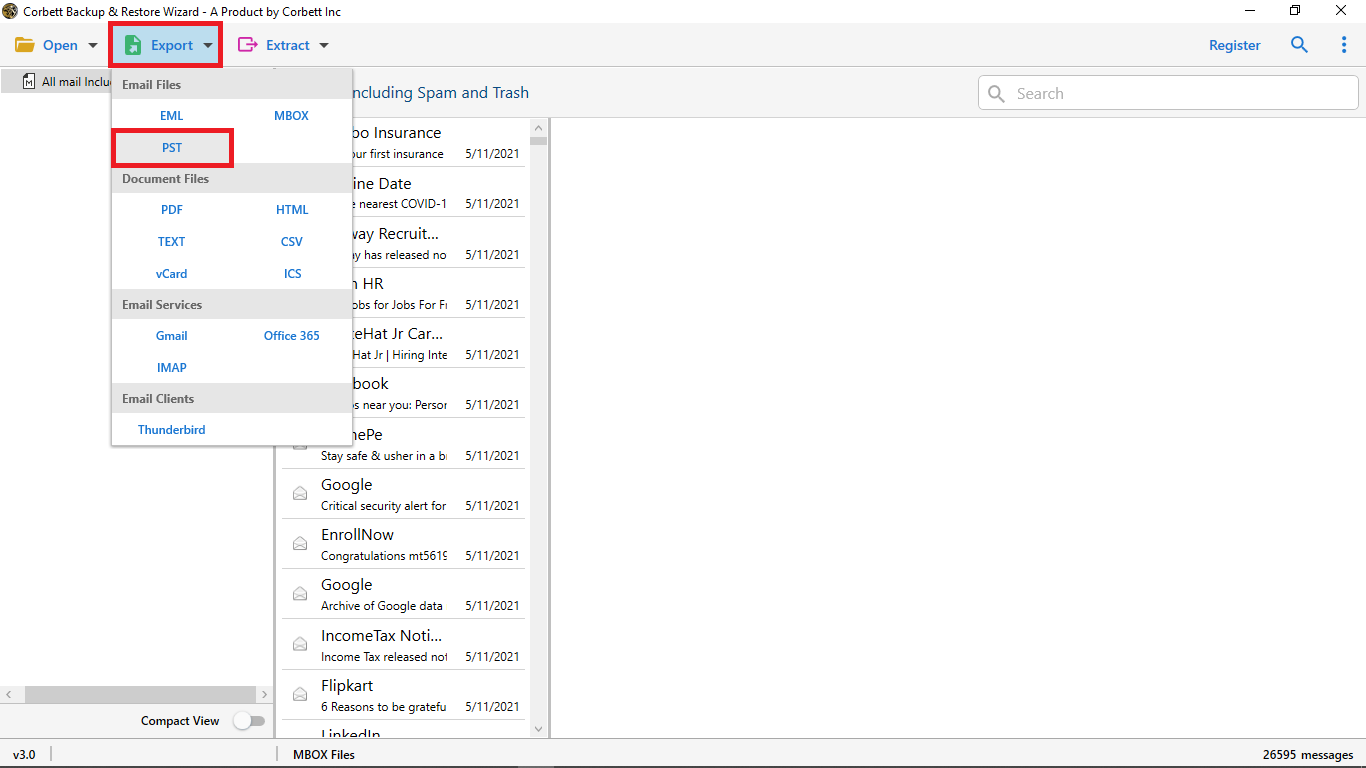
Output formats
Email files export to EML or MBOX. Document files export to PDF, HTML, TXT or CSV, with contacts going to vCard and calendars to ICS.
Filter first by attachments, date range, time range, To, From, Cc, Bcc, file name and file size, then save only matched items.
Export options
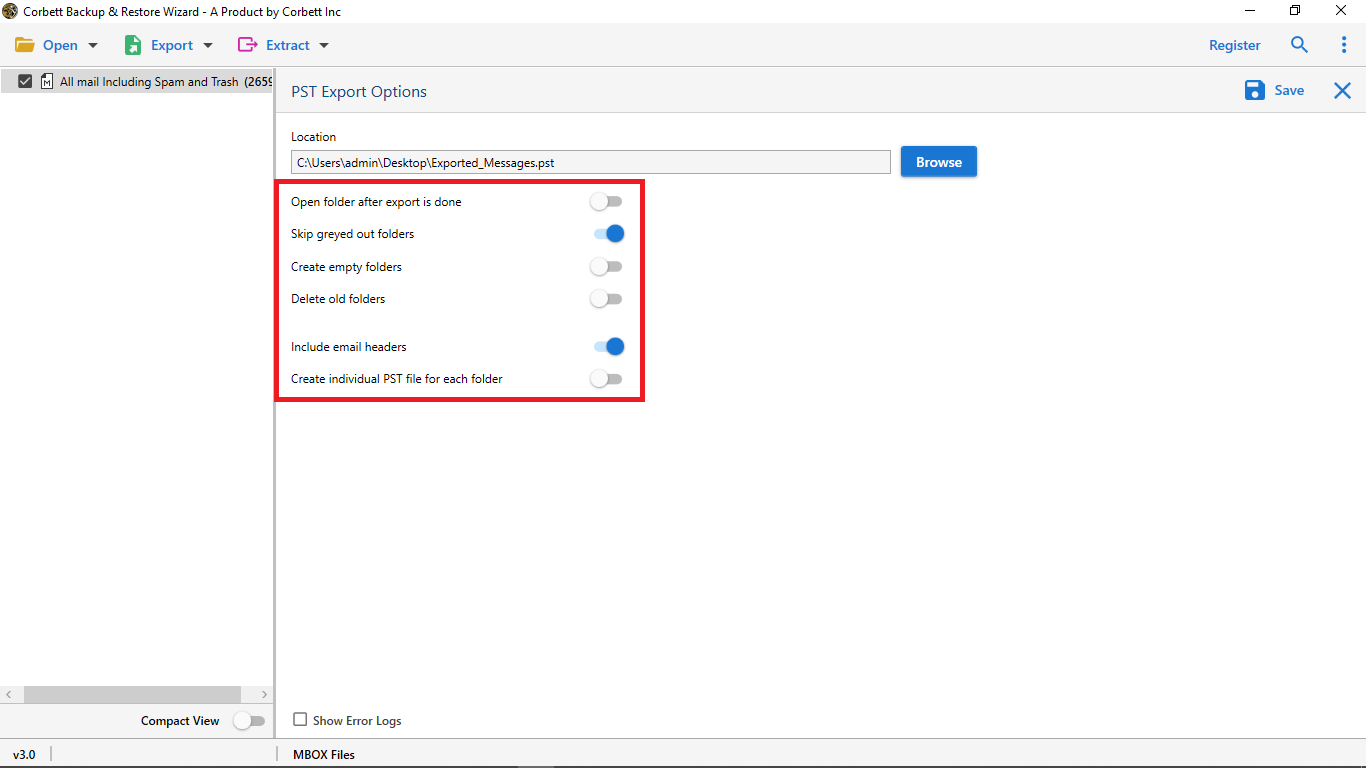
Switch on open folder after export, leave out greyed out folders, create empty folders and include email headers. Create a separate PST for every folder so small files stay healthy and avoid corruption errors.
Select Browse to choose a destination, then Save. Live progress shows every folder as it converts. Need MBOX files? Open PST to MBOX Converter.
Working process
Four steps take a PST file to its new format. Try them on one file in free demo first.
Open your PST file
Start Corbett, select Open, then Email Data Files and choose PST File. Select Choose Files for one file or Choose Folders for many.
Preview and select folders
Your PST appears as one folder tree. Click any email to preview it, tick folders and set filters to trim your PST conversion.
Choose your output
Select Export and choose a format from EML or MBOX for email files, PDF, HTML, TXT or CSV for documents, vCard for contacts and ICS for calendars.
Save your converted mail
Set options, select Browse for a folder and press Save. Live progress shows every folder and Open Folder takes you to your output.
Want screenshots for every click? Follow PST converter guide.
Working process
Prefer text? Open Open PST file to see what a PST holds before conversion.
Extra options
Small options that save hours when you convert PST files in bulk.
Batch PST conversion
Many PST files converted in one session
No file size limit
Large PST files convert too
Folder hierarchy kept
Inbox, Sent and subfolders stay in order
Attachment extraction
Save attachments alone from any PST
Email address extraction
Export addresses to CSV
Phone number extraction
Pull numbers from message bodies
File naming options
Name output by From, To, Date or Subject
Smart filters
Date, sender, subject and size
Quick and advance search
Find emails before you convert
Four preview views
Content, header, hex and raw message
Unicode PST output
Split large PST or merge many into one
Individual PST per folder
One PST file for every folder
Log and CSV report
See what converted and what failed
USB and NAS targets
Save output to external drives and network storage
Include email headers
Keep full header data in output
Choose output
PST file converter saves to nine file formats. Match format to where your converted mail will open.
| Format | Best for | Opens in |
|---|---|---|
| PST | Split a large PST or merge many into one | Microsoft Outlook |
| MBOX | Moving mail to a free email client | Thunderbird and Apple Mail |
| EML | One file per email, quick to search | Windows Mail and most email clients |
| Legal files, audits and printing | Any PDF viewer | |
| HTML | Reading mail with no email client | Any web browser |
| TXT | Plain text archives | Any text editor |
| CSV | Lists of senders, dates and subjects | Excel and Google Sheets |
| vCard | Contacts moved into a phone or address book | Outlook, Gmail and phones |
| ICS | Calendar entries shared between apps | Outlook, Google Calendar and Apple Calendar |
Free demo
Test PST File Converter on a Real PST
Install free demo, open a PST file, select a folder and choose a format. Free demo converts 10 emails per folder so your output is quick to check.
Download free demoTry before you buy
Free demo opens, previews and filters your full PST. Only conversion is capped.
| Feature | Free demo | Full version |
|---|---|---|
| Open PST and load folders | Yes | Yes |
| Preview, filter and analysis views | All available | All available |
| Emails converted per folder | 10 | Unlimited |
| PST size and file count | Conversion stops at 10 per folder | No limit |
| Price | Free | From $99 one time |
Use cases
Anyone who must convert a PST file that will not open where needed.
People switching email client
PST converter saves Outlook mail as MBOX or EML for Thunderbird and retains folders in place.
Legal and compliance teams
Convert PST emails to PDF with sender, date and attachments named clearly for case files and audits.
IT admins after a switch
Convert leftover PST files from retired PCs into formats users open without Outlook.
Users on new Outlook
New Outlook cannot import PST files. Convert them first, then move mail where you need it.
Investigators
Preview message header, hex and raw views for a PST of unknown origin before you export.
Marketers and list builders
Export addresses and phone numbers from an old PST to CSV for outreach.
Why Corbett
No subscription
Lifetime price from $99
Works offline
No login and no upload
Original stays safe
PST opens in view mode
No Outlook needed
Convert PST with no Outlook
No size limit
Any PST size and file count
Folders kept
Hierarchy stays in order
Smart filters
Date, sender, subject and size
30 day refund
Refund window after purchase
Before conversion
PST File utility turns an Outlook data file into another format. Here is what that includes and where it stops.
| Capability | Supported | What it means |
|---|---|---|
| File to file conversion | Yes | PST to PDF, EML, MBOX, HTML, TXT and CSV with folders kept |
| Contacts and calendars | Yes | Contacts convert to vCard and calendars to ICS |
| Outlook installed | Not needed | Files open on a PC with no Outlook |
| Source PST | View mode only | Output goes to a new folder and your original stays as it was |
| Internet and passwords | Not needed | Conversion works offline on local files |
| Damaged PST | Repair first | Badly damaged PST needs repair before it converts |
| Live mailboxes | Other mode | Use Email Backup Software or Email Migration Tool for accounts |
| Mac and Linux | No | PST file converter installs on Windows only |
Outlook or tool
Outlook exports mail to a PST file and works on one file at a time. Microsoft guide to exporting Outlook items to a PST file handles it. Here is where Outlook stops.
| Task | Outlook export | Corbett |
|---|---|---|
| Cost | Free | From $99 one time |
| Handful of emails | Save As or print to PDF in Outlook | Works too |
| Entire PST to PDF or EML | One message at a time | Every folder in one session |
| Many PST files | Open one at a time | One batch of files or folders |
| New Outlook | PST import not supported yet | Opens the file with no Outlook |
| Contacts and calendars | Contacts to CSV only in classic Outlook | vCard, CSV and ICS output |
| Filters | Basic search only | Date, time, To, From, size and name |
| PDF file names | Typed in by hand | Named by From, To, Date or Subject |
| Machine without Outlook | Cannot open your file | Opens files by itself |
Outlook export wins for a handful of messages.
Global recognition
Users rate Corbett PST file converter 4.6 out of 5 from 683 reviews and these software directories list it.
 CNET
CNET Download.io
 UpdateStar
 TopSoftware Advisor
 SaaSHub
 Uptodown


Specifications
Download details
System
Supported editions
Windows 11 (64 bit), 10, 8 and 7 in 32 bit or 64 bit, plus Windows Server 2016, 2012 R2 and 2008.
Start PST file converter with administrator rights.
Corbett has built Windows email utilities since 2020. Setup trouble and first use questions go to our support desk.
User testimonials
PST File conversion software shares 683 reviews on software index sites and customer feedback.
Collected across 683 reviews from software indexes and customer feedback. Three reviews below are unedited.
I tried the Corbett PST File Converter Software to import PST file into Gmail account. This is the best choice for me because it maintains the file hierarchy and folder structure during the conversion process.
Due to my job profile as marketing associate, I've used plenty of software's over years. I have to say that Corbett PST file converter Tool is one of the finest solution I have used so far.
One of my colleagues suggested to use Corbett Outlook PST conversion tool. I use this application to convert PST files to document format, and the result was quite good with multiple advanced features.
Before conversion
Three short checks keep your PST conversion clean.
Copy your PST to a local drive
Gather your PST files in one folder on your PC. Loading from a local drive is faster and safer than a network share.
Close Outlook
Quit Outlook first. Open Outlook can lock its own PST file and block loading.
Check free disk space
PDF and EML output can take more room than your PST. Select an output drive with plenty of space.
Best practice
Your PST conversion only helps if your mail arrives in full. Four habits keep your data safe through it.
Backup first
Copy your original PST before you start. Keep 3 copies on 2 types of media with 1 copy off site.
Start with a small PST
Convert one small PST and open a few messages in your new format. Catch a wrong setting before a large job.
Repair damaged PST first
PST that Outlook refuses to open needs repair before conversion. Converting never fixes corruption. Open PST is not an Outlook data file first.
Keep originals until checked
Store your source PST files until folder counts match. Delete them only after you open converted mail.
Common questions
Steps, formats, limits and licence answers for PST file conversion.
Corbett opens an Outlook PST file and saves its emails, attachments, contacts and calendars in another format. Corbett PST File Converter does that offline on Windows.
Open PST File software, select Open, then Email Data Files and PST File. Choose Files or Choose Folders, preview your content, select Export, choose a format, apply filters and press Save. Attachments stay with every message.
Yes. PST file converter opens your file by itself so a PC with no Outlook installed still converts it. No internet connection or mailbox password is needed.
Not yet. Microsoft guide to exporting Outlook items to a PST file says importing a mailbox or calendar from a PST is not supported in new Outlook and Microsoft guide to importing a PST file in new Outlook lists limits on opening PST files there. Convert your PST to a format you can use instead.
EML and MBOX for email files, plus PDF, HTML, TXT and CSV for documents, vCard for contacts and ICS for calendars. Split or merged PST is an option.
Select PDF in Export menu, apply filters if you need only some emails, choose a naming option and press Save. Every message becomes a PDF with attachments named by From, To, Date or Subject. Convert PST to PDF shows every click.
Yes. Select EML for one file per email or MBOX for Thunderbird and Apple Mail. Folders stay in order. Open PST to EML Converter or PST to MBOX Converter for that job.
Yes. Contacts convert to vCard and calendars convert to ICS and both can go to CSV. That helps because new Outlook does not open calendar and contacts saved in PST files.
No. PST file converter sets no size cap and large PST files convert too. Outlook itself caps a Unicode PST at 50 GB by default, as Microsoft PST file size limits documentation explains.
Yes. Select Choose Folders and load an entire directory of PST files, then convert them in one session.
Yes. Create a separate PST for every folder so small files stay healthy and avoid corruption errors.
Yes. Filter by attachments, date range, time range, To, From, Cc, Bcc, file name and file size, then save only matched items.
Yes. Reading pane opens beside content, message header, properties, hex and raw message views for every email.
Yes. Folder hierarchy stays in order so Inbox, Sent and subfolders arrive as they were.
No. Your PST opens in view mode and output goes to a new folder. Keep a spare copy anyway.
Repair first. Badly damaged PST needs repair before it converts and converting never fixes corruption. PST is not an Outlook data file explains the common error.
Yes. Export addresses to CSV, pull phone numbers from message bodies and save attachments alone. Extract attachments from PST file shows the steps.
Convert your PST to MBOX or EML first, then follow Import PST to Gmail without Outlook account. Email Migration Tool and Email Recovery Software handle uploads into a live account.
No. Conversion happens on your PC with no upload. Corbett never sees your PST or messages.
Free demo opens your PST, shows every folder and gives you every filter and preview. Conversion stops at 10 messages per folder, enough to test your output before you buy.
Windows 11 (64 bit), 10, 8 and 7, plus Windows Server 2016, 2012 R2 and 2008. There is no macOS or Linux build.
Personal licence works on 5 machines for $99, Business handles 25 for $299 and Enterprise works on 100 for $499. All three are one time payments with lifetime validity, 24/7 support and a 30 day refund.
PST guides
Every page below handles one PST job and answers questions it raises.
Other mail files sit on email converter tool page. Hosted account moves use Email Migration Tool, broken archives belong with email recovery software and email viewer software opens mail files free. Save a live account with Outlook Backup Tool or Office 365 Backup Tool.
Get started
Test PST File Converter on a spare PST copy first. Full access is from $99 in a single payment and refunds are open for 30 days.
Download free demo Purchase now
87.4 MB · Windows 11 to 7 and Windows Server 2025 to 2008 · 30 day money back