Corbett

Email Backup Software

Corbett Email Backup Software saves mail from 209+ webmail services, IMAP servers and desktop clients to PST, MBOX, EML, MSG, PDF, CSV, HTML or TXT on Windows. Back up Gmail, Office 365, Yahoo and IMAP accounts with modern sign-in. One licence covers every provider, several accounts per session and mailboxes of any size.

Download free demo Purchase now

4.6 out of 5 from 683 reviews

Every connection goes from your PC straight to your mail provider. Corbett servers never see your data.

Free demo, scanned clean on VirusTotal and a 30-day money-back window.

Lifetime licence from $99 Free trial backs up 10 emails per folder

Mailbox coverage

Email Backup Software for 209+ Email Services

Corbett Email Backup Tool Saves Mail From Any Provider

Accounts get hacked, suspended or hit their storage quota. Email backup software saves a live mailbox to a local drive with folder hierarchy, attachments and dates intact. Corbett email backup tool connects over IMAP and POP3, so Gmail, Office 365, Yahoo, iCloud and 200+ more webmail and hosting accounts back up in one program. Select a provider below for its own setup notes.

Dedicated pages with login notes: Gmail backup tool, Outlook.com backup tool, Hotmail backup tool, Office 365 backup tool and Yahoo backup tool. Apple users have iCloud backup tool. Google Workspace accounts use Google Workspace backup tool. Hosting mail uses Webmail backup tool.

Email Services Supported by Email Backup Wizard

Provider missing from our list or using a custom domain? Any account with IMAP switched on backs up identically.

Quick answer

What Is Email Backup Software?

Email backup software connects to a mailbox, copies its emails and attachments, and saves them as files on a drive you control. Corbett Email Backup Software does that for 209+ webmail and IMAP services and saves PST, MBOX, EML, MSG, PDF, CSV, HTML or TXT files on Windows.

What it saves

Emails, attachments, contacts, calendars, tasks, journals and notes

Where it saves

Local drive, USB drive, external disk or NAS

Who uses it

IT admins, business owners, freelancers and home users

Core features

Email Backup Features by Screen

Five screens of Corbett email backup tool, in backup order.

Add account screen

Automatic setup

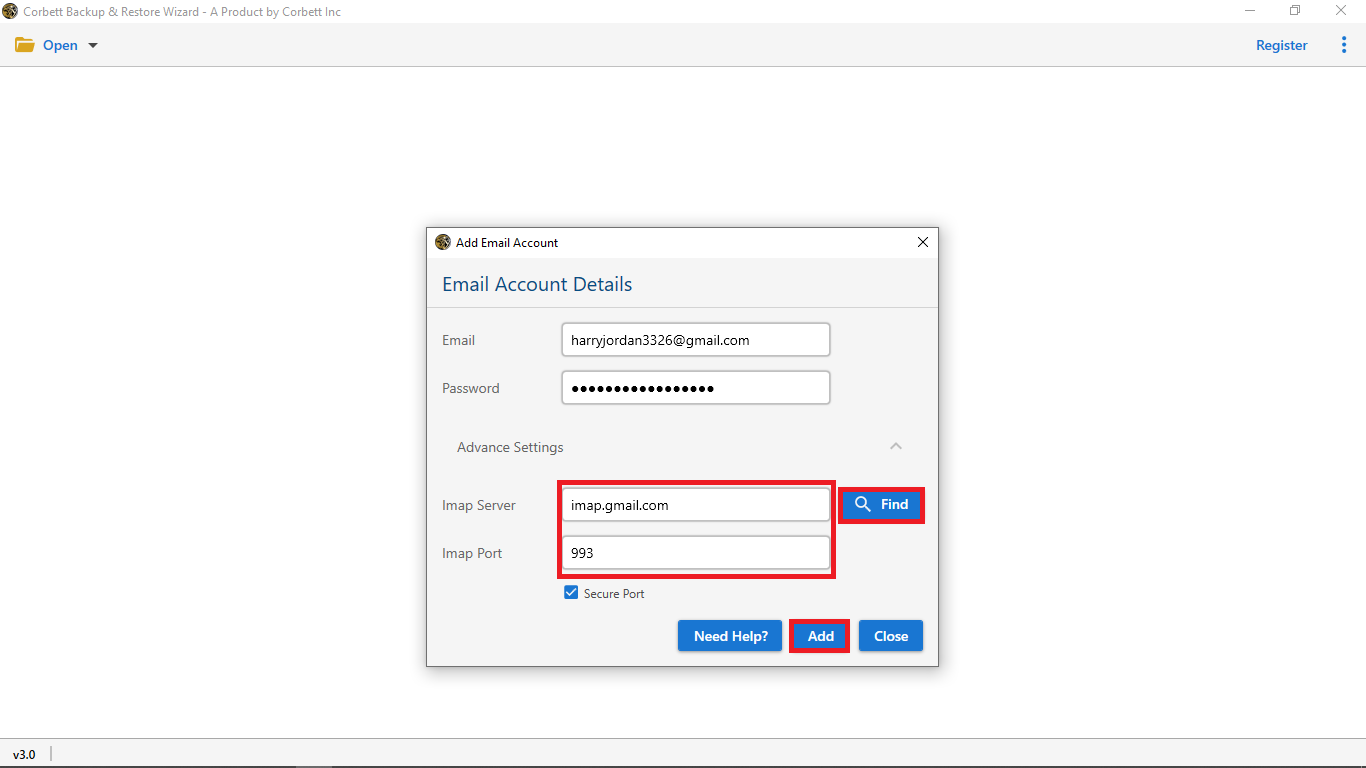
Add Accounts With Auto Server Detection

Select your mail service, enter an address and password, and email backup tool detects IMAP host and port on its own. That screen also accepts custom settings for non-standard hosts, so any account with IMAP switched on works.

Gmail, Yahoo and iCloud accept an app password, and Gmail and Office 365 accounts can sign in with modern authentication (OAuth 2.0). Add several accounts to one backup session or load many from a CSV list. Credentials connect your PC to your provider and go nowhere else.

Folder tree with selection checkboxes

Folder selection

Select Folders to Back Up

Your mailbox loads as one tree with a checkbox per folder. Inbox, Sent, Drafts, Gmail labels and nested subfolders switch on or off individually, and per-folder totals show backup size before anything starts.

Untick Spam, Trash or any folder not worth saving. Original folder names carry into output, so your backup mirrors your mailbox.

Message preview with hex and raw views

Message preview

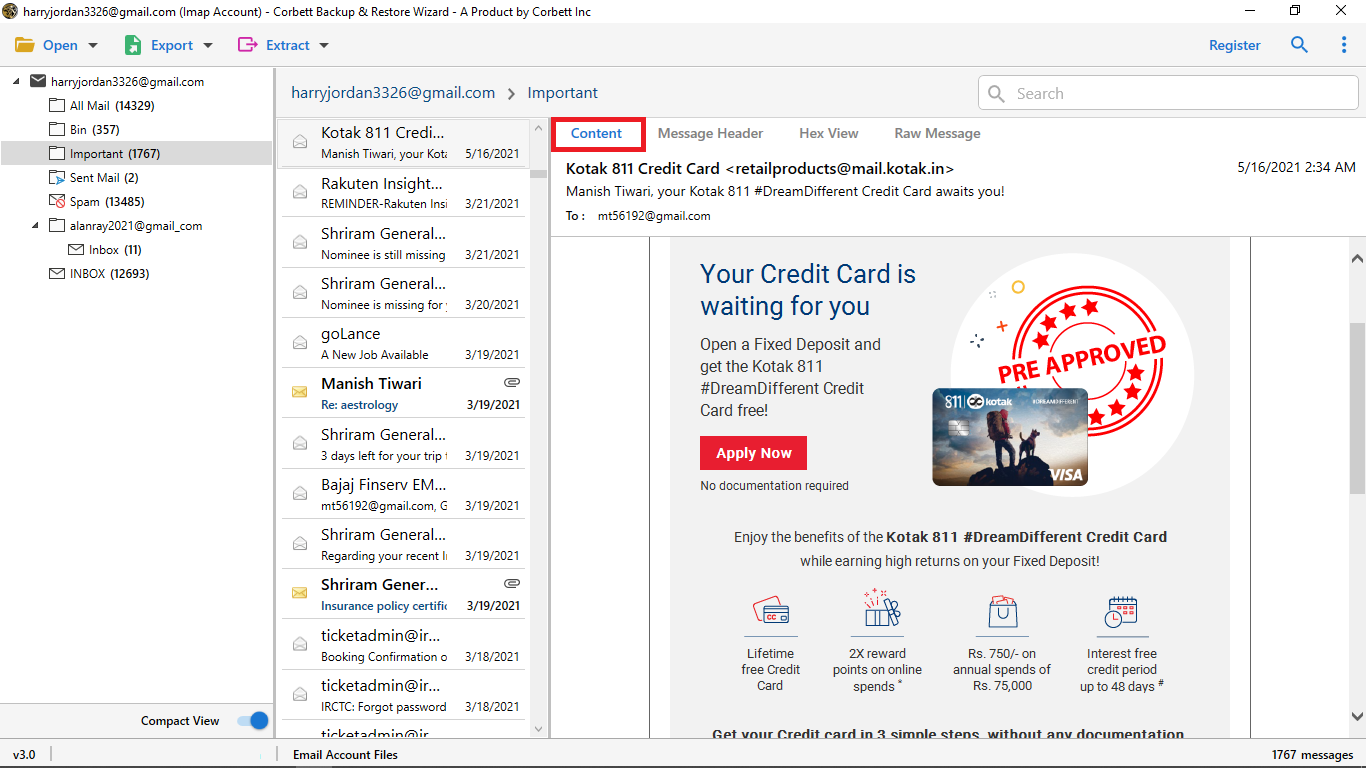
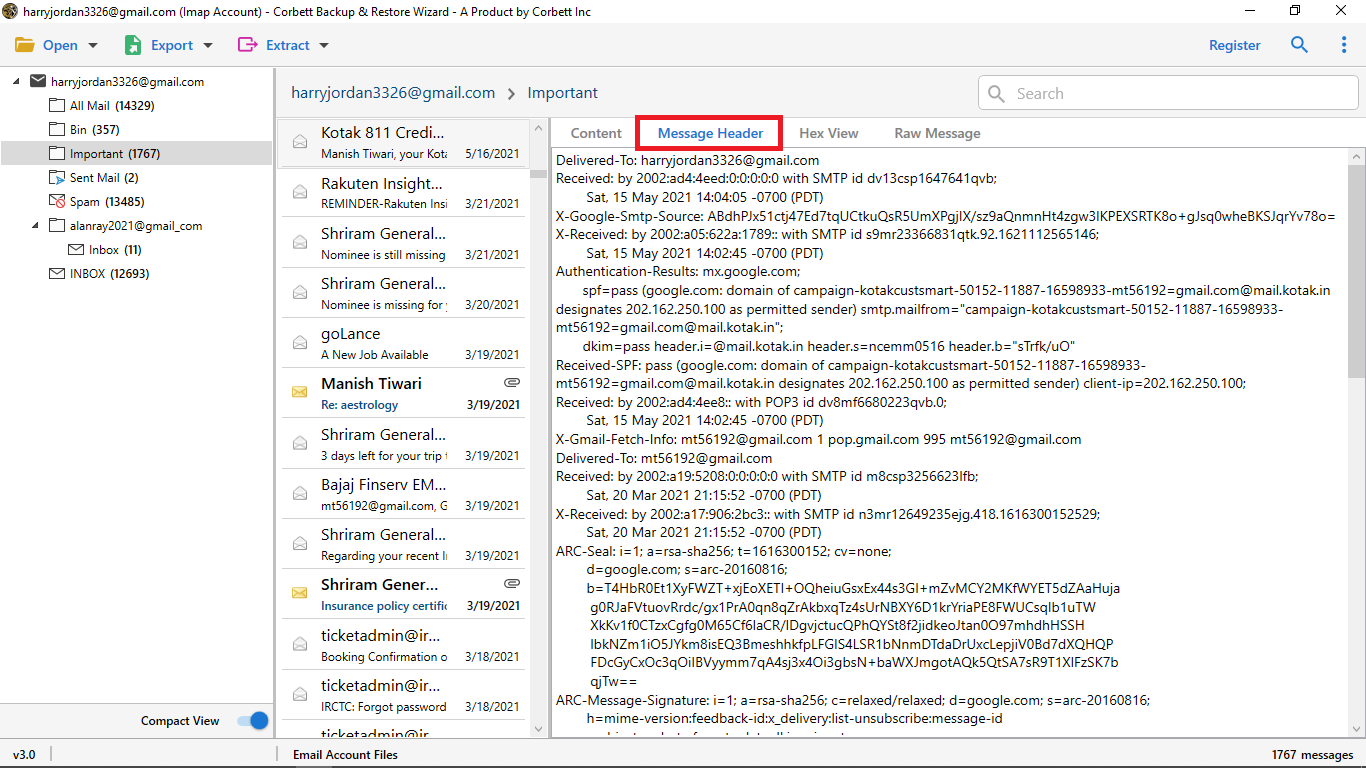
Preview Emails Before Backup

Click a message and it opens beside four analysis views. That depth separates Corbett email backup software from a basic export utility, and IT admins and forensic teams rely on it.

Content reproduces your mail with every address line. Message header follows every relay and its timing. Properties lists size, flags and attachment names, while hex and raw message views present stored source untouched.

Advanced search filters

Selective export

Multiple Filtering Options

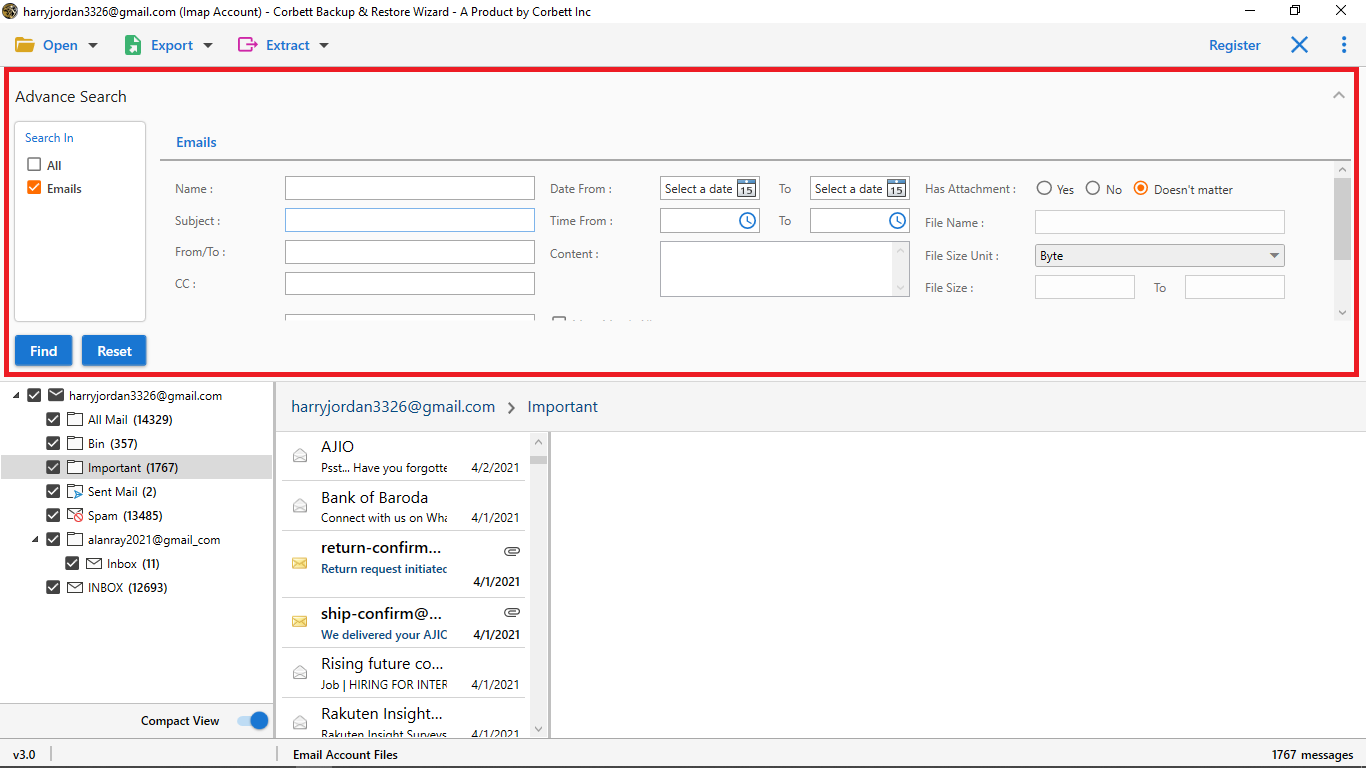
Advanced Search trims your mailbox before saving. Back up one client across one quarter, or everything except spam.

Set From and To dates for any period, search by keyword, phrase or pattern, and sort by emails, calendars, contacts, tasks or notes. Duplicate emails are skipped and junk is excluded, so output holds only mail worth keeping.

Backup format and destination options

Output options

Select Format and Save Location

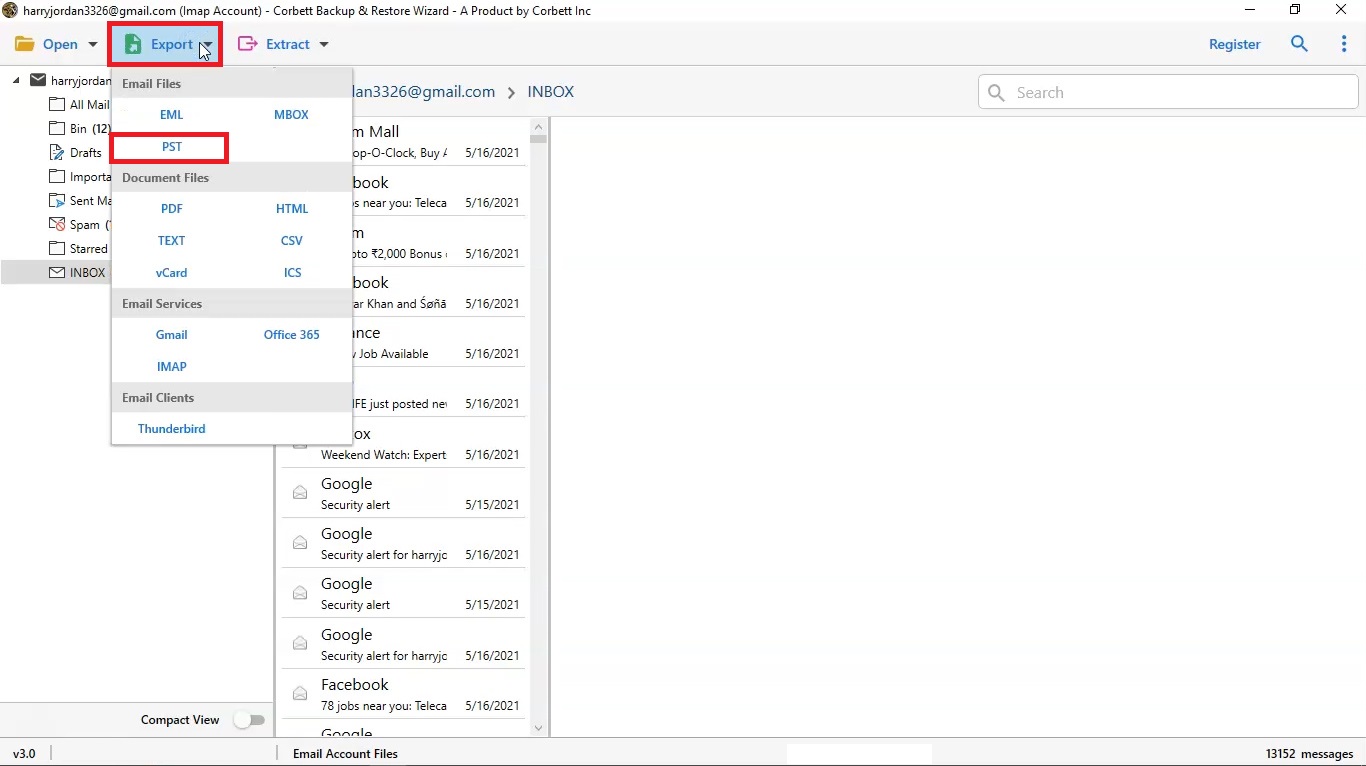
After preview, choose an outcome: files on disk in one of eight formats or a direct move into a second account. Folder structure, attachments, inline images, dates and read state survive both routes. Saved PST and MBOX files need no licence to open, so your email backup stays usable for good.

Choose PST, MBOX, EML, MSG, PDF, HTML, CSV or TXT, name files by original name or by From, To, Date and Subject, and save to a local drive, USB drive, external disk or NAS. Direct transfer into Gmail, Microsoft 365, Yahoo or any IMAP host works too, with details on Gmail Migration Tool and Yahoo Mail Migration Tool pages.

Flexible use

Three Ways to Back Up Emails With One Tool

Email backup wizard fits a single mailbox, a long list of accounts or an entire Office 365 tenant. Select your job below and test it in free demo first.

Back up one email account

Add a Gmail, Yahoo, iCloud or IMAP account, tick folders and save a PST, MBOX or PDF copy. Best for personal mail, a leaving employee or a hacked account that you want to keep.

Back up many accounts at once

Load a CSV list of addresses and passwords, and email backup software signs in to all of them in one session. Save every account to its own folder or merge them into one PST.

Back up Office 365 as an admin

Sign in with an admin account and use impersonation to back up user mailboxes without collecting user passwords. Queue dozens of users in one backup session.

Working process

How to Back Up Emails in Four Simple Steps

Four steps take a live mailbox to files on your drive. Try them on any account in free demo first.

1

Add your email account

Download email backup software, install it and select your mail service. Enter an address and password. Gmail, Yahoo and iCloud accept an app password. Gmail and Office 365 accept modern sign-in.

2

Select folders and filters

Your mailbox loads as one tree. Tick folders, then set a date range, keyword or item type to trim your backup.

3

Select format and location

Choose PST, MBOX, EML, MSG, PDF, HTML, CSV or TXT. Save to a local drive, USB drive, external disk or NAS.

4

Start email backup

Press start and watch live progress for every folder. A log and CSV report list what was saved.

Want screenshots for every click? Follow IMAP backup guide.

Working process

Email Backup Wizard Video Walkthrough

Prefer screenshots? IMAP backup guide covers email backup software step by step.

Email backup software video walkthrough showing folder selection and backup progress

Advanced options

More Backup Features Made for Admins

Small options that save hours on large email backup jobs.

OAuth 2.0 sign-in

Modern authentication for Gmail and Office 365

Office 365 admin backup

Impersonation backs up user mailboxes with one admin login

Bulk sign-in

Load many accounts from one CSV list

Proxy support

Connect through your own proxy server

Split PST by size

Cut large PST output into smaller files

Unicode PST

Modern PST format with a 50 GB default limit in Outlook

Merge accounts

Combine many accounts into one PST

Duplicate skip

Repeated emails are saved once

USB, drive and NAS

Save to USB, external disk or network storage

Live progress

Watch every folder as it saves

Auto retry and resume

Recovers from dropped connections

Log and CSV report

Proof of what was saved

Choose output

Email Backup Formats and Where They Open

Email backup tool saves to eight formats. Match format to what you plan to do with your backup.

FormatBest forOpens in
PSTOne file per mailbox with folders intactMicrosoft Outlook
MBOXMoving mail to a free email clientThunderbird and Apple Mail
EMLOne file per email, easy to searchWindows Mail and most email clients
MSGSingle messages kept as Outlook itemsMicrosoft Outlook
PDFLegal files, audits and printingAny PDF viewer
HTMLReading mail with no email clientAny web browser
CSVLists of senders, dates and subjectsExcel and Google Sheets
TXTPlain text archivesAny text editor

Free demo

Test Email Backup Software on a Live Mailbox

Install free demo, sign in to any supported account, tick folders and select a format. Testing costs nothing.

Download free demo

Try before you buy

Free Demo vs Full Email Backup Software

Free demo connects, loads and previews your full mailbox. Only export is capped.

Feature Free demo Full version
Connect accounts and load mailboxes Yes Yes
Preview, filter and analysis views All available All available
Emails exported per folder 10 Unlimited
Mailbox size limit Export stops at 10 per folder None
Price Free $99 one time
Machines per licence Not applicable Up to 5
Money back window Not applicable 30 days

Download free demo Purchase now

Use cases

Who Needs Email Backup Software?

Anyone whose work lives in a mailbox they do not fully control.

IT administrators

Save leaver mailboxes before an account closes, copy departments during a tenant move and load many accounts from one CSV list. Admin backup for Office 365 works without asking every user for a password.

Business owners and teams

Keep a local copy of staff mail when people leave, a provider changes or an audit asks for old messages. One licence covers up to 5 machines.

Freelancers and home users

Save mail from a hacked, suspended or full account to your own drive. Back up old Yahoo, AOL or Hotmail mail before a service closes it.

Why Corbett

Why Choose Corbett Email Backup Tool?

One licence

Covers every one of 209+ providers

No subscription

Lifetime price from $99

Read-only access

Nothing is deleted at source

Direct connection

No Corbett server in between

Eight formats

Plus account to account transfer

No size limit

Any mailbox size or message count

Free demo

10 emails exported per folder

30 day money back

Refund window on every licence

Before purchase

Email Backup Software vs Manual Methods

Mail sitting on a server is not a backup. Accounts get suspended, hacked or wiped, and no provider guarantees permanent retention. Manual routes exist and work for small exports. Here is where manual routes stop.

Task Manual method Email Backup Wizard
Cost Free $99 one time
One account, one format Google Takeout or Outlook export handles it Covers it as well, with extras below
Several accounts in one session One at a time, manually Queued together
Choice of output format One format from your provider Eight file formats plus direct cloud transfer
Filter before exporting Rarely, never by date and keyword together Date range, keyword, item type and exclusions
View message headers and raw source Not offered Header, properties, hex and raw views
Servers with no export feature No route Any host with IMAP enabled
Licence model Not applicable One time, no subscription

Rows tinted green are where a manual route wins.

For a single Gmail account exported once, Google Takeout is free and enough, so you need no email backup software. Free Google Takeout Viewer opens Takeout files. Provider walkthroughs: Save Yahoo emails to computer, Backup iCloud emails to computer, Download Hotmail emails to computer, Save Outlook 365 emails to hard drive, Save AOL emails to hard drive, Backup Verizon emails, Namecheap email backup and Backup Hostinger email.

Global recognition

Email Backup Software Users Trust

Users rate Corbett email backup software 4.6 out of 5 across 683 reviews, and software directories list it.

  • CNETCNET
  • Download.ioDownload.io
  • UpdateStarUpdateStar
  • TopSoftware AdvisorTopSoftware Advisor
  • SaaSHubSaaSHub
  • UptodownUptodown
  • GoodFirms partner
  • Software Informer award
  • SaaSHub approved
  • Softpedia award
  • SoftwareSuggest award

Specifications

Email Backup Software Specifications

Windows Versions Supported by Email Backup Software

Download details

Released
Dec 2020
Download size
87.4 MB
Trial limit
10 emails per folder
Delivery
Download link and key by email
Licence
Lifetime, up to 5 machines
Download Now

System

Hard disk
150 MB to install, plus room for output
RAM
4 GB minimum
Processor
1 GHz, 2.4 GHz advised
Rights
Run as Administrator
Other software
None needed

Supported editions

Windows 11, 10, 8.1, 8 and 7, in 32 and 64 bit. Windows Server 2025 down to 2008. Outlook is not required.

No macOS or Linux build.

Corbett has built and maintained Windows email utilities since 2020. Email Backup Software tickets go to its own engineering team.

Full specification

Email Backup Sources and Output Formats

Complete source and output list for Corbett email backup software.

Goes in

Mailbox sources

Services
209+ webmail and hosted providers
Protocols
IMAP and POP3, host detected automatically
Desktop clients
Thunderbird, Outlook, Apple Mail, Maildir
Local files opened
PST, OST, MBOX, EML, EMLX, MSG
Mail servers
Zimbra, Kerio, MDaemon, Axigen, CommuniGate
Item types
Emails, attachments, contacts, calendars, tasks, journals, notes
Sign-in
Password, app password and OAuth 2.0
Office 365 admin
Admin account with impersonation
Network
Proxy server supported
Accounts per session
Several, queued together
Mailbox size limit
None
Access mode
Read-only, nothing deleted at source
Bulk sign-in
Load many accounts from a CSV list
Shared mailboxes
Supported

Comes out

Backup destinations

Client formats
PST for Outlook, MBOX for Thunderbird, EML, MSG
PST options
Unicode PST, split by size, merge accounts into one PST
Save locations
Local drive, USB drive, external disk, NAS
Duplicates
Skipped
Document formats
PDF, HTML, CSV, TXT
Contacts and calendar
vCard and ICS
Cloud destinations
Gmail, Microsoft 365, Outlook.com, Yahoo, any IMAP
Carried through
Folder tree, attachments, inline images, dates, read/unread status
Header fields kept
To, Cc, Bcc, From, Subject, Date, Time
File naming
Original or From, To, Date and Subject
Separate extraction
Attachments, email addresses, phone numbers
If your line drops
Auto retry, then resume where it stopped
Reports
Live progress, log and CSV report
Speed
Set by IMAP throttling from your provider

To convert saved files later, use email converter tool or single-format PST File Converter Tool, MBOX File Converter, EML Converter Tool and MSG Converter Tool. To move one live account into another, use email migration tool. To open a saved file without exporting, use free email viewer software.

User testimonials

Email Backup Tool Reviews From Users

Across 683 reviews of email backup software, including ones that dock a star.

4.6 out of 5

Collected across 683 reviews from rating directories and customer feedback. Three below are unedited, with a four star review among them.

Saved attachments from 1,500 emails

I needed to save the attachments from my emails. There were about 1500 emails. I did look for manual methods for a while, but due to the confidential nature of my work, I couldn't go ahead with those free manual methods. Then I found this tool. It is super easy to use and I would suggest it to anyone looking to back up their emails.

Samantha Roth

A terabyte scale handover

Being an IT administrator, I was tasked to back up all emails due to a change of department. The size of the data being in TBs, manual methods were out of the question. After looking on the internet for a while I found this software. As far as email management is concerned, this tool is pretty good.

Steven FrewIT administrator

Works well, but I found it a bit pricey

I had a bunch of old email files stored in EML format. Because of some office work I needed to back these up into my webmail account. I bought it at the suggestion of a colleague. I will give it four stars; the cut back of one star is not due to functionality. I felt it to be a bit pricey, but hey, maybe that's just me. The tool works pretty well.

Dave Adams

Best practice

How to Keep Your Email Backup Safe

A backup only helps if you can open it later. Four habits keep your saved mail usable for years.

Follow 3-2-1

Keep 3 copies on 2 types of media with 1 copy off site. Save to your drive, then copy to USB or NAS and to storage that you own off site.

Open a sample file

After every email backup, open a few messages from your PST or MBOX. Catch a bad path or a missing folder while your account is still live.

Name backups by date

Save every backup to a folder named with account and date. Repeat backups copy your mailbox again, so dated folders keep versions apart.

Back up before you delete

Save mail before you close an account, change provider or remove a user. Deleted accounts cannot be recovered once your provider purges them.

Common questions

Email Backup Software FAQs

What Corbett email backup software saves, where it saves it and where it stops.

What does free email backup software demo include?

Free demo connects to any supported account, loads your full mailbox and opens every preview, filter and analysis view of licensed edition. Export is capped at 10 emails per folder.

Is there a limit on mailbox size?

No. Full edition sets no ceiling on account size or number of messages. Large accounts take longer and need disk space for output, yet nothing halts midway.

Does Corbett see any of my mail?

No. Your PC talks to your mail provider directly and saves messages wherever you choose. Corbett never stores or relays a message.

Is it safe to use email backup software on my mailbox?

Yes. Corbett email backup software opens mailboxes read-only, so nothing is deleted or changed at source. Every connection goes from your PC to your provider, and installer is scanned clean on VirusTotal.

Is Email Backup Software available for Mac?

No. Corbett email backup software is Windows-only, built for desktop Windows 7 to 11 and Windows Server 2008 to 2025.

Can I back up emails from a provider that is not listed?

Yes, in most cases, provided IMAP is switched on for that account. Named providers get server settings filled in automatically. Anything else takes a host name and port, entered once. Test your provider in free demo first.

Can one session cover several email accounts?

Yes. Add accounts one after another or load a CSV list for dozens. They all back up in one session, and several folders inside one account can be selected together too.

How many computers can I install Email Backup Software on?

One licence covers up to 5 machines. Lifetime licence has no yearly fee.

Do Gmail, Yahoo and iCloud need an app password?

Yes, wherever two-step verification is switched on, which is now default on those services. Generate an app password in account security settings and use it in place of your normal password. Google explains when app passwords apply in Google app passwords help.

Does email backup software support modern authentication?

Yes. Gmail and Office 365 accounts can sign in with OAuth 2.0, so you do not have to store a normal password in email backup tool.

Can an admin back up Office 365 mailboxes of other users?

Yes. Sign in with an admin account and use impersonation to back up user mailboxes, or load a CSV list to queue many users in one session.

Why does sign-in fail when I add an account?

Most sign-in errors come from IMAP switched off or a normal password on an account with two-step verification. Switch on IMAP in account settings, generate an app password and sign in again. Gmail users can follow Enable IMAP in Gmail not showing.

Does email backup tool keep folder structure, attachments and dates?

Yes. Folder hierarchy is rebuilt at your destination. Attachments, inline images, sent and received dates, read/unread status and To, Cc, Bcc, From and Subject fields all carry across.

What happens if my email backup is interrupted?

Email backup tool retries on connection errors and resumes where it stopped after your line returns. Messages already saved are not downloaded again.

Does it skip duplicate emails?

Yes. Duplicate messages are skipped, so a folder that appears twice or a repeated message does not fill your backup with copies.

Can I save a backup to a USB drive, external disk or NAS?

Yes. Select any drive or network location Windows can open as your save path.

Can it split a large PST file?

Yes. Set a size limit and email backup software splits output into several Unicode PST files. Outlook sets a 50 GB default limit per Unicode PST, as Microsoft PST file size limits documentation explains, so splitting keeps files easy to open. You can also merge many accounts into one PST.

Can it back up contacts, calendars and tasks?

Yes. Alongside emails it backs up calendars, contacts, tasks, journals and notes. Every item type can be sorted and selected separately before your backup starts.

Does it fit a 3-2-1 backup plan?

A 3-2-1 plan keeps 3 copies on 2 types of media with 1 copy off site. Save one copy to a local drive and another to USB or NAS. Move a third copy to off site storage that you own. CISA lists 3-2-1 in its CISA back up business data guide.

Can backup wizard restore a backup into a mailbox?

Not from a saved file. It can send mail straight from one account into another, so a live mailbox copies to a new one in one backup session. To put saved files back into an account, use email recovery software.

Does email backup wizard schedule backups?

No. You start every backup and it works while software is open. There is no scheduler, no background service and no incremental mode, so a repeat backup copies your mailbox again instead of only new mail.

Can I extract only attachments or email addresses?

Yes. Extract has separate options for attachments, email addresses and phone numbers, so they come out without saving full messages. For address lists alone, use Email Address Extractor Software.

Step by step

Email Backup How-To Guides

Short guides for jobs that Corbett Email Backup Software takes care of.

Get started

Start an Email Backup With Corbett Today

Download free demo and test it on a real mailbox. A personal licence costs $99 once, refundable for 30 days.

Download free demo Purchase now

87.4 MB · Windows 11 to 7 and Windows Server 2025 to 2008 · 30 day money back